

LingRoll lite
Yipeng Huang Book iPhoneiPadiPod touch
LingRoll lite is a free Book app for iPhone and iPad by Yipeng Huang. Rated 4.0/5 from 4 ratings. Requires iOS 15.0. Updated October 7, 2026.
- Rating
- 4.0
- 4 ratings
- Price
- Free
- on the App Store
- Size
- 54 MB
- Age 4+
- Updated
- Oct 7
- 2026 · v2.0.7
Screenshots



About LingRoll lite
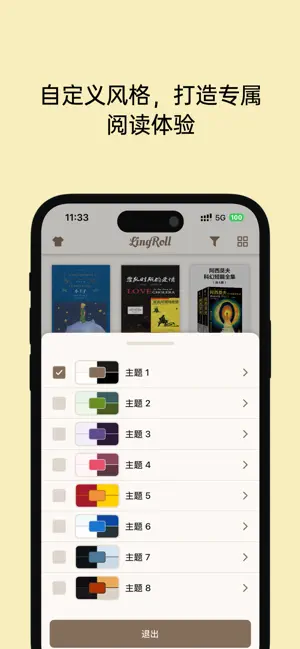
LingRoll is an all-in-one reading app built for people who love both reading and listening. It supports multiple ebook formats and advanced TTS features, giving you a smooth, flexible, and detailed reading experience. Core Features • Format support: TXT, DOC, DOCX, EPUB, MOBI, AZW3, PDF • Smart listening: System TTS, Azure/Edge TTS, and MiMo TTS • Professional layout: Fully customizable reading interface • File management: Folder-based library, sorting, search, and recent imports • Statistics: Track reading and listening habits Detailed Features 1. File Support • Supports TXT, DOC, DOCX, EPUB, MOBI, AZW3, PDF. DRM-protected files are not supported • Auto-detects text encoding and supports manual encoding selection • Extracts encrypted or unencrypted RAR, ZIP, and 7Z archives • PDF text extraction and OCR for scanned documents • Import via iTunes File Sharing, iCloud Drive, or WiFi transfer 2. Listening • Built-in iOS TTS voices • Azure/Edge TTS and MiMo TTS neural voices • Natural language recognition with voice matching for Azure/Edge TTS • Narration and dialogue detection with separate voices • TTS text replacement for pronunciation, terms, and symbols • Long-paragraph optimization for smoother playback • Auto skip trailing silence • Custom background music, speed, pitch, and volume • Sleep timer • Listen while reading, scroll freely, or follow the playing paragraph • Home screen display during background playback • Progress styles: highlight, underline, line-by-line highlight, sentence underline • Headphone controls and custom lock screen display • Pre-download full-book audio • Offline TTS audio duration statistics 3. Reading • System fonts and custom font installation • Adjustable spacing, margins, first-line indent, hanging indent, and more • Custom background image with optional scroll-follow effect • Custom themes with RGBA colors • Chinese conversion between Simplified, Traditional, Hong Kong Traditional, and Taiwan Traditional • Tencent Translation API support • Auto scroll/auto page turn with adjustable speed • Auto reading modes: pixel scroll, line-by-line display, sentence underline • TOC parsing for TXT, EPUB, MOBI, and AZW3 • Original annotation display for EPUB/MOBI/AZW3 4. Bookmarks and Notes • Categorized bookmarks • Notes with underline, wavy line, dashed line, double strikethrough, redaction line, border, and background color • Custom color for each note • Tap bookmarks or notes to jump • Export notes as Markdown or TXT 5. File Management • Real folder-based book management • Sort by name, size, date, type, or reading duration • Pin files and set folders to top, bottom, or hidden • Read covers from EPUB/MOBI/AZW3, or update via web search/photos • Rename files using built-in book titles • Search files, folders, and full text while reading • Recent imports for quick access 6. Format Conversion • Convert EPUB/MOBI/AZW3/PDF to TXT • Convert TXT to EPUB • Supports Chinese conversion and encoding selection • Preserves original TOC structure 7. Statistics • Daily reading/listening duration • Reading heatmap • Book progress • Offline TTS audio duration 8. Security • Password and Touch ID/Face ID protection 9. Migration and Sync • Export/import reading history and personal settings • Export single or multiple themes 10. Clean Reading Lite has no ads and still supports basic listening with system TTS. Lite vs Pro: Pro-only features • Azure/Edge TTS and MiMo TTS • Narration/dialogue detection • Natural language voice matching • TTS audio export • Offline TTS audio duration statistics • Long-paragraph optimization • Auto skip trailing silence • Custom listening background music • Advanced highlight styles • Custom font installation • TXT to EPUB conversion • Chinese conversion • Text translation with Tencent Translation • Reading statistics • Password and Touch ID/Face ID protection • Backup/import reading history, settings, and themes
What’s new
Version 2.0.7 · Updated October 7, 2026
1. Added TTS to replace manual pinyin selection 2. Adjusted synthesizer selection strategy; fixed the issue where selection had no effect 3. Optimized folder size calculation 4. Optimized file downloads in browser 5. Fixed abnormal narration and dialogue detection 6. Fixed the issue where MDict could not be added
App privacy
The developer, Yipeng Huang, reported these privacy practices to Apple.
Data Not Collected
The developer does not collect any data from this app.
Alternatives to LingRoll lite
Looking for apps like LingRoll lite? Here are 6 similar apps on the App Store. The highest rated is Readova - eBook Reader (5.0/5), and all 6 are free to download.
-
 Readova - eBook Reader
5.0
Readova - eBook Reader
5.0
-
 静静听书-多角色沉浸式听书
5.0
静静听书-多角色沉浸式听书
5.0
-
 AnyRead - Simple Book Reader
-
 Tingwen Reader
5.0
Tingwen Reader
5.0
-
 剧情万花筒
剧情万花筒
-
 Audio Tome - Audiobook Player
4.5
Audio Tome - Audiobook Player
4.5
| App | Rating | Price | Last updated | Compare |
|---|---|---|---|---|
| LingRoll lite | 4.0 / 5 (4 ratings) | Free | October 7, 2026 | |
| Readova - eBook Reader | 5.0 / 5 (2) | Free | Oct 20, 2026 | Compare |
| 静静听书-多角色沉浸式听书 | 5.0 / 5 (1) | Free | Sep 17, 2026 | Compare |
| AnyRead - Simple Book Reader | – | Free | Oct 1, 2026 | Compare |
| Tingwen Reader | 5.0 / 5 (1) | Free | Oct 15, 2026 | Compare |
| 剧情万花筒 | – | Free | Jun 22, 2026 | Compare |
| Audio Tome - Audiobook Player | 4.5 / 5 (8) | Free | Oct 12, 2026 | Compare |
Compare LingRoll lite with the top alternatives: ratings, updates, ASO score and keyword gaps →