

PolyPDF
Euclidean Software LLC Utilities iPhoneiPadiPod touchMac
PolyPDF is a free Utilities app for iPhone and iPad by Euclidean Software LLC. Rated 5.0/5 from 2 ratings. Requires iOS 17.0. Updated September 29, 2026.
- Rating
- 5.0
- 2 ratings
- Price
- Free
- on the App Store
- Size
- 57 MB
- Age 4+
- Updated
- Sep 29
- 2026 · v1.6.1
Screenshots



About PolyPDF
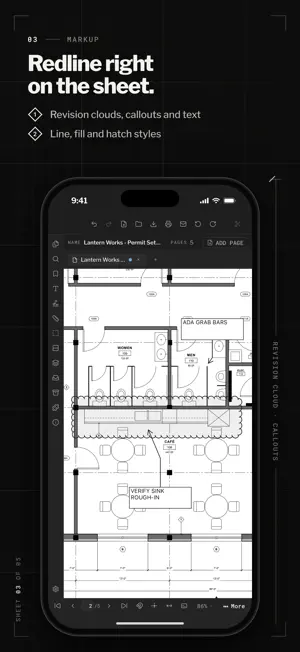
PolyPDF brings drawing-set review and PDF markup to iPad and iPhone. Open plans from Files, move between pages, measure to scale, add markups, and save your work back to a PDF. Built for AEC work • Review multi-page plan sets with thumbnails and tabs. • Measure lengths and areas using a calibrated scale. • Add callouts, clouds, shapes, stamps, and freehand markup. • Count symbols and organize findings in the Markup Table. • Export or share the finished PDF. Your documents remain in the locations you choose in Files. PolyPDF supports an optional Pro purchase for advanced tools; the app shows which features require Pro before purchase. PolyPDF is also available on Mac. Visit polypdf.com for details and support.
What’s new
Version 1.6.1 · Updated September 29, 2026
A new iPad and iPhone workspace for reviewing drawing sets, measuring to scale, marking up PDFs, counting symbols, and saving or sharing your work. Includes a redesigned touch interface and Pro purchase support.
App privacy
The developer, Euclidean Software LLC, reported these privacy practices to Apple.
Data Not Collected
The developer does not collect any data from this app.
Alternatives to PolyPDF
Looking for apps like PolyPDF? Here are 6 similar apps on the App Store. The highest rated is Pixply (5.0/5), and all 6 are free to download.
-
 Astreea Mobility
-
 Vector Flow - Animator
-
 Rheem Smart Monitor
-
 RAL Colors: Color Identifier
-
 Pixply
5.0
-
 HVAC Duct Calculator
| App | Rating | Price | Last updated | Compare |
|---|---|---|---|---|
| PolyPDF | 5.0 / 5 (2 ratings) | Free | September 29, 2026 | |
| Astreea Mobility | – | Free | Mar 29, 2026 | Compare |
| Vector Flow - Animator | – | Free | Jul 19, 2026 | Compare |
| Rheem Smart Monitor | – | Free | May 14, 2026 | Compare |
| RAL Colors: Color Identifier | – | Free | Aug 20, 2026 | Compare |
| Pixply | 5.0 / 5 (1) | Free | Oct 31, 2026 | Compare |
| HVAC Duct Calculator | – | Free | Jun 24, 2026 | Compare |
Compare PolyPDF with the top alternatives: ratings, updates, ASO score and keyword gaps →