

Crown Book
Artur Janowicz Book iPhoneiPadiPod touchApple Watch
Crown Book is a free Book app for iPhone and iPad by Artur Janowicz. Requires iOS 17.6. Updated July 27, 2026.
- Price
- Free
- on the App Store
- Size
- 2 MB
- Age 4+
- Updated
- Jul 27
- 2026 · v1.6
Screenshots


About Crown Book
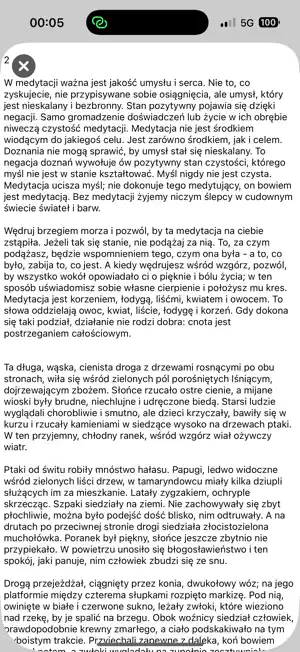
A full-screen reader for large text files on your watch. One book at a time: a .txt file sent from Crown Book for iOS. Sending another book to your watch replaces the previous one. Font size matches system settings – you can change it while reading in the watchOS control center. Large files (>10 KB) are divided into pages and remember the last page you were reading. You can scroll through text with your finger, the crown, or the "double tap" gesture. Tapping the system clock takes you to the top of the page. At the beginning of each page there is a button with the page number, which, when pressed, takes you to any page (selection with a preview of the first line of text). At the end of each page (except the last) there is a button that takes you to the next page. At the end of the book, there's a "CLOSE" button to close the book. A closed book can be deleted ("Delete" button) or started over ("BOOK" button). You can set a widget on the watch face displaying the page number of the currently read page and several lines of text (modular). ! The program comes with instruction (in the form of a mini-book: "Help" button) for two of my apps (Crown Book and Equatch) in two languages (English and Polish). Sending a file from iPhone to Apple Watch: UTF-8 encoded .txt format (you can use TextEdit in macOS to change the encoding). .txt compatibility with Apple Pages: File - Export to - Plain Text... - Save. Compatibility with free gutenberg.org ebooks (PlainText UTF-8). The loaded .txt file can be viewed in the iOS app (button with the file name). The .txt file remains in the iOS app until it is replaced by another file. ! When sending a file from iPhone, the Apple Watch must be unlocked with the app running. ! If the text doesn't appear on your watch after uploading, try again until it succeeds. Minimum system requirements: watchOS 10 and iOS 17 ("double tap" scrolling requires Apple Watch 9 or later).
What’s new
Version 1.6 · Updated July 27, 2026
- watchOS: widgets displaying the saved page number and several lines of text (modular) - watchOS: updated "Help" instructions - iOS: preview of loaded text (button with the file name) - iOS: text remains in the app until it is replaced by another text
App privacy
The developer, Artur Janowicz, reported these privacy practices to Apple.
Data Not Collected
The developer does not collect any data from this app.
Alternatives to Crown Book
Looking for apps like Crown Book? Here are 6 similar apps on the App Store. The highest rated is Wrist Ebook Reader (5.0/5), and all 6 are free to download.


| App | Rating | Price | Last updated | Compare |
|---|---|---|---|---|
| Crown Book | – | Free | July 27, 2026 | |
| Wrist Ebook Reader | 5.0 / 5 (2) | Free | Oct 20, 2026 | Compare |
| BeeReader | 5.0 / 5 (2) | Free | Oct 13, 2026 | Compare |
| Wibby Books | – | Free | Jul 11, 2026 | Compare |
| Wrist Novel Reader | 5.0 / 5 (1) | Free | Oct 16, 2026 | Compare |
| Wrist Reads | 4.0 / 5 (2) | Free | Oct 20, 2026 | Compare |
| ThusRead | – | Free | Oct 11, 2026 | Compare |
Compare Crown Book with the top alternatives: ratings, updates, ASO score and keyword gaps →