

Clarity: Voice Planner
Federica Cabrera Doglio Productivity iPhoneiPadiPod touch
Clarity: Voice Planner is a free Productivity app for iPhone and iPad by Federica Cabrera Doglio. Rated 3.3/5 from 3 ratings. Requires iOS 15.1.
- Rating
- 3.3
- 3 ratings
- Price
- Free
- on the App Store
- Size
- 50 MB
- Age 4+
- Updated
- Oct 19
- 2026 · v6.29
Screenshots


About Clarity: Voice Planner
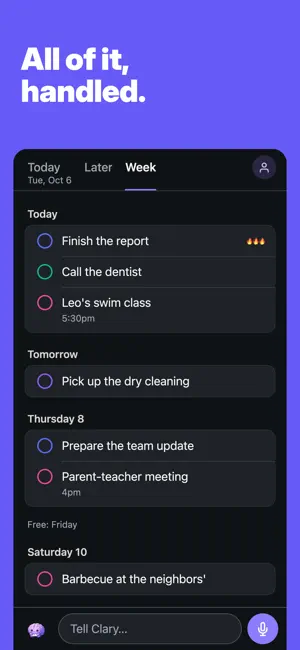
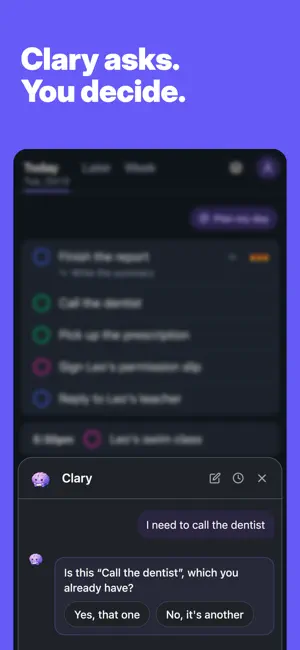
You have a lot going on. Clarity puts all of it in order, so you always know what comes next. Tell Clary what's on your plate, out loud or typed, as it comes. She turns it into tasks, lists and notes, each on the right day, and shows you where to start. You stay in charge of every change. SAY IT, AND IT'S SORTED Say "call the dentist tomorrow, the report is due Friday, and a shopping list: milk, eggs, coffee" and you get a task for tomorrow, a deadline on Friday and a list with its items. Subtasks, reminders, notes and ideas for later land where they belong. Each card in the chat shows what was created and where it went. CLARY ASKS INSTEAD OF GUESSING If something looks like a task you already have, she asks. If she gets it wrong, say "no, I meant..." and she fixes it. To change a category or a priority, tap it on the card, and Undo takes back what she just did. YOUR DAY, YOUR ORDER Today, Later and Week, nothing else. Tap "Plan my day" and Clary proposes an order in focus blocks; "Back to my order" puts yours back. Move any task to another day in a second. What you finish stays crossed off for a moment, and "See what you did" keeps what you just closed in view. SHE LEARNS HOW YOU WORK Clary remembers the people, places and projects you mention, and the words you use. You can see everything she knows about you and make her forget any of it. ALWAYS AT HAND Widgets for your Home Screen and Lock Screen. Reminders that ring when you asked them to. On iPhone, iPad and Mac with Apple silicon, in sync. LANGUAGES The app is in English, Spanish and French. Talk to Clary in any language and she answers in the same one. FREE AND PRO Your first 7 days with Clary are free. After that, talking to Clary is part of Clarity Pro. Everything you already built stays yours, for free: you can still see, complete, move and edit your tasks, with your widgets and reminders. If you started using Clarity on or before 17 September 2026, nothing changes for you: Clary stays free. Clarity Pro comes as a monthly plan (US$9.99 per month) or a yearly plan (US$59.99 per year), with a 7-day free trial for eligible new subscribers. Prices are for the United States; the App Store shows the price in your currency before you confirm. Payment is charged to your Apple Account when you confirm the purchase. Your subscription renews automatically unless you cancel at least 24 hours before the end of the current period, and the renewal is charged within the 24 hours before that period ends. Manage or cancel it anytime in Settings > your name > Subscriptions. If you subscribe during a free trial, the rest of the trial ends. Terms of Use (EULA): https://www.apple.com/legal/internet-services/itunes/dev/stdeula/ Privacy Policy: https://www.withclarity.online/privacy-policy
What’s new
Version 6.29 · Updated October 19, 2026
Capture without opening the app: - Add Clarity to the Action Button, Control Center or Lock Screen, or say "Tell Clarity" to Siri, and start talking. If your iPhone has no Action Button, Clarity shows you how to do it with Back Tap. Your lists: - Put a list on a day: you see it in Today that day, and once the day passes it goes back to Later. - Links you give Clarity are saved in the task and open with one tap from your list. - On the Mac, right-click a task to check it off, move it, edit it or delete it. - Your week view remembers how many days you like to see. And also: - The assistant inside the app is now called Clarity, like the app, and the name under the icon is just Clarity. - If you use Clarity on two devices, opening the app on one no longer undoes what you did on the other. - Fixed a bug that, with a weak signal when you opened the app, sometimes showed you the previous version of Clarity. - Renaming a habit now renames it on every upcoming day and in its reminders. - The "where to start" suggestion answers in the language you write your tasks in. - If you fix by hand how a name is spelled in a task, Clarity remembers it right from the start. - When you ask Clarity to plan your day, it no longer tells you it didn't make the change while it's doing it. - The app opens with the Clarity logo instead of a blank screen.
App privacy
The developer, Federica Cabrera Doglio, reported these privacy practices to Apple.
Data Not Collected
The developer does not collect any data from this app.
Alternatives to Clarity: Voice Planner
Looking for apps like Clarity: Voice Planner? Here are 6 similar apps on the App Store. The highest rated is AI Checklist (5.0/5), and all 6 are free to download.
-
 AI Checklist
5.0
AI Checklist
5.0
-
 NudgeMe Reminders
-
 Catch — A Pocket Notebook
5.0
Catch — A Pocket Notebook
5.0
-
 Task Batch
3.0
Task Batch
3.0
-
 VocaList_
5.0
VocaList_
5.0
-
 Voice Memo & Note : Thinkpool
2.0
Voice Memo & Note : Thinkpool
2.0
| App | Rating | Price | Last updated | Compare |
|---|---|---|---|---|
| Clarity: Voice Planner | 3.3 / 5 (3 ratings) | Free | October 19, 2026 | |
| AI Checklist | 5.0 / 5 (1) | Free | Sep 27, 2026 | Compare |
| NudgeMe Reminders | – | Free | Sep 26, 2026 | Compare |
| Catch — A Pocket Notebook | 5.0 / 5 (1) | Free | Jun 10, 2026 | Compare |
| Task Batch | 3.0 / 5 (2) | Free | Oct 2, 2025 | Compare |
| VocaList_ | 5.0 / 5 (3) | Free | Jun 4, 2026 | Compare |
| Voice Memo & Note : Thinkpool | 2.0 / 5 (1) | Free | Jul 23, 2026 | Compare |