

Running Interval Timer HIIT
Ali Umer Health & Fitness iPhoneiPadiPod touch
Running Interval Timer HIIT is a free Health & Fitness app for iPhone and iPad by Ali Umer. Requires iOS 15.0. Updated October 22, 2026.
- Price
- Free
- on the App Store
- Size
- 31 MB
- Age 4+
- Updated
- Oct 22
- 2026 · v3.0
Screenshots


About Running Interval Timer HIIT
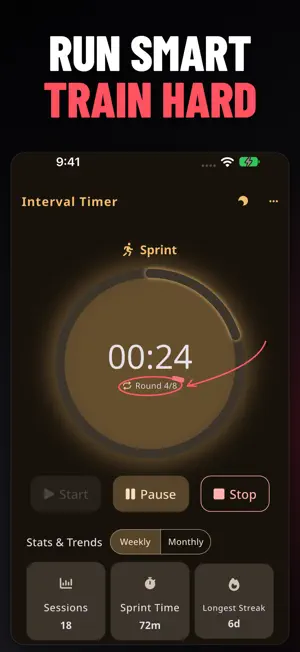
Time your runs, walks and recovery breaks with custom intervals, voice cues and a clear countdown. Running Interval Timer HIIT helps you follow your workout from warm-up to cool-down on iPhone and iPad. SET YOUR OWN PACE Choose your warm-up, sprint, recovery, rounds and cool-down. Alternate running with walking, build a sprint session, or set timed work and rest for HIIT and circuit workouts. Set recovery to zero when you want to move straight into the next round. START WITH A PRESET Choose built-in routines including Tabata 20/10, 30/30 intervals and EMOM 40/20. Adjust the settings to suit your session, or create and save your own named presets for next time. FOLLOW THE CUES Hear spoken phase changes and countdown prompts. Choose from classic, click and whistle beep styles. Keep following your intervals with background audio and lock-screen playback controls, or enable Keep screen on during your workout. REVIEW YOUR TRAINING Browse saved sessions and review your interval settings and completed workout duration. See session counts, total sprint time, your longest training streak and weekly activity charts. Share a session card or export a backup of your settings, presets and history. MADE FOR YOUR SCREEN Use a clear timer display, light and dark appearance options, and layouts adapted for iPhone and iPad. Core timer functions work offline. FREE TO TRAIN The timer, presets, history and analytics are available free with advertising. Upgrade to Premium to remove ads and support continued improvements. PREMIUM OPTIONS Choose a Weekly or Yearly auto-renewing subscription, or a Lifetime one-time purchase. Current prices and any eligible offers are shown in the app before purchase. Payment is charged to your Apple Account at confirmation. Subscriptions renew automatically unless canceled at least 24 hours before the current period ends. Manage or cancel subscriptions in your App Store account settings. Lifetime access is a one-time purchase and does not renew. Privacy Policy: https://owlspeak.web.app/privacy Terms of Use: https://owlspeak.web.app/terms
What’s new
Version 3.0 · Updated October 22, 2026
• A new Sprint Dial app icon. • Clearer text, controls and layouts on iPhone and iPad. • Better contrast in light and dark modes. • A simpler setup flow for your first workout. • Improved timer synchronization and lock-screen controls. • Fixes for duplicate history entries, workout duration summaries and training statistics. • More reliable backup imports, purchase restoration and ad handling. Your saved workouts, history and existing purchases are preserved.
App privacy
The developer, Ali Umer, reported these privacy practices to Apple.
Data Used to Track You
The following data may be used to track you across apps and websites owned by other companies:
- Other Data: Other Data Types
Data Not Linked to You
The following data, which may be collected but is not linked to your identity, may be used for the following purposes:
- Other Data: Other Data Types
Used for: Third-Party Advertising
Alternatives to Running Interval Timer HIIT
Looking for apps like Running Interval Timer HIIT? Here are 6 similar apps on the App Store. The highest rated is Cadence: Run Walk Timer (4.5/5), and all 6 are free to download.
-
 Interval Coach Trainer
-
 Interval Timer: HIIT & Gym
-
 Cadence: Run Walk Timer
4.5
-
 AmpHIIT
-
 5K Run-Walk Interval Trainer
-
 DailyRoutineFitness: For Women
| App | Rating | Price | Last updated | Compare |
|---|---|---|---|---|
| Running Interval Timer HIIT | – | Free | October 22, 2026 | |
| Interval Coach Trainer | – | Free | May 6, 2026 | Compare |
| Interval Timer: HIIT & Gym | – | Free | Aug 14, 2026 | Compare |
| Cadence: Run Walk Timer | 4.5 / 5 (2) | Free | Aug 20, 2026 | Compare |
| AmpHIIT | – | Free | Jul 1, 2026 | Compare |
| 5K Run-Walk Interval Trainer | – | Free | Jun 10, 2026 | Compare |
| DailyRoutineFitness: For Women | – | Free | Aug 31, 2026 | Compare |