

Steve: Offline Music Player
Hamza RABI Music iPhoneiPadiPod touchApple Watch
Steve: Offline Music Player is a free Music app for iPhone and iPad by Hamza RABI. Rated 4.8/5 from 175 ratings. Requires iOS 18.6.
- Rating
- 4.8
- 175 ratings
- Price
- Free
- on the App Store
- Size
- 23 MB
- Age 4+
- Updated
- Nov 12
- 2026 · v1.4.0
Screenshots
Save to Pinterest


About Steve: Offline Music Player
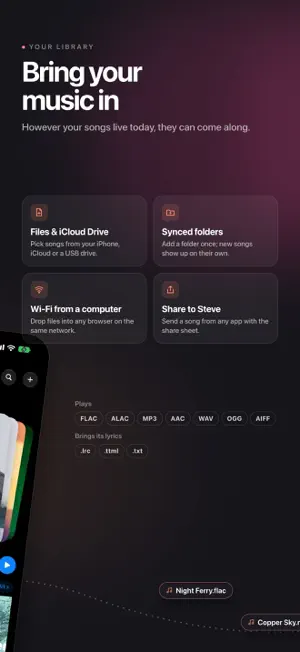
Steve is a music player for the songs you own. Play your files offline and beautifully: no ads, no account, and every core feature free. It plays FLAC, ALAC, MP3, AAC/M4A, WAV, OGG, Opus and AIFF, including hi-res up to 24-bit/192 kHz, with gapless playback. BRING YOUR MUSIC IN • Files, iCloud Drive or a USB drive • Synced folders: new songs show up on their own • Wi‑Fi upload from any browser on your computer • Share songs to Steve from any app • Full backups: your whole library, songs included, in one .zip MADE FOR LISTENING • Synced lyrics from LRC and TTML files, in full screen • 10-band equalizer with presets • Sleep timer, playback speed (0.5× to 3×) and A–B loop • Queue, AirPlay, Lock Screen and Control Center • CarPlay, and an Apple Watch remote • Siri, Shortcuts and Spotlight YOUR LIBRARY, TIDY • Albums, artists, genres and playlists, with search • Edit titles, artists, albums and artwork • Optional online covers and artist photos • Find and remove duplicates STEVE PRO (OPTIONAL) • Ten themes, each in light and dark, and your own fonts • A vinyl record player in Now Playing • Listening stats: top songs and artists, listening clock, activity and where your music comes from • Home Screen and Lock Screen widgets Steve Pro is an optional subscription with a free trial. Everything else in Steve stays free. PRIVATE BY DESIGN • Your music and listening history stay on your device • No sign-up, and no internet needed to play • Online info is off until you turn it on, and only sends artist and album names For iPhone and iPad, in 17 languages. Terms of Use: https://www.apple.com/legal/internet-services/itunes/dev/stdeula/
Ratings & reviews
4.8
175 ratings
What’s new
Version 1.4.0 · Updated November 12, 2026
• Organize your way: sort and reorder playlists and albums, show up to 5 per row, and browse albums in a new grid. Albums you add to a playlist stay together. • A cleaner look: black and white by default, so your covers bring the color. • Listening Stats, redesigned: a wall of your albums and your top songs as a chart. Your streak and today's listening now sit at the top of Home. • Tap a lyric to jump to it, save a Wi-Fi import as a playlist, and shuffle your whole library from Jump Back In. • Hide the 10-second skips on Now Playing if you don't use them. • Steve Pro: keep your cover's colors with any theme, and your font now applies across the whole app. This month's stats, top songs and monthly recap stay free; the deeper Listening Stats pages and older months are now part of Pro. • Fixes: editing an album keeps each song's artist, pausing at other speeds no longer jumps back, and Steve tells you when a missing file is skipped.
App privacy
The developer, Hamza RABI, reported these privacy practices to Apple.
Data Not Linked to You
The following data, which may be collected but is not linked to your identity, may be used for the following purposes:
- Purchases: Purchase History
- Usage Data: Product Interaction
- Diagnostics: Crash Data, Performance Data
- Search History: Search History
Used for: Analytics, App Functionality
Alternatives to Steve: Offline Music Player
Looking for apps like Steve: Offline Music Player? Here are 6 similar apps on the App Store. The highest rated is Offline Music Player: No Ads (4.8/5), and all 6 are free to download.
-
 Tuneo: Offline Music Player
4.3
-
 Cosmos : Offline Music Player
4.5
-
 Offline Music Player: No Ads
4.8
-
 Synic - Offline Music Player
4.5
-
 Sonora - Offline Music Player
4.4
-
 Jewelcase
4.8
| App | Rating | Price | Last updated | Compare |
|---|---|---|---|---|
| Steve: Offline Music Player | 4.8 / 5 (175 ratings) | Free | November 12, 2026 | |
| Tuneo: Offline Music Player | 4.3 / 5 (104) | Free | Nov 5, 2026 | Compare |
| Cosmos : Offline Music Player | 4.5 / 5 (48) | Free | Nov 10, 2026 | Compare |
| Offline Music Player: No Ads | 4.8 / 5 (83) | Free | Nov 11, 2026 | Compare |
| Synic - Offline Music Player | 4.5 / 5 (60) | Free | Nov 9, 2026 | Compare |
| Sonora - Offline Music Player | 4.4 / 5 (56) | Free | Apr 20, 2025 | Compare |
| Jewelcase | 4.8 / 5 (86) | Free | Jan 14, 2026 | Compare |