

Filters Camera
NIKOLAY KOVALSKIY Photo & Video iPhoneiPadiPod touch
Filters Camera is a free Photo & Video app for iPhone and iPad by NIKOLAY KOVALSKIY. Rated 4.7/5 from 3 ratings. Requires iOS 15.0. Updated October 5, 2026.
- Rating
- 4.7
- 3 ratings
- Price
- Free
- on the App Store
- Size
- 125 MB
- Age 4+
- Updated
- Oct 5
- 2026 · v2.3
Screenshots
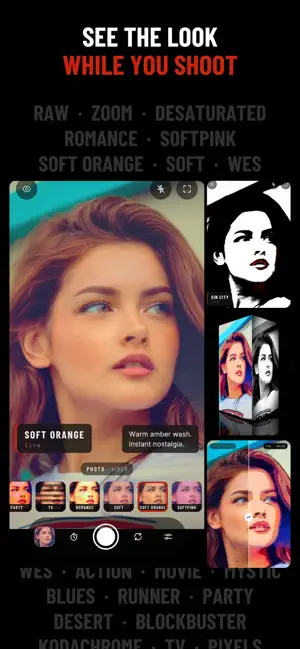


About Filters Camera
Filters Camera turns your iPhone or iPad into a live filter camera for both photo and video. Pick a look, instantly see it on screen while you shoot, and get the finished photo or video using a What You See Is What You Get approach. No post-processing needed, everything stays privately on your device WHAT'S INSIDE • Dozens of live looks: film stocks, cinematic color, black & white, anime and other artistic styles • Real-time preview – the look is applied to the live camera feed, not added later • Live adjustments: brightness, contrast, saturation, hue and sharpness on top of any look • Video recording with the filter baked into the footage (up to 10 seconds) • Photo editing: crop to Square, Avatar, 4:5, 16:9 and more, rotate and straighten, then save a copy or replace the original • My Shots: your photos and clips gallery accessible from within the app too • QR codes: open links and sign in to websites with a passkey, just like the built-in Camera • Front and back camera, pinch to zoom, mirror selfie, flash • No ads, no watermarks, easily share your feed with friends and media BEST FOR • Shooting stunning selfies, portraits, products, interiors and outdoors scenarios • Creating incredible videos to surprise everyone with your artistic look • Discovering the fun and beauty behind shooting in black and white • Kids having fun shooting with incredible filters LINKS AND CREDITS How To Use Guide: https://filterscamera.app/help App made with .NET MAUI using DrawnUI.
What’s new
Version 2.3 · Updated October 5, 2026
Filters Camera now speaks your language: English, French, German, Spanish, Italian, Russian, Japanese, Korean and Serbian. It opens in your phone's language, and Settings > Language switches the whole app upon your choice. Scans QR codes, just like the built-in Camera: point at a code and its link appears in the viewfinder. Tap to open it. Signing in to a website on your computer? Scan a passkey code with your iPhone. In-app gallery: Edit - crop your photo to avatar, or some 4:5 or 16:9 etc., rotate and straighten, then save a copy or replace the original. Info - see EXIF metadata, including location if you enabled GPS this in Settings.
App privacy
The developer, NIKOLAY KOVALSKIY, reported these privacy practices to Apple.
Data Not Linked to You
The following data, which may be collected but is not linked to your identity, may be used for the following purposes:
- Purchases: Purchase History
- Location: Coarse Location
- Identifiers: Device ID
- Usage Data: Product Interaction
- Diagnostics: Crash Data
Used for: Analytics, App Functionality
Alternatives to Filters Camera
Looking for apps like Filters Camera? Here are 6 similar apps on the App Store. The highest rated is Vintage Camera Filter - Lukyo (5.0/5), and all 6 are free to download.
-
 Face Filters: AR Cam & Emoji
2.6
-
 Vintage Camera Filter - Lukyo
5.0
-
 Camera Effects and Filters
4.5
-
 SLAY cam: G7X, Y2K & DigiCam
5.0
-
 Camera Cube - 3D Effects Live!
3.2
-
 Amber: Photo Editor & Filters
5.0
| App | Rating | Price | Last updated | Compare |
|---|---|---|---|---|
| Filters Camera | 4.7 / 5 (3 ratings) | Free | October 5, 2026 | |
| Face Filters: AR Cam & Emoji | 2.6 / 5 (59) | Free | Apr 20, 2026 | Compare |
| Vintage Camera Filter - Lukyo | 5.0 / 5 (4) | Free | Mar 19, 2026 | Compare |
| Camera Effects and Filters | 4.5 / 5 (345) | Free | Nov 21, 2023 | Compare |
| SLAY cam: G7X, Y2K & DigiCam | 5.0 / 5 (4) | Free | Oct 22, 2026 | Compare |
| Camera Cube - 3D Effects Live! | 3.2 / 5 (10) | Free | Oct 8, 2026 | Compare |
| Amber: Photo Editor & Filters | 5.0 / 5 (5) | Free | Sep 4, 2025 | Compare |
Compare Filters Camera with the top alternatives: ratings, updates, ASO score and keyword gaps →