

Time0 - Smart Planning
Steffen Meyer Productivity iPhoneiPadiPod touch
Time0 - Smart Planning is a paid Productivity app for iPhone and iPad by Steffen Meyer. Requires iOS 16.4. Updated October 26, 2026.
- Price
- 1.99 USD
- on the App Store
- Size
- 49 MB
- Age 4+
- Updated
- Oct 26
- 2026 · v2.1.0
Screenshots


About Time0 - Smart Planning
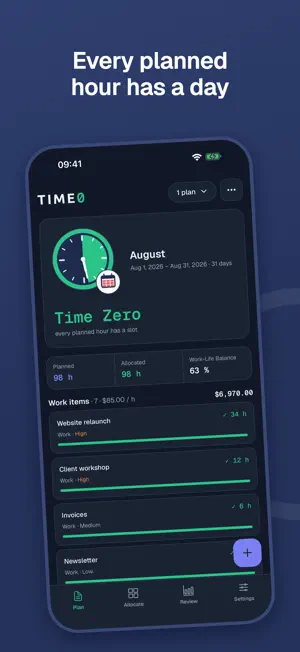
Time0 is zero-based time planning: every hour of your period gets a purpose before you live it. Just like zero-based budgeting gives every dollar a job, Time0 gives every hour a day. HOW IT WORKS Create a plan for a month or a project, add your work items with the hours they need, and spread those hours over the days. When every planned hour has a day, you have reached Time Zero. THE CLOCK The Clock shows your plan at a glance: the face is all your time, the indigo wedge is planned work, the emerald wedge is what already has a day. When both hands meet, the rim turns emerald: Time Zero. Plan more than the period holds, or put more hours on an item than it needs, and the rim warns you. ALLOCATE YOUR WAY • Table: work items against days, the whole month in one view • One item: one work item and its hours over the days • One day: a day's timeline with start times; Auto-arrange places the day's items one after another • Auto-schedule with one of four strategies you choose: Weekend Priority, Balanced Workload, Priority Focus or Front-Load Scheduling • Your own day limits for weekdays and weekends SEE WHERE YOUR TIME GOES Review shows your daily workload, estimates against allocated hours, and a calendar of full and open days. The work-life balance tells you how much of your time stays yours. PDF REPORTS Five report types for clients, billing and planning: Plan Overview, Detailed Schedule, Executive Summary, Task List and Time Sheet. On A4 or US Letter, shared from your device. WORK AND LIFE Plan life items next to work items, with priorities and your own hourly rates. Time0 shows what your allocated hours are worth. YOURS, ON YOUR DEVICE Everything stays on this device. No account, no sync, no tracking. Back up to your own iCloud and restore whenever you need to, or export and import your data as a file. MADE FOR Freelancers and consultants, project managers, accountants, creative and technical professionals — and anyone who wants to decide where their hours go before they are gone. • 14 languages • Seven themes, light and dark • A one-time purchase: no subscription, no ads From Time Zero to Time Smart.
What’s new
Version 2.1.0 · Updated October 26, 2026
Allocate's Table now spans the whole plan: • One sideways table from the first day to the last, item names fixed on the left; Today jumps back. • With a keyboard on iPad or Mac it works like a spreadsheet: typing replaces a value, Tab / ⇧Tab move between days, Return / ⇧Return between items, ↑ ↓ step the hours. • Long plans stay quick, and wider cells fit values like 12.75. • Picking a plan in the sidebar opens it.
App privacy
The developer, Steffen Meyer, reported these privacy practices to Apple.
Data Not Collected
The developer does not collect any data from this app.
Alternatives to Time0 - Smart Planning
Looking for apps like Time0 - Smart Planning? Here are 6 similar apps on the App Store. The highest rated is CalenGoo Calendar (4.6/5), and 5 of the 6 are free to download.
-
 FocusBox - AI Task Planner
-
 Social Club
-
 NumberLink Client
3.7
-
 Godspeed – To Do List
4.5
-
 CalenGoo Calendar
4.6
-
 RDC-DLD
| App | Rating | Price | Last updated | Compare |
|---|---|---|---|---|
| Time0 - Smart Planning | – | 1.99 USD | October 26, 2026 | |
| FocusBox - AI Task Planner | – | Free | Jul 6, 2026 | Compare |
| Social Club | – | Free | Oct 19, 2026 | Compare |
| NumberLink Client | 3.7 / 5 (3) | Free | Oct 8, 2026 | Compare |
| Godspeed – To Do List | 4.5 / 5 (22) | Free | Oct 9, 2026 | Compare |
| CalenGoo Calendar | 4.6 / 5 (301) | 6.99 USD | Apr 21, 2026 | Compare |
| RDC-DLD | – | Free | Dec 10, 2025 | Compare |