

Pinshotcaller
Scott Bennett Entertainment iPhoneiPadiPod touch
Pinshotcaller is a paid Entertainment app for iPhone and iPad by Scott Bennett. Requires iOS 14.0. Updated August 29, 2025.
- Price
- 0.99 USD
- on the App Store
- Size
- 7 MB
- Age 4+
- Updated
- Aug 29
- 2025 · v1.1
Screenshots
About Pinshotcaller
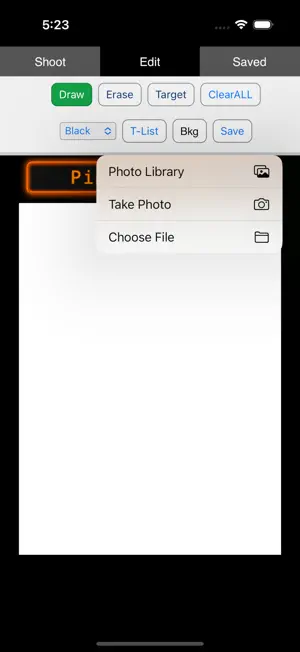
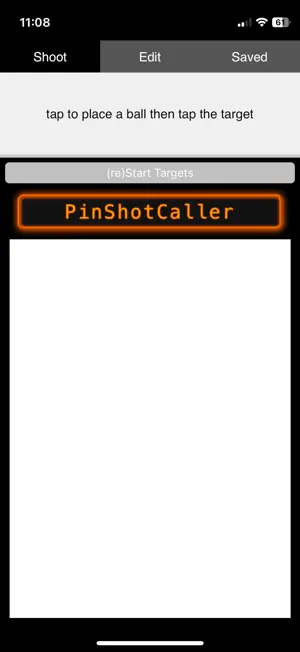
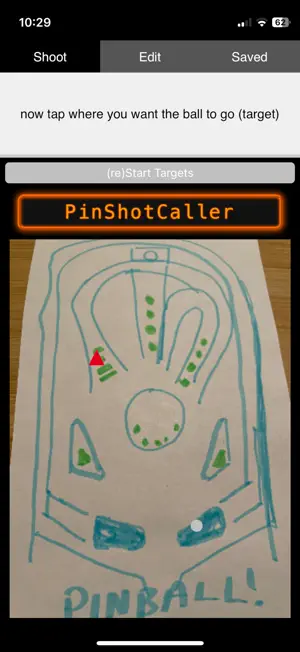
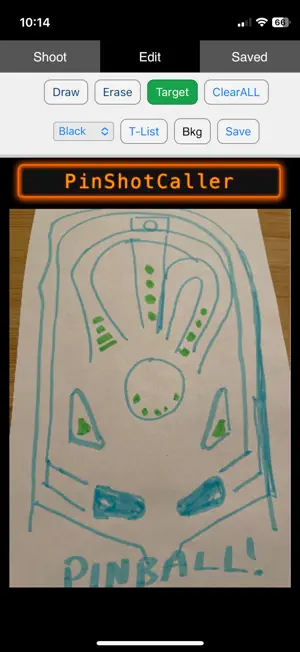
PinShotCaller is a compact tool for building a “pinball journal” for each table you play. You can sketch or photograph (BKG) the playfield, mark key targets, and attach step‑by‑step messages (with DMD text) that advance as you simulate shots. Use it to: • Capture rules and scoring patterns for specific tables. • Practice sequences repeatedly to build consistency. • Demonstrate strategies to others by walking through the shots in order, with on‑screen prompts. • Save and share complete table profiles (artwork + targets + messages) as portable JSON packs. PinShotCaller has three tabs across the top: 1. Shoot – Run practice/demos. You “shoot” by clicking (or tapping) twice: first to set a launch point, second on the destination for the ball (target). The app checks whether you hit the active target, shows the message for that hit, updates the DMD banner, and moves on when a target is completed. 2. Edit – Build the playfield drawing or import a background (BKG) photo, then add, edit, and reorder targets. Each target can carry an ordered list of messages and optional DMD updates for each hit. 3. Saved – Save, load, rename, delete, import, and export entire table profiles. Quick Start (5 minutes) 1. Open Edit. Choose Draw to sketch lanes and ramps, or the Bkg (Background) file picker to load a photo/screenshot of the playfield. Edit is also where you save your playfield and targets to a pinshotcaller table (to export and save permanently etc.) 2. Add targets. Switch to Target mode and tap where a shot should register. A form opens—choose the number of hits (e.g., 3) and write the message(s) for each hit. Optionally add a DMD line per hit (appears on the Shoot tab’s banner). Save. 3. Reorder & refine. Use the T‑List to reorder targets (↑ / ↓), edit their messages, or delete them. 4. Save & share. Go to Saved, hit Save in Edit (or use the Saved tab to Export Selected as a JSON or HTML pack you can import on another device - HTML exports are also stand-alone viewable). 5. Practice. Switch to Shoot and press (re)Start Targets. Click once to set a ball, then click a destination (the blinking target). Advance through messages and targets; the banner updates as you go.
What’s new
Version 1.1 · Updated August 29, 2025
the only change in this build is the app used to say "good shot" when you tapped in one place and then tapped in another place that did not have a target (on the shoot tab) - now it says "you missed a blinking target - try again" - no other updates to the approved app.
App privacy
The developer, Scott Bennett, reported these privacy practices to Apple.
Data Not Collected
The developer does not collect any data from this app.
Alternatives to Pinshotcaller
Looking for apps like Pinshotcaller? Here are 6 similar apps on the App Store. The highest rated is Preshow Theater (5.0/5), and all 6 are free to download.
-
 Pinlights
-
 Preshow Theater
5.0
-
 IFPA Companion
4.7
-
 Supercast
4.7
-
 Siren & Air Horn Sounds
4.4
-
 Stern Pinball IC
3.3
| App | Rating | Price | Last updated | Compare |
|---|---|---|---|---|
| Pinshotcaller | – | 0.99 USD | August 29, 2025 | |
| Pinlights | – | Free | Nov 21, 2025 | Compare |
| Preshow Theater | 5.0 / 5 (2) | Free | Oct 22, 2026 | Compare |
| IFPA Companion | 4.7 / 5 (32) | Free | Oct 12, 2026 | Compare |
| Supercast | 4.7 / 5 (199) | Free | Oct 22, 2026 | Compare |
| Siren & Air Horn Sounds | 4.4 / 5 (1,396) | Free | May 21, 2026 | Compare |
| Stern Pinball IC | 3.3 / 5 (46) | Free | Oct 12, 2026 | Compare |
Compare Pinshotcaller with the top alternatives: ratings, updates, ASO score and keyword gaps →