

Scanner: Cam Smart Scan to PDF
Nikolai Kangur Business iPhoneiPadiPod touch
Scanner: Cam Smart Scan to PDF is a free Business app for iPhone and iPad by Nikolai Kangur. Rated 4.5/5 from 66 ratings. Requires iOS 16.0.
- Rating
- 4.5
- 66 ratings
- Price
- Free
- on the App Store
- Size
- 46 MB
- Age 4+
- Updated
- Feb 5
- 2026 · v1.0.1
Screenshots

About Scanner: Cam Smart Scan to PDF
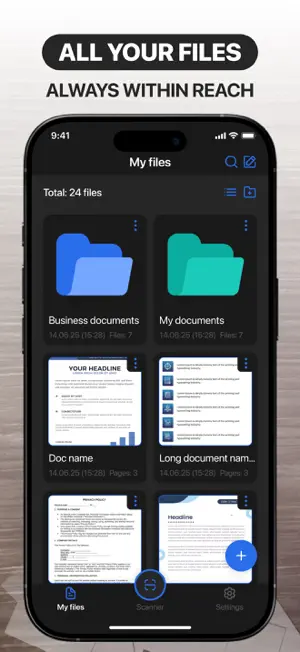
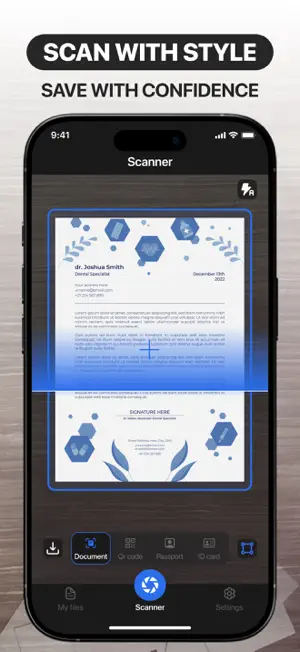
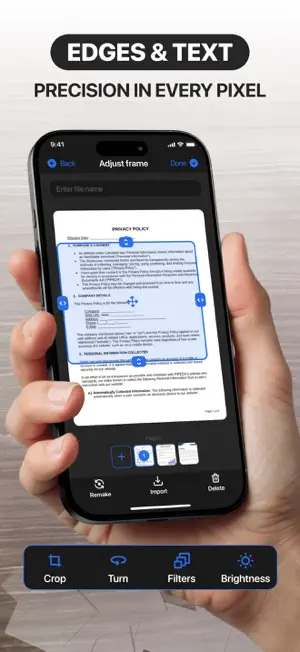
Paper to digital effortlessly Easily scan any documents or images and turn them into your digital tools. Your documents are always at your fingertips and in perfect order. Effortlessly Transform Paper to Digital Say goodbye to piles of paperwork—seamlessly scan any document or image and convert it into a versatile digital file. With just a few clicks, your physical papers become organized, searchable, and always accessible. Whether at home, in the office, or on the go, your important documents are right at your fingertips, perfectly sorted and ready whenever you need them. Capture Perfect Clarity, Every Time Experience crisp, high-quality scans with every use. Once your document is digitized, effortlessly highlight key sections, add notes, or make quick edits—all with intuitive, user-friendly tools. No more printing, scribbling, or rescanning. Refine your documents anytime, anywhere, with unmatched speed and precision. Capture clarity, every time After scanning a document, you can highlight the most important parts for you. Edit documents quickly, conveniently, and effortlessly at any time. Export files in various formats Upload and share your documents in various text formats, as images, or as PDFs. Convenient and easy file export, always according to your rules. Sign documents digitally Create your own unique digital signatures and easily transfer them to documents. Don't bother searching for a pen with a reliable digital tool. Access more features: Ability to edit and customize documents Scanning QR codes, passports & ID cards Document Text Recognition Function Premium Membership: Week Features A 3-day trial is available with all subscriptions. Your iTunes account will be charged after the purchase is confirmed. Subscriptions automatically renew unless you cancel at least 24 hours before the current period ends. Manage your subscriptions and auto-renewal in Account Settings. Support and Privacy Policy Consult our privacy policy:https://kopolomech.art/PrivacyPolicy.html Visit our Terms of Use to understand how we protect your information:https://kopolomech.art/TermsOfUse.html Reach our customer support at:[email protected] Your Documents—Simplified, Secure, and Always Within Reach.
Ratings & reviews
4.5
66 ratings
What’s new
Version 1.0.1 · Updated February 5, 2026
Minor fixes
App privacy
The developer, Nikolai Kangur, reported these privacy practices to Apple.
Data Used to Track You
The following data may be used to track you across apps and websites owned by other companies:
- Identifiers: User ID, Device ID
Data Not Linked to You
The following data, which may be collected but is not linked to your identity, may be used for the following purposes:
- Identifiers: User ID, Device ID
- Usage Data: Product Interaction
Used for: Third-Party Advertising, Developer’s Advertising or Marketing, Analytics
Alternatives to Scanner: Cam Smart Scan to PDF
Looking for apps like Scanner: Cam Smart Scan to PDF? Here are 6 similar apps on the App Store. The highest rated is Invoice Maker・Estimate App (4.9/5), and all 6 are free to download.
-
 Invoice Maker: Simple Generate
4.7
Invoice Maker: Simple Generate
4.7
-
 PDF scanner app Documents scan
4.5
PDF scanner app Documents scan
4.5
-
 Document Converter To PDF Edit
4.7
Document Converter To PDF Edit
4.7
-
 Invoice Maker・Estimate App
4.9
Invoice Maker・Estimate App
4.9
-
 JPEG & Image To PDF Converter
4.5
JPEG & Image To PDF Converter
4.5
-
 Hearing Aid App: Sound Booster
4.3
Hearing Aid App: Sound Booster
4.3
| App | Rating | Price | Last updated | Compare |
|---|---|---|---|---|
| Scanner: Cam Smart Scan to PDF | 4.5 / 5 (66 ratings) | Free | February 5, 2026 | |
| Invoice Maker: Simple Generate | 4.7 / 5 (194) | Free | Jun 14, 2025 | Compare |
| PDF scanner app Documents scan | 4.5 / 5 (87) | Free | Sep 8, 2025 | Compare |
| Document Converter To PDF Edit | 4.7 / 5 (47) | Free | Sep 17, 2025 | Compare |
| Invoice Maker・Estimate App | 4.9 / 5 (201) | Free | Sep 18, 2026 | Compare |
| JPEG & Image To PDF Converter | 4.5 / 5 (62) | Free | Sep 11, 2025 | Compare |
| Hearing Aid App: Sound Booster | 4.3 / 5 (457) | Free | Aug 6, 2025 | Compare |