

ScrollBuddy: Screen Time
Aaron Vinod Productivity iPhoneiPadiPod touch
ScrollBuddy: Screen Time is a free Productivity app for iPhone and iPad by Aaron Vinod. Rated 4.0/5 from 10 ratings. Requires iOS 26.0.
- Rating
- 4.0
- 10 ratings
- Price
- Free
- on the App Store
- Size
- 13 MB
- Age 4+
- Updated
- Oct 14
- 2026 · v2.0.8
Screenshots


About ScrollBuddy: Screen Time
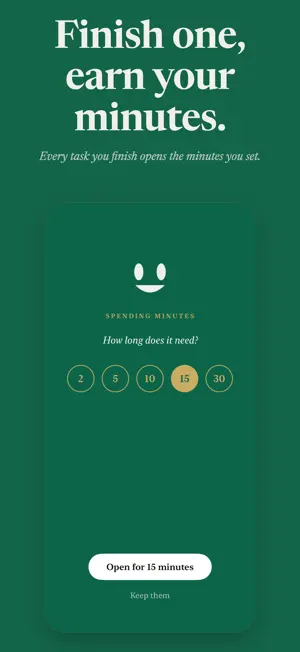
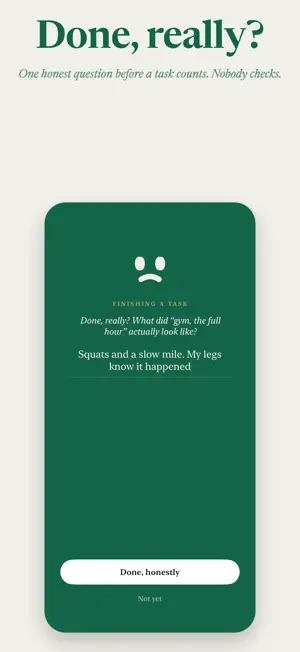
Your apps start the day shut. You write up to three tasks, say what each is worth, up to thirty minutes, and finishing one earns exactly that. That is the whole loop. The apps you named are blocked from midnight, before you have to decide anything. Willpower at seven in the morning is a bad plan. A choice you already made is a good one. Then you write the day. One to three tasks, no more. SB, the buddy in the app, helps you turn a vague intention into something you can start, and asks about the one that is too big to begin. Once the page is sealed, that is the day. Finishing a task puts its minutes in the bank. Before a task counts as done, SB asks one honest question about it. "Done, really? What did the gym session actually look like?" Nobody checks your answer. That is the point. The bank holds up to 150 minutes. Spending takes a moment. SB asks what it is for and how long, 2 to 30 minutes, and the apps shut again quietly when the time is up. A bank left unspent is a good day. In the evening the bell rings at the hour you chose. SB tells the day back to you in your own words: what got done, what you said about it, what did not happen, and how much closer you are to this month's goal. Then he asks what tomorrow is for, and you write the next page before you sleep. The month has one goal, with a finish line you can count. Twelve gym sessions. Four chapters. Ten applications sent. Tasks either serve it or they do not, and the book keeps the tally. ScrollBuddy was built by one person. Your first full day is on the house: plan it, live it, finish it, and write tomorrow. After that it costs money to keep going: a small subscription, monthly or yearly, or a single purchase that keeps it for good. The prices are shown in the app before you decide. If it does not help, walk away free, no hard feelings. There is no account and no login. Your goal, your tasks, your honest answers and your day count live on your phone and nowhere else. There is no partner to disappoint, no leaderboard, and nobody reading your day but you. Blocking uses Apple's Screen Time permission. ScrollBuddy never sees which apps you open or what you do inside them.
Ratings & reviews
4.0
10 ratings
What’s new
Version 2.0.8 · Updated October 14, 2026
Say how long: open the apps for 2 to 30 minutes at a time, and the room says how much today has already opened. Apps you add are blocked the moment you close the gear. Apps you take out stay blocked until today's tasks are done, or until midnight. The evening bell says how many tasks are still open, and an afternoon nudge says it earlier on days with something left. Lift a task from Apple Reminders when you write the page. ScrollBuddy asks for Screen Time on every return until it is granted. Now runs on iOS 26.0. Fixes for hangs at launch.
App privacy
The developer, Aaron Vinod, reported these privacy practices to Apple.
Data Linked to You
The following data, which may be collected and linked to your identity, may be used for the following purposes:
- Contact Info: Email Address
- User Content: Other User Content
Used for: App Functionality
Data Not Linked to You
The following data, which may be collected but is not linked to your identity, may be used for the following purposes:
- Location: Coarse Location
- Usage Data: Product Interaction
- Diagnostics: Crash Data, Performance Data
Used for: Analytics, App Functionality
Alternatives to ScrollBuddy: Screen Time
Looking for apps like ScrollBuddy: Screen Time? Here are 6 similar apps on the App Store. The highest rated is Unglue: Screen Time Friend (4.7/5), and all 6 are free to download.
-
 Useless - Screen Time Control
4.5
Useless - Screen Time Control
4.5
-
 Barrier: Screen Time For Focus
4.6
Barrier: Screen Time For Focus
4.6
-
 Snitch: Screen Time Control
4.0
Snitch: Screen Time Control
4.0
-
 Unglue: Screen Time Friend
4.7
Unglue: Screen Time Friend
4.7
-
 Unrot: Earn your Screen Time
4.7
Unrot: Earn your Screen Time
4.7
-
 Roots: Screen Time Control
4.7
Roots: Screen Time Control
4.7
| App | Rating | Price | Last updated | Compare |
|---|---|---|---|---|
| ScrollBuddy: Screen Time | 4.0 / 5 (10 ratings) | Free | October 14, 2026 | |
| Useless - Screen Time Control | 4.5 / 5 (289) | Free | Oct 3, 2026 | Compare |
| Barrier: Screen Time For Focus | 4.6 / 5 (336) | Free | Jul 1, 2026 | Compare |
| Snitch: Screen Time Control | 4.0 / 5 (60) | Free | Oct 14, 2026 | Compare |
| Unglue: Screen Time Friend | 4.7 / 5 (2,679) | Free | Oct 14, 2026 | Compare |
| Unrot: Earn your Screen Time | 4.7 / 5 (56,943) | Free | Oct 6, 2026 | Compare |
| Roots: Screen Time Control | 4.7 / 5 (3,068) | Free | Oct 7, 2026 | Compare |