

Smart Security: Online Protect
TGroup Apps Utilities iPhoneiPadiPod touch
Smart Security: Online Protect is a free Utilities app for iPhone and iPad by TGroup Apps. Requires iOS 16. Updated October 5, 2026.
- Price
- Free
- on the App Store
- Size
- 18 MB
- Age 17+
- Updated
- Oct 5
- 2026 · v1.4
Screenshots
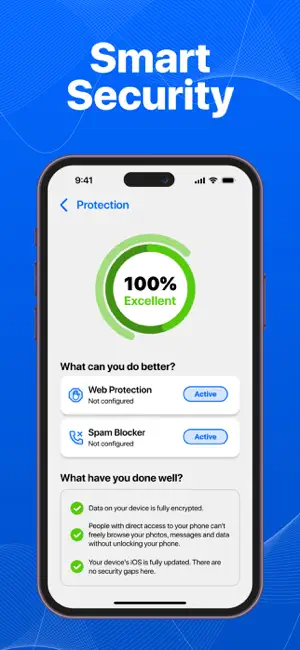


About Smart Security: Online Protect
Smart Security: Online Protect helps you browse, connect, and share with confidence. Enjoy ad-free browsing, fewer unwanted interruptions, and more control over your personal data - all in one simple app. Key Features: Web Protection 1. Block banner ads, pop-ups, and pop-under windows for a distraction-free experience 2. Stop autoplay videos and unwanted scripts from loading in the background 3. Filter adult content to keep browsing comfortable in any environment 4. Prevent tracking technologies from collecting your browsing habits 5. Improve page loading speed by removing unnecessary elements 6. Customize protection settings to match your preferences Call & SMS Blocker 1. Block calls and SMS from numbers in your personal block list 2. Silence hidden or unknown numbers so you only get the calls you want 3. Filter spam messages to keep your inbox cleaner 4. Keep a log of blocked calls and messages for easy review 5. Enable or disable blocking rules anytime with one tap Location Remover 1. Remove GPS and location data from your photos before sharing 2. Keep image quality while protecting your personal details 3. Edit and clean multiple images in just a few taps And more useful tools to help you keep your digital space organized and comfortable. Subscription Management Subscriptions can be managed by the user, and auto-renewal can be turned off in Account Settings: 1. Open the Settings app. 2. Tap your Apple ID name. 3. Select Subscriptions. 4. Choose the subscription you want to manage. Subscription Details: 1. Payment will be charged to your iTunes Account upon confirmation of purchase. 2. Subscription renews automatically unless auto-renew is turned off at least 24 hours before the current period ends. 3. Your account will be charged for renewal within 24 hours prior to the end of the current period, showing the cost of renewal. 4. No cancellation of the current subscription is allowed during the active subscription period. 5. Any unused portion of a free trial, if offered, will be forfeited when you purchase a subscription. Privacy Policy: https://tgroup20.info/privacy.html Terms and Conditions: https://tgroup20.info/terms.html
What’s new
Version 1.4 · Updated October 5, 2026
New features have been added
App privacy
The developer, TGroup Apps, reported these privacy practices to Apple.
Data Used to Track You
The following data may be used to track you across apps and websites owned by other companies:
- Identifiers: Device ID
- Usage Data: Advertising Data
Data Not Linked to You
The following data, which may be collected but is not linked to your identity, may be used for the following purposes:
- Identifiers: Device ID
- Usage Data: Advertising Data, Product Interaction
- Diagnostics: Crash Data
Used for: Third-Party Advertising, Developer’s Advertising or Marketing, Analytics
Alternatives to Smart Security: Online Protect
Looking for apps like Smart Security: Online Protect? Here are 6 similar apps on the App Store. The highest rated is SmartClean: Media Cleaner (4.5/5), and all 6 are free to download.
-
 Spark Cleaner - Easy Clean
-
 Cleanup Storage Pro
4.1
-
 SmartClean: Media Cleaner
4.5
-
 Smart Cleaner – Phone Clean
-
 AI Cleaner: PhotoCraft
4.3
-
 Magic Cleaner – Smart Cleanup
| App | Rating | Price | Last updated | Compare |
|---|---|---|---|---|
| Smart Security: Online Protect | – | Free | October 5, 2026 | |
| Spark Cleaner - Easy Clean | – | Free | Apr 3, 2026 | Compare |
| Cleanup Storage Pro | 4.1 / 5 (7) | Free | Nov 13, 2025 | Compare |
| SmartClean: Media Cleaner | 4.5 / 5 (48) | Free | Apr 14, 2026 | Compare |
| Smart Cleaner – Phone Clean | – | Free | May 3, 2026 | Compare |
| AI Cleaner: PhotoCraft | 4.3 / 5 (26) | Free | Nov 23, 2025 | Compare |
| Magic Cleaner – Smart Cleanup | – | Free | Feb 13, 2026 | Compare |