

GamePlan: Calendar Syncing
LAND MK 1 Utilities iPhoneiPadiPod touch
GamePlan: Calendar Syncing is a free Utilities app for iPhone and iPad by LAND MK 1. Rated 5.0/5 from 1 ratings. Requires iOS 17.0. Updated October 20, 2026.
- Rating
- 5.0
- 1 ratings
- Price
- Free
- on the App Store
- Size
- 17 MB
- Age 4+
- Updated
- Oct 20
- 2026 · v1.7
Screenshots


About GamePlan: Calendar Syncing
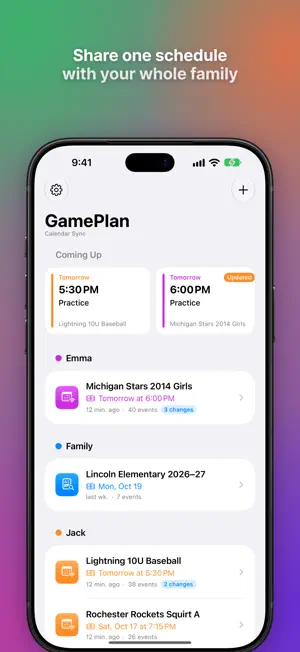
Never miss a school event, practice, or game again — no more manual calendar updates for each family member! If your family juggles multiple sports schedules from apps like TeamSnap, SportsEngine, or LeagueApps, you know the frustration: • Every season, every team, every family member has to manually add ICS links to their calendar. • It’s slow, clunky, manual, and… it usually never gets done. GamePlan solves that. How it works: 1. Grab the ICS link for your team’s schedule from their website or sports app. 2. Paste it into GamePlan and choose the shared iCloud calendar you want to keep in sync. 3. Done! GamePlan automatically keeps that calendar up-to-date every day — so your entire family always sees the latest schedule. Why you’ll love it: • Hands-off syncing — updates appear without you reopening the app. • Works with any ICS feed — sports, school, work, community, or personal. • Organized by calendar — keep events sorted into the right shared iCloud calendar. • One setup for everyone — no more duplicate work for each family member. • Live updates — changes and cancellations show up automatically for the entire family. Perfect for: • Families with kids in multiple sports. • Busy parents tired of chasing team schedules. • Anyone who wants their sports events to appear in their existing iCloud calendar. Stop copy-pasting ICS links. Start letting GamePlan handle it for you. https://www.apple.com/legal/internet-services/itunes/dev/stdeula/
What’s new
Version 1.7 · Updated October 20, 2026
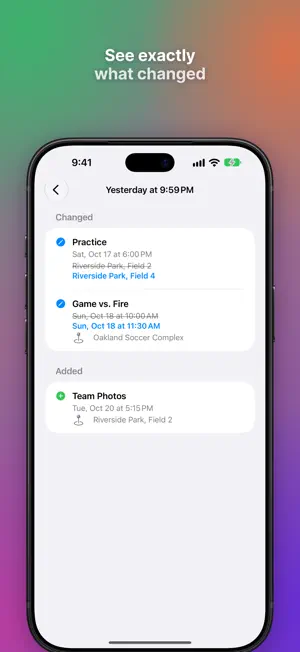
What's New in GamePlan 1.7 Headline features: - Support for iPhone Duo - An updated design to make it easier to get in, get what you need, and get out. See more details: • Each sync now records which events were added, moved or cancelled, with the old and new time, place and name side by side. • Schedule notifications name up to three of the changes, and now also tell you when games are cancelled. • Tap a notification about one team to go straight to that team. New dashboard: • Coming Up shows your next events across every team, and marks the ones that just changed. • Each team shows its calendar color, next event, last sync, and any recent changes. • Swipe a team to sync it right away. Fresher schedules: • GamePlan checks your teams in the background more often and refreshes when opening the app for the first time in a while.
App privacy
The developer, LAND MK 1, reported these privacy practices to Apple.
Data Not Linked to You
The following data, which may be collected but is not linked to your identity, may be used for the following purposes:
- Usage Data: Product Interaction, Advertising Data
- Diagnostics: Crash Data, Performance Data
Used for: Analytics, App Functionality
Alternatives to GamePlan: Calendar Syncing
Looking for apps like GamePlan: Calendar Syncing? Here are 6 similar apps on the App Store. The highest rated is Wrixle (5.0/5), and 4 of the 6 are free to download.
-
 Klavette
-
 Fincalc Family Budget
-
 Wrixle
5.0
Wrixle
5.0
-
 Inset: PiP for Every App
5.0
Inset: PiP for Every App
5.0
-
 Skip Notes
5.0
Skip Notes
5.0
-
 Lucky for Safari
4.6
Lucky for Safari
4.6
| App | Rating | Price | Last updated | Compare |
|---|---|---|---|---|
| GamePlan: Calendar Syncing | 5.0 / 5 (1 rating) | Free | October 20, 2026 | |
| Klavette | – | Free | Oct 27, 2026 | Compare |
| Fincalc Family Budget | – | Free | Jul 29, 2026 | Compare |
| Wrixle | 5.0 / 5 (1) | Free | Aug 1, 2025 | Compare |
| Inset: PiP for Every App | 5.0 / 5 (4) | 3.99 USD | Oct 19, 2026 | Compare |
| Skip Notes | 5.0 / 5 (1) | Free | Apr 24, 2026 | Compare |
| Lucky for Safari | 4.6 / 5 (12) | 2.99 USD | Sep 10, 2026 | Compare |