

GTK - Guitar Player's Toolkit
Jon Machtynger Music iPhoneiPadiPod touch
GTK - Guitar Player's Toolkit is a paid Music app for iPhone and iPad by Jon Machtynger. Rated 3.0/5 from 2 ratings. Requires iOS 18.0.
- Rating
- 3.0
- 2 ratings
- Price
- 9.99 USD
- on the App Store
- Size
- 64 MB
- Age 4+
- Updated
- Oct 29
- 2026 · v1.7.6
Screenshots

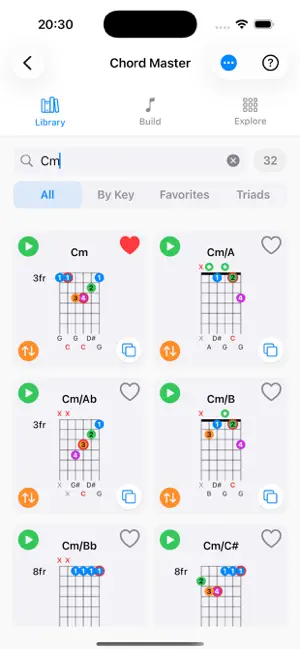

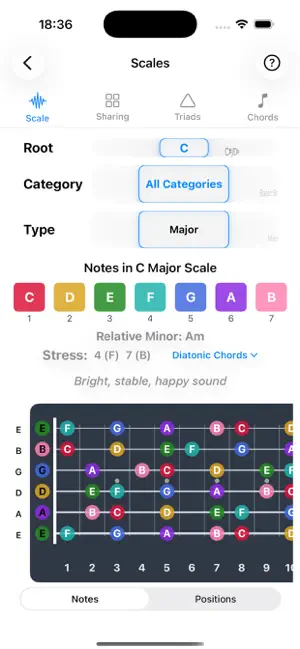
About GTK - Guitar Player's Toolkit
Over the many phases of my guitar playing journey, I got my head around concepts such as chord composition, triads, scales, modes, transpositions, but then had difficulty applying this to the fretboard. A disconnect between theory and the guitar held me back. This toolkit isn't a primer on theory, but a collection of very useful tools, showing how theory maps to the fretboard making it more accessible and memorable. Theory doesn't have to be difficult. I built these tools for me, and now you get to use them too. This application is under constant development. If you have any feedback for improvements, or any issues with the app, please use the 'Contact Us' button in Settings and we will respond. The Guitar Player's Toolkit includes: Practice tools: 1) Note Practice • Learn where every note is on the fretboard • Set a tempo/pace to practice at. Choose the strings, notes, and enharmonic format, and you'll be given a note and a string number to play. • Hear the note and compare it to what you hear on your guitar. See the note on the fretboard to help you learn. • Start with a single string, and work up to string pairs or collections. 2) Triad Practice • Triads are 3 notes that make up chords. Learn these across string sets, and extend your mastery of the fretboard. • Like Note Practice - pick your chords, string set, type of chord (Maj/Min/Aug/Dim), an inversion (Root/1st/2nd), and a tempo. • Hear the chord/triad and compare it to what you hear on your guitar. See the triad on the fretboard to help you learn. • Start with a single string set, Maj/Min and increase the complexity in terms of diminished/augmented, and multiple string sets Chord Theory 3) Chord Master • A comprehensive chord library containing around 3600 chords. • Create custom chords • Know where to put the fingers, but don't know the name? Use this tool • Know the notes, but don't know the name? Use this tool. • Use the triad library to learn the finger positions across different string sets, inversions, and starting frets • use the key based diatonic progressions library to help with song writing and melody construction • All chords can be played with guitar accurate sounds to suit Nylon, Classical, and Steel strings. 4) Scales • Show notes across every key - major, minor, diminished, augmented, but also modes, pentatonics, blues, jazz, Arabic / middle eastern, exotic, symmetrical, Chinese, Japanese, Korean, and so on. • Compare up to 4 scales, triads, or chords at once on a single, colour-coded fretboard in Scale Sharing, with shared notes marked and notes of interest highlighted. • See diatonic chords for scales that have them (Major/Minor and modes, Harmonic Minor/Major, Melodic Minor), and explore a triad library across different string sets and inversions for any chord progression you build • For scales with a diatonic chord sequence, toggle between the scale's note description and its chord sequence 5) Position Finder • Play notes in a specific key, but at a place in the fretboard that suits you. • Want to play without having to slide your hand up and down the fretboard? • This tool shows you the notes in the scale, and where they sit on the fretboard around a fret you choose. You can play in a position without sliding your hand up and down the neck. Toggle between key and mode context to quickly see how the same shape works across different modes. 6) Chord Transposer • If a song has chords you either don't like, or don't suit your voice, use this to transpose all chords to a different key, or recalculate them using a capo 7) Circle of Fifths • Invaluable for song writing. Show the relationship between keys and chords and work with modes. 8) Mode converter • Convert from one musical mode to another Practical 9) Tuner • Chromatic tuner to identify any note. Tune your guitar to any tuning scheme 10) Metronome • Provide regular beats per minute and beats per measure. Manually tap a tempo to match a beat in your head
What’s new
Version 1.7.6 · Updated October 29, 2026
• Position Finder now follows your selected tuning — the mode and key lookup uses the lowest string of the current tuning instead of assuming standard E, and refreshes when you change tuning. • Position Finder fret picker now reaches fret 24 (previously it stopped at 12). • Position Finder shows the correct spelling for flat keys, e.g. {bold:Key of Eb} rather than D#. • Refreshed app icon (with dark and tinted variants) and splash screen, with a larger splash image on iPad.
App privacy
The developer, Jon Machtynger, reported these privacy practices to Apple.
Data Not Collected
The developer does not collect any data from this app.
Alternatives to GTK - Guitar Player's Toolkit
Looking for apps like GTK - Guitar Player's Toolkit? Here are 6 similar apps on the App Store. The highest rated is Chords Maestro (5.0/5), and 1 of the 6 are free to download.
-
 Chords Maestro
5.0
Chords Maestro
5.0
-
 NAM AUv3: Neural Amp Modeler
4.5
NAM AUv3: Neural Amp Modeler
4.5
-
 Algonautic
4.0
Algonautic
4.0
-
 Guitar Chords Compass
3.9
Guitar Chords Compass
3.9
-
 Xsynth Editor
-
 Bass Guitar Colour Scales
2.2
Bass Guitar Colour Scales
2.2
| App | Rating | Price | Last updated | Compare |
|---|---|---|---|---|
| GTK - Guitar Player's Toolkit | 3.0 / 5 (2 ratings) | 9.99 USD | October 29, 2026 | |
| Chords Maestro | 5.0 / 5 (2) | 8.99 USD | Jan 5, 2026 | Compare |
| NAM AUv3: Neural Amp Modeler | 4.5 / 5 (2) | 4.99 USD | Oct 25, 2026 | Compare |
| Algonautic | 4.0 / 5 (4) | 5.99 USD | Jul 14, 2026 | Compare |
| Guitar Chords Compass | 3.9 / 5 (54) | 4.99 USD | Sep 16, 2025 | Compare |
| Xsynth Editor | – | Free | Apr 9, 2026 | Compare |
| Bass Guitar Colour Scales | 2.3 / 5 (4) | 3.99 USD | Sep 28, 2026 | Compare |