

Habit Tracker-Habitto
Chloe Lee Productivity iPhoneiPadiPod touch
Habit Tracker-Habitto is a free Productivity app for iPhone and iPad by Chloe Lee. Rated 5.0/5 from 1 ratings. Requires iOS 18.0. Updated October 22, 2026.
- Rating
- 5.0
- 1 ratings
- Price
- Free
- on the App Store
- Size
- 169 MB
- Age 4+
- Updated
- Oct 22
- 2026 · v1.1.21
Screenshots

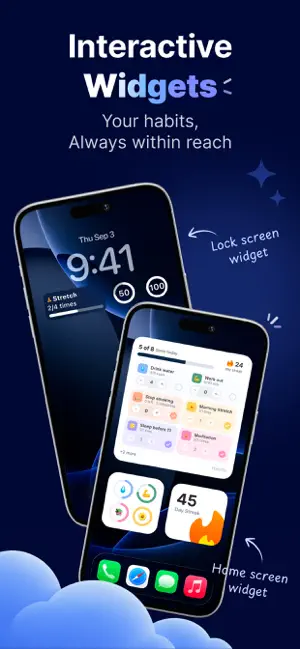


About Habit Tracker-Habitto
Build habits that fit real life. Habitto is a gentle habit tracker that helps you build good habits and let go of bad ones — at your own pace. No guilt. No perfection. Just steady progress. WHAT YOU CAN DO - Build or break habits - Track habits by completion, time, or count - Set daily, weekly, monthly, or custom goals - Take breaks with Vacation Mode — no resets STAY MOTIVATED, GENTLY - Calm progress tracking - Optional streaks and rewards - Rate habit difficulty to track your patterns over time - Choose how streaks work — full completion or any progress DESIGNED FOR EVERY DAY - Light & dark mode - Home Screen widgets for quick check-ins - Clear insights without overwhelming stats - Flexible reminders - Offline support BUILT WITH CARE - Clean, modern SwiftUI design - Guest mode or account sync - Regular updates based on user feedback Start small. Build gently. Stay consistent. Terms of Use: https://www.apple.com/legal/internet-services/itunes/dev/stdeula/ Privacy Policy: https://habitto.win/privacy
What’s new
Version 1.1.21 · Updated October 22, 2026
- Backups restore more safely. Restore refreshes first, keeps every completion, and the daily backup runs at the right time. - Progress has a monthly view. You can move through months, see every habit on one calendar, and read a clearer “showed up” count. Weekday labels are a single letter, and today and the selected day are marked with a ring inside the tile. - Celebrations are split by moment. Finishing the day, hitting a streak, and leveling up each have their own scene. Streaks rotate through 13 screens, and a level-up plays once, on Home. - A short Home tutorial appears once, after you log a habit, so the swipe and tap are clear. - The paywall shows real App Store prices, with Lifetime highlighted. Premium now follows the Apple ID, so Restore and Vacation Mode stay in sync. - Sound & Haptics lets you turn off taps and celebration cues. - Signing in asks what to do with data you already have, on a screen that matches Welcome back. - Habit details only show Details and History. Reminders are split into habit reminders and a daily reminder.
App privacy
The developer, Chloe Lee, reported these privacy practices to Apple.
Data Not Collected
The developer does not collect any data from this app.