

My Lists: Grocery & Packing
Nazirhusain Bhata Productivity iPhoneiPadiPod touch
My Lists: Grocery & Packing is a free Productivity app for iPhone and iPad by Nazirhusain Bhata. Requires iOS 18.0. Updated October 13, 2026.
- Price
- Free
- on the App Store
- Size
- 8 MB
- Age 4+
- Updated
- Oct 13
- 2026 · v2.1
Screenshots
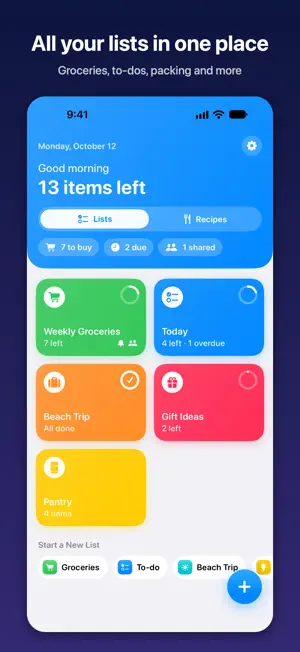


About My Lists: Grocery & Packing
Groceries, to-dos, packing and everything else, beautifully organized in one app. My Lists keeps every list in one colorful place. Groceries sort themselves by aisle, your family can shop from the same list in real time, and everything stays private in your own iCloud. SMART GROCERY LISTS • Items sort into store aisles automatically: Produce, Dairy, Bakery and more • Prices and a running total, so you know what you'll spend • "Often bought" re-adds your favorites in one tap EVERY KIND OF LIST • Grocery, To-do, Packing and General lists, each with its own icon and color • To-dos with due dates and priority • Packing lists you reset for the next trip in one tap • Ready-made templates, or save your own RECIPES AND COOKING • Save recipes with a photo, ingredients, steps and notes • Import from any recipe website, or straight from Safari • Add ingredients to your grocery list in one tap. Things you already have stay off • Scale servings up or down and every amount updates • Cooking mode: step-by-step in big text, screen stays on, built-in timers MEAL PLANNER • Plan breakfast, lunch, dinner and snacks for the whole week • Turn the week's meals into one grocery list, with amounts added up • Repeat last week's plan in one tap YOUR STORES AND PANTRY • Put a store's aisles in the order you walk them, and your list follows • Keep a pantry list: put groceries away, and add them back when you run out TOGETHER AND EVERYWHERE • Share a list with family and edit it together, live • See who added what • Syncs across iPhone, iPad and Mac with iCloud. No account to create STAY ON TOP OF IT • Reminders for any list, and due-date reminders for tasks • Home Screen widgets with tap-to-check items, plus Lock Screen widgets • "Hey Siri, add an item in My Lists" MAKE IT YOURS • 7 themes, from Ocean to Midnight, plus card styles and app colors • Light and Dark mode PRIVATE BY DESIGN No ads. No tracking. No account. Your lists stay on your devices and in your own iCloud. We never see them. FREE AND PRO Unlimited lists and items, aisle sorting, templates, up to 3 recipes, cooking mode, item notes, sharing as text, widgets and Siri are free. My Lists Pro adds unlimited recipes, recipe import, the meal planner, stores, the pantry, iCloud sync, family sharing, unlimited reminders, prices and totals, photos on items, "Often bought", due dates, all templates and all themes. SUBSCRIPTION DETAILS My Lists Pro is available as a monthly or yearly auto-renewable subscription, or as a one-time Lifetime purchase. New subscribers can try it free for 1 week. Payment is charged to your Apple ID when the free trial ends, unless you cancel at least 24 hours before the trial ends. Subscriptions renew automatically unless cancelled at least 24 hours before the end of the current period. Manage or cancel anytime in your iPhone Settings. Privacy Policy: https://www.bhatallc.com/privacy-policy Terms of Use (EULA): https://www.apple.com/legal/internet-services/itunes/dev/stdeula/
What’s new
Version 2.1 · Updated October 13, 2026
Our biggest update yet: recipes, a meal planner, your stores and your pantry. RECIPES AND COOKING • Save recipes with a photo, ingredients, steps and notes • Import a recipe from any recipe website, or from Safari with Share → My Lists • Add to Groceries: ingredients go on your list in one tap, sorted by aisle • Change the servings and every amount updates • Cooking mode: big step-by-step text, the screen stays on, and tap a time like "bake 20 minutes" to start a timer MEAL PLANNER • Plan breakfast, lunch, dinner and snacks for the week • Add a recipe or a simple note like "Leftovers" or "Eat out" • Add Week to Groceries: one list for the whole week, with amounts added up (1 onion + 2 onions = 3 onions) • Repeat Last Week in one tap YOUR STORES • Make your stores (Costco, Walmart, your local market) and drag the aisles into the order you walk them • Choose a store for a grocery list and it follows that order PANTRY • Put Away moves the things you bought into your pantry • Ran out? Swipe or tap the cart button to put it back on your grocery list • Things already in your pantry stay off when you add a recipe or a week of meals ALSO NEW • Share recipes with family, just like lists • Add a note or a photo to any item ("the low-sodium one") • Smaller fixes and improvements
App privacy
The developer, Nazirhusain Bhata, reported these privacy practices to Apple.
Data Not Collected
The developer does not collect any data from this app.
Alternatives to My Lists: Grocery & Packing
Looking for apps like My Lists: Grocery & Packing? Here are 6 similar apps on the App Store. The highest rated is Simple List App (4.7/5), and all 6 are free to download.
-
 Lists for Days
4.0
-
 SimpleListApp (Official)
3.9
-
 MyListMaker
4.1
-
 Simple List App
4.7
-
 Life Lists: Notes & Habits
4.7
-
 Make-A-List
4.6
| App | Rating | Price | Last updated | Compare |
|---|---|---|---|---|
| My Lists: Grocery & Packing | – | Free | October 13, 2026 | |
| Lists for Days | 4.0 / 5 (2) | Free | Aug 12, 2026 | Compare |
| SimpleListApp (Official) | 3.9 / 5 (7) | Free | Aug 10, 2026 | Compare |
| MyListMaker | 4.1 / 5 (9) | Free | Feb 5, 2025 | Compare |
| Simple List App | 4.7 / 5 (398) | Free | Oct 18, 2026 | Compare |
| Life Lists: Notes & Habits | 4.7 / 5 (1,819) | Free | Oct 18, 2026 | Compare |
| Make-A-List | 4.6 / 5 (206) | Free | Sep 5, 2026 | Compare |