

Delete Photos: TinyRoll
Above AS Photo & Video iPhoneiPadiPod touch
Delete Photos: TinyRoll is a free Photo & Video app for iPhone and iPad by Above AS. Rated 3.3/5 from 4 ratings. Requires iOS 17.1. Updated July 30, 2026.
- Rating
- 3.3
- 4 ratings
- Price
- Free
- on the App Store
- Size
- 15 MB
- Age 4+
- Updated
- Jul 30
- 2026 · v2.2.6
Screenshots



About Delete Photos: TinyRoll
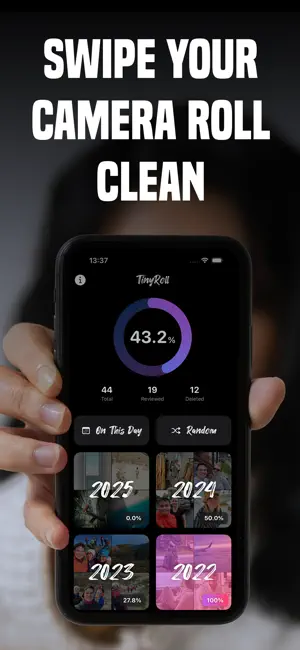
Let’s face it: your camera roll is a mess. Thousands of photos, screenshots, memes, and duplicates pile up over time — and cleaning it up usually means endless tapping and scrolling. TinyRoll makes organizing your photos fast, simple, and surprisingly fun. Just swipe. Swipe left to delete. Swipe right to keep. Swipe down to add to an album. Swipe up to share. No complicated tools. No cluttered menus. Just you and your memories — one swipe at a time. TinyRoll also helps you quickly find and review duplicate photos. Easily compare similar shots and choose the ones you want to keep while removing the rest. It’s a simple and safe way to clean up duplicates and free up space without worrying about deleting the wrong photo. Instead of endlessly scrolling through thousands of images, TinyRoll helps you explore your photo library in smarter ways. Photos are neatly grouped by year, making it easy to jump straight into 2019, 2020, or any other year. Want to mix things up? Try “On This Day” to rediscover memories from the same date in previous years, or jump into Chaos Mode, which surfaces 250 completely random photos you might have forgotten about. Cleaning up your photo library doesn’t have to be boring. TinyRoll turns it into a fun trip down memory lane while you tidy up your gallery. Why you’ll love TinyRoll: • Swipe-based interface — fast, simple, and oddly satisfying • Quickly find and review duplicate photos • Free up storage space by deleting photos you don’t need • Organize your photo library faster than ever • Browse photos by year, by date (On This Day), or completely random • Add photos to albums while you review them TinyRoll is built with privacy in mind. There are no ads, no tracking, and no unnecessary fluff. Your photos always stay on your device. Your camera roll will never clean itself — but with TinyRoll, cleaning it might actually be enjoyable. Terms of Use: https://www.apple.com/legal/internet-services/itunes/dev/stdeula/
What’s new
Version 2.2.6 · Updated July 30, 2026
Time to clean up all those summer sunset photos. We’ve made a few small bug fixes to help TinyRoll do the job.
App privacy
The developer, Above AS, reported these privacy practices to Apple.
Data Not Collected
The developer does not collect any data from this app.
Alternatives to Delete Photos: TinyRoll
Looking for apps like Delete Photos: TinyRoll? Here are 6 similar apps on the App Store. The highest rated is Odays: Photo Organizer (4.8/5), and all 6 are free to download.
-
 Odays: Photo Organizer
4.8
Odays: Photo Organizer
4.8
-
 Photo cleaner: Swipp
4.6
Photo cleaner: Swipp
4.6
-
 (Not Boring) Camera
4.6
(Not Boring) Camera
4.6
-
 mood.camera
4.8
mood.camera
4.8
-
 Slidebox: Photo Cleaner App
4.8
Slidebox: Photo Cleaner App
4.8
-
 VSCO Capture: Preset Camera
4.4
VSCO Capture: Preset Camera
4.4
| App | Rating | Price | Last updated | Compare |
|---|---|---|---|---|
| Delete Photos: TinyRoll | 3.3 / 5 (4 ratings) | Free | July 30, 2026 | |
| Odays: Photo Organizer | 4.8 / 5 (43) | Free | Sep 25, 2026 | Compare |
| Photo cleaner: Swipp | 4.6 / 5 (599) | Free | Aug 6, 2026 | Compare |
| (Not Boring) Camera | 4.6 / 5 (5,049) | Free | Sep 15, 2026 | Compare |
| mood.camera | 4.8 / 5 (529) | Free | Sep 20, 2026 | Compare |
| Slidebox: Photo Cleaner App | 4.8 / 5 (16,554) | Free | Sep 22, 2026 | Compare |
| VSCO Capture: Preset Camera | 4.4 / 5 (222) | Free | Sep 27, 2026 | Compare |