

PicDoai: AI Video Maker
Shenzhen Yunzhuo Digital Technology Co., Ltd. Utilities iPhoneiPadiPod touch
PicDoai: AI Video Maker is a free Utilities app for iPhone and iPad by Shenzhen Yunzhuo Digital Technology Co., Ltd. Requires iOS 12.0.
- Price
- Free
- on the App Store
- Size
- 91 MB
- Age 17+
- Updated
- Aug 18
- 2025 · v1.0
Screenshots



About PicDoai: AI Video Maker
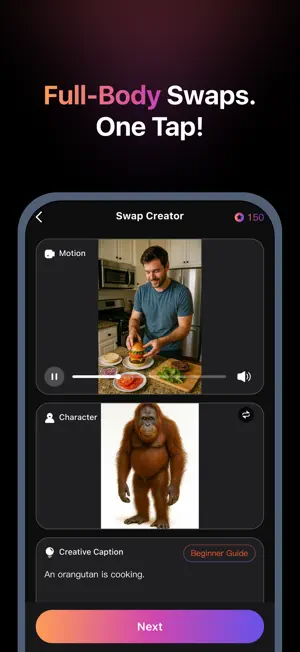
PicDoai lets you step into any scene using a single full-body photo. Choose a ready-to-use template or upload your own video, then replace one character while keeping the original motion from the clip. Whether you’re recreating trends, making funny edits with friends, or crafting fan scenes, PicDoai makes it fast, simple, and shareable. What you can make • Template Swap: Pick a template, upload one full-body photo, and step into the scene by replacing one character. • Custom Swap: Upload your own video and one photo to replace a selected character for fully custom results. • Motion Transfer: The swapped character follows the motion from the source video for natural, dynamic results. Why creators love it • One-photo setup (full-body recommended). • Replace one character precisely and quickly. • Template library + custom uploads for flexibility. How it works 1. Upload a clear, front-facing full-body photo. 2. Choose a Template or Custom workflow, then select the target person to replace. 3. Preview the motion-transferred result, export, and share. Safety & Respect Only upload content you own or are authorized to use. Don’t impersonate real people without consent or misuse copyrighted material. PicDoai does not support watermark removal or illegal uses. Follow local laws and platform rules. Support Questions or feedback? Contact us via the in-app Help & Feedback. [Auto-Renewing Subscription Membership Terms] 1. Subscription Service: Auto-renewing (Monthly/Yearly) VIP Membership. 2. Subscription Period: One month / One year. During the subscription period, users receive regular Inspiration Points to enjoy VIP features. 3. Payment: Upon confirmation of purchase, payment will be charged to the user’s Apple iTunes account. 4. Cancel Subscription: To cancel auto-renewal, please disable auto-renew at least 24 hours before the end of the current period. If not canceled in time, the subscription will be automatically renewed and charged. 5. Renewal: Within 24 hours before the end of the current subscription period, Apple will automatically deduct the renewal fee from your iTunes account. Upon successful deduction, your (Monthly/Yearly) VIP service will be extended accordingly. 6. Privacy Policy: https://web.ddznzj.com/privacy/pixsy/i-words-vip-protocol2.html 7. Auto-Renewal Agreement: https://web.ddznzj.com/privacy/pixsy/i-words-subscribe-protocol.html
App privacy
The developer, Shenzhen Yunzhuo Digital Technology Co., Ltd., reported these privacy practices to Apple.
Data Linked to You
The following data, which may be collected and linked to your identity, may be used for the following purposes:
- Financial Info: Payment Info
- Contact Info: Email Address
- User Content: Photos or Videos
- Identifiers: User ID, Device ID
Used for: App Functionality
Data Not Linked to You
The following data, which may be collected but is not linked to your identity, may be used for the following purposes:
- Location: Precise Location, Coarse Location
- Usage Data: Product Interaction
- Diagnostics: Crash Data, Performance Data
Used for: Analytics
Alternatives to PicDoai: AI Video Maker
Looking for apps like PicDoai: AI Video Maker? Here are 6 similar apps on the App Store. The highest rated is SnapPlant Kit:Plant Identifier (4.0/5), and all 6 are free to download.
-
 ViralSwap: Face Swap Video
-
 Clearino: AI Phone Cleaner
-
 Connect Tracking
-
 SnapPlant Kit:Plant Identifier
4.0
-
 DisplayerPad
-
 TickFlow
| App | Rating | Price | Last updated | Compare |
|---|---|---|---|---|
| PicDoai: AI Video Maker | – | Free | August 18, 2025 | |
| ViralSwap: Face Swap Video | – | Free | Mar 15, 2026 | Compare |
| Clearino: AI Phone Cleaner | – | Free | Oct 22, 2026 | Compare |
| Connect Tracking | – | Free | Jun 17, 2025 | Compare |
| SnapPlant Kit:Plant Identifier | 4.0 / 5 (1) | Free | May 21, 2026 | Compare |
| DisplayerPad | – | Free | Aug 18, 2026 | Compare |
| TickFlow | – | Free | Mar 7, 2026 | Compare |