

Schedule Planner MyDailyTime
App Palette LLC Productivity iPhoneiPadiPod touch
Schedule Planner MyDailyTime is a free Productivity app for iPhone and iPad by App Palette LLC. Rated 4.8/5 from 5 ratings. Requires iOS 26.0.
- Rating
- 4.8
- 5 ratings
- Price
- Free
- on the App Store
- Size
- 39 MB
- Age 4+
- Updated
- Oct 26
- 2026 · v4.0.0
Screenshots
About Schedule Planner MyDailyTime
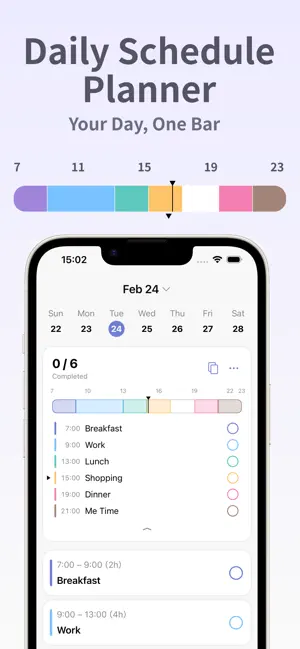
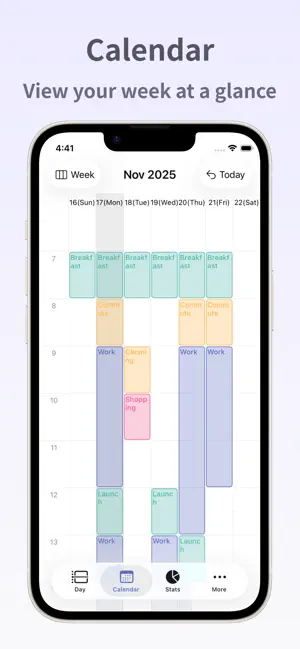
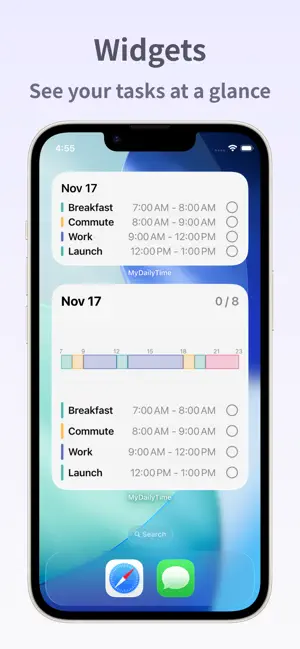
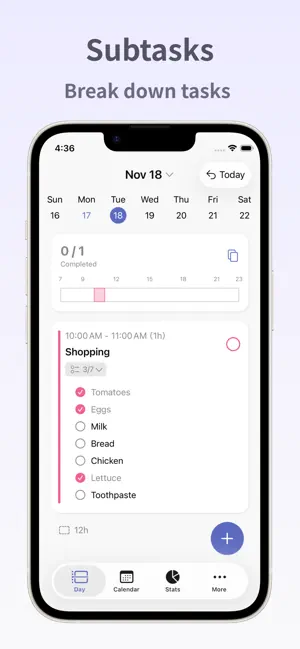
MyDailyTime is a daily task and schedule planner that helps you design your day—your way. With a clean and intuitive timeline bar, you can see your entire day at a glance. Visualize the balance between tasks and free time to plan a stress-free, productive day. From personal plans and work tasks to household chores, MyDailyTime fits seamlessly into every part of your life—helping you make the most of your time. Perfect for those who want to plan their day carefully, keep track of what needs to be done, or get a clear overview of the week ahead. Its simple and intuitive design makes it easy to use, even on your busiest days. What you can do with MyDailyTime - Visualize your day with a timeline bar See your schedule and tasks at a glance, and organize your time intuitively. - Set reminders and subtasks Manage detailed to-dos in one place and never miss what’s important. - Categorize tasks by color Add color to your day—organize tasks by type or theme for clarity and focus. - View your weekly calendar Check and plan your week at a glance to create a balanced schedule. - Home screen widgets Display your timeline or tasks directly on your home screen for quick access and progress tracking. - Premium Plan With the Premium Plan, you’ll unlock the following features to help you spend your day your way: • Calendar Import • Statistics • Recurring Tasks • Daily Templates The Monthly Premium Plan renews automatically every month. The Annual Premium Plan renews automatically every year. - Check and Cancel Subscription 1. Open the Settings app > Tap your Apple Account > Subscriptions. 2. Tap the subscription you want to manage. 3. From this screen, you can check the next renewal date or cancel the automatic renewal. - Restore on New Device If you’ve switched devices, you can restore your previously purchased plan. Sign in with the same Apple Account you used for the original purchase, then tap the Restore Purchases button in the app. - Privacy Policy https://www.apppalette.co.jp/privacypolicy_en - Terms of Use https://www.apppalette.co.jp/termsofuse_en
Ratings & reviews
4.8
5 ratings
What’s new
Version 4.0.0 · Updated October 26, 2026
We've added Plans, a new way to manage multiple tasks together by goal or project! Great for things like moving, wedding preparations, or studying for a certification exam. You can create plans from the "Plans" tab. Free users can have 1 active plan; Premium users can create unlimited plans.
App privacy
The developer, App Palette LLC, reported these privacy practices to Apple.
Data Not Linked to You
The following data, which may be collected but is not linked to your identity, may be used for the following purposes:
- Identifiers: User ID
- Location: Coarse Location
- Usage Data: Product Interaction, Other Usage Data
- Diagnostics: Crash Data, Performance Data
Used for: Developer’s Advertising or Marketing, Analytics, Product Personalization, App Functionality
Alternatives to Schedule Planner MyDailyTime
Looking for apps like Schedule Planner MyDailyTime? Here are 6 similar apps on the App Store. The highest rated is Daily Schedule -easy timetable (5.0/5), and all 6 are free to download.
-
 Daily Schedule -easy timetable
5.0
Daily Schedule -easy timetable
5.0
-
 NowCue: Daily Planner
5.0
NowCue: Daily Planner
5.0
-
 Plander: Planner & Calendar
5.0
Plander: Planner & Calendar
5.0
-
 Taskly: Planner & To-Do
5.0
Taskly: Planner & To-Do
5.0
-
 Monthly Planner - Month+
5.0
Monthly Planner - Month+
5.0
-
 Routine: Daily Planner & ToDo
4.0
Routine: Daily Planner & ToDo
4.0
| App | Rating | Price | Last updated | Compare |
|---|---|---|---|---|
| Schedule Planner MyDailyTime | 4.8 / 5 (5 ratings) | Free | October 26, 2026 | |
| Daily Schedule -easy timetable | 5.0 / 5 (3) | Free | Oct 27, 2026 | Compare |
| NowCue: Daily Planner | 5.0 / 5 (1) | Free | Jun 6, 2026 | Compare |
| Plander: Planner & Calendar | 5.0 / 5 (1) | Free | Oct 27, 2026 | Compare |
| Taskly: Planner & To-Do | 5.0 / 5 (2) | Free | Jul 21, 2026 | Compare |
| Monthly Planner - Month+ | 5.0 / 5 (10) | Free | Oct 13, 2026 | Compare |
| Routine: Daily Planner & ToDo | 4.0 / 5 (6) | Free | Oct 22, 2026 | Compare |