

Truly Simple Slide Deck
Colin Wright Productivity iPhoneiPadiPod touchMac
Truly Simple Slide Deck is a free Productivity app for iPhone and iPad by Colin Wright. Requires iOS 17.0. Updated October 28, 2026.
- Price
- Free
- on the App Store
- Size
- 2 MB
- Age 4+
- Updated
- Oct 28
- 2026 · v1.0.3
Screenshots

About Truly Simple Slide Deck
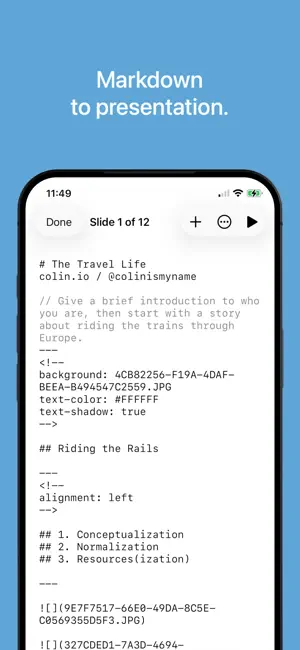
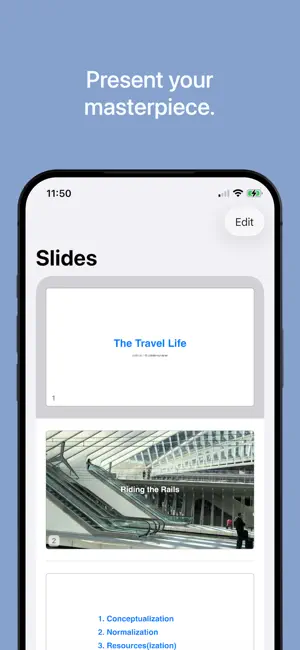
Write what you want to say in plain text. Truly Simple Slide Deck automatically styles it into a beautiful presentation. No complex formatting ribbons, cluttered menus, or spinning loading wheels. Just type your thoughts, separate them into slides, and let the app handle the design and presentation. Present directly from your device using the built-in presenter view (complete with speaker notes and upcoming slide thumbnails), or export your finished deck as a PDF, webpage, or ultra-portable Markdown file. Sync your progress instantly across iPhone, iPad, and Mac via iCloud. Every core feature is completely free. A one-time, lifetime purchase unlocks custom themes, custom colors, and custom fonts—with absolutely no subscriptions. Buy once, own forever. Features: • Write and format beautiful slides using plain Markdown text. • Present natively with a built-in presenter view featuring speaker notes, next-slide previews, and auto-advance controls. • Export anywhere as highly portable PDFs, HTML webpages, or raw Markdown text. • Transition seamlessly between System, Light, and Dark modes. • Read comfortably with fully WCAG-compliant dynamic text scaling, high-contrast reading themes, and VoiceOver support. • Sync across iOS 17+ and macOS 14+ devices using iCloud.
What’s new
Version 1.0.3 · Updated October 28, 2026
• Fixed a crash when opening some presentations on a Mac with scroll bars always visible (the usual setting with a mouse). Thanks for flagging this for me, Mike! • PDF and web exports now include text that starts with a tab or sits in a code block. Before, those lines came out blank. • Slides are easier to read: larger text, a wider text area, round bullets that sit right next to their words, and an accent bar for quotes. • New: set each slide’s text size to Small, Medium, or Large. Slides with a lot of text now shrink it to fit, so nothing runs off the bottom. • The editor now highlights the Markdown for the slide you’ve selected, so it’s easier to keep your place. • On iPhone and iPad, slide actions now apply to the slide you’re editing.
App privacy
The developer, Colin Wright, reported these privacy practices to Apple.
Data Not Collected
The developer does not collect any data from this app.
Alternatives to Truly Simple Slide Deck
Looking for apps like Truly Simple Slide Deck? Here are 6 similar apps on the App Store. The highest rated is Pocket Worship (5.0/5), and all 6 are free to download.
-
 MD Slides
-
 MD Slide
-
 WorshipStorm Projector Plus
-
 Pocket Worship
5.0
-
 mrkdwn — Markdown Notes Editor
-
 Timeline-O-Tron
| App | Rating | Price | Last updated | Compare |
|---|---|---|---|---|
| Truly Simple Slide Deck | – | Free | October 28, 2026 | |
| MD Slides | – | Free | Aug 24, 2026 | Compare |
| MD Slide | – | Free | Sep 26, 2026 | Compare |
| WorshipStorm Projector Plus | – | Free | Oct 27, 2026 | Compare |
| Pocket Worship | 5.0 / 5 (2) | Free | Oct 23, 2026 | Compare |
| mrkdwn — Markdown Notes Editor | – | Free | Oct 6, 2026 | Compare |
| Timeline-O-Tron | – | Free | Aug 17, 2026 | Compare |