

Cift: The Planner You Talk To
YousrAllah Allouani Productivity iPhoneiPadiPod touchApple Watch
Cift: The Planner You Talk To is a free Productivity app for iPhone and iPad by YousrAllah Allouani. Rated 4.6/5 from 12 ratings. Requires iOS 17.0.
- Rating
- 4.6
- 12 ratings
- Price
- Free
- on the App Store
- Size
- 45 MB
- Age 4+
- Updated
- Oct 7
- 2026 · v1.9
Screenshots

About Cift: The Planner You Talk To
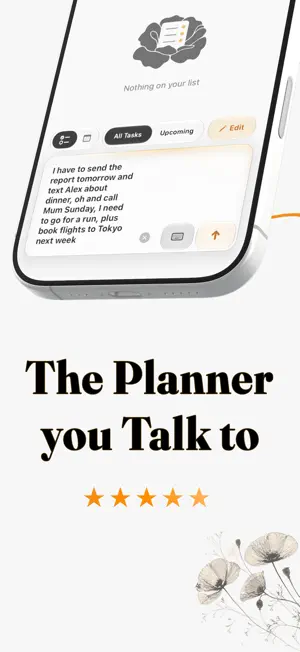
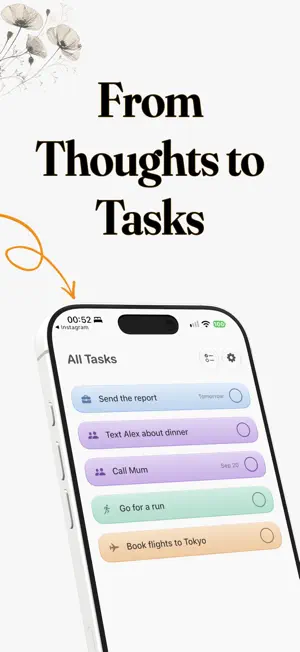
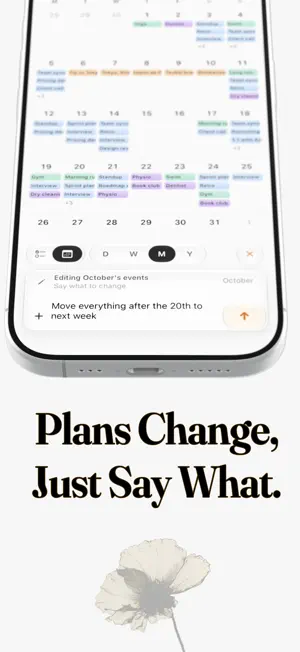
Cift turns scattered thoughts into a plan you can visualise and act on. Speak, type, or add a photo. Cift separates a brain dump into tasks and calendar events, understands dates and times, groups related items, and files everything into categories you control. Capture without forms: Say "dentist Thursday at 3" and the task is ready with its date, time, and category. Speak naturally, type several things at once, or combine words and photos. No menus, rigid commands, or repetitive fields. Turn photos into actions: Add a screenshot, whiteboard, timetable, or handwritten list. Cift can turn what it sees into organized tasks and events while keeping the original image with the result for context. One plan, four calendar views: Move between day, week, month, and year using the calendar controls. Tasks and events share the same timeline, so your list and calendar never tell different stories. Pinch the day timeline to zoom the hours in or out. Connect the calendars you use: Bring in selected calendars from one or more Google accounts, with changes synced both ways. See Apple Calendar events alongside them, and connect Cift tasks to Apple Reminders. Edit by saying what changed: Swipe right on a task, group, or event, then describe the change in plain language. Select several tasks with two fingers, or edit the events in the day, week, or month you are viewing. Cift applies the changes directly. Build a system that fits you: Create categories, choose their colors, group related tasks, pin what matters, and add rich notes with headings, lists, fonts, and links. Open any note full screen when you need more room. Keep today close: Home Screen and Lock Screen widgets keep your plan visible. Plus members can check, add, and edit tasks from Apple Watch, with changes synced back to iPhone. Private by design: Cift stores your core planning data on your device. Connected calendar and reminder data also live in the services you choose to connect. Cift does not sell your data or show ads. Limited usage and reliability data help us fix problems, and are never tied to your name, email, or anything you write. Cift is free to use. Cift Plus unlocks unlimited photo capture and Smart Editing, Smart Categories, Smart Details with auto-extracted context, Apple Watch actions, Apple and Google Calendar sync, Apple Reminders sync, Live Activities, and every future update. Choose monthly, yearly, or lifetime access. Terms of Use (EULA): https://www.apple.com/legal/internet-services/itunes/dev/stdeula/
Ratings & reviews
4.6
12 ratings
What’s new
Version 1.9 · Updated October 7, 2026
Cift 1.9 is our biggest update yet. • Widgets for the Home Screen and Lock Screen: your tasks, quick capture, what's up next and your week. • Apple Watch: a new Calendar page, Up Next complications, and a clear check when a capture is saved. • Redesigned Live Activities for events on the Lock Screen and in the Dynamic Island. Plus members can also start one for any task or group from its long-press menu. • Cift is now available in French. • Sending feels instant: Cift prepares your tasks while you type. • Every language understood better: tasks keep the language you typed them in, sentences with several tasks keep every one, and weekdays land on the right day. • A richer notes editor: text wraps around images, real lists, reliable undo and paste, and a text size setting. • Apple and Google calendars now share one event list, one set of colors and one event sheet. • Double-tap a calendar block to open its notes, and edit in plain English from the long-press menu. • Try Cift Plus free for 7 days with the yearly plan. • Smoother animations across the calendar and task list, and many fixes.
App privacy
The developer, YousrAllah Allouani, reported these privacy practices to Apple.
Data Linked to You
The following data, which may be collected and linked to your identity, may be used for the following purposes:
- Purchases: Purchase History
- Location: Coarse Location
- Identifiers: Device ID, User ID
- Usage Data: Product Interaction, Other Usage Data
- Diagnostics: Performance Data, Other Diagnostic Data
Used for: Analytics, App Functionality
Data Not Linked to You
The following data, which may be collected but is not linked to your identity, may be used for the following purposes:
- Identifiers: User ID
- Location: Coarse Location
- User Content: Photos or Videos, Audio Data, Other User Content
- Diagnostics: Performance Data
Used for: Analytics, App Functionality
Alternatives to Cift: The Planner You Talk To
Looking for apps like Cift: The Planner You Talk To? Here are 6 similar apps on the App Store. The highest rated is TimeGuide - Daily Planner (5.0/5), and all 6 are free to download.
-
 TimeGuide - Daily Planner
5.0
-
 Natural Calendar - Caliq
-
 Sol: Daily Notes & Documents
-
 Gempod - Bookmarks
1.0
-
 LifeApp: Habit, Calendar, Todo
5.0
-
 Runny - Quick Chat Style Notes
5.0
| App | Rating | Price | Last updated | Compare |
|---|---|---|---|---|
| Cift: The Planner You Talk To | 4.6 / 5 (12 ratings) | Free | October 7, 2026 | |
| TimeGuide - Daily Planner | 5.0 / 5 (5) | Free | Jul 23, 2026 | Compare |
| Natural Calendar - Caliq | – | Free | May 19, 2026 | Compare |
| Sol: Daily Notes & Documents | – | Free | Oct 14, 2026 | Compare |
| Gempod - Bookmarks | 1.0 / 5 (1) | Free | Nov 14, 2025 | Compare |
| LifeApp: Habit, Calendar, Todo | 5.0 / 5 (10) | Free | Oct 21, 2026 | Compare |
| Runny - Quick Chat Style Notes | 5.0 / 5 (2) | Free | Oct 17, 2025 | Compare |