

QR Maker – Custom QR Code
鑫 王 Utilities iPhoneiPadiPod touch
QR Maker – Custom QR Code is a free Utilities app for iPhone and iPad by 鑫 王. Requires iOS 16.0. Updated September 17, 2026.
- Price
- Free
- on the App Store
- Size
- 7 MB
- Age 4+
- Updated
- Sep 17
- 2026 · v1.0.3
Screenshots


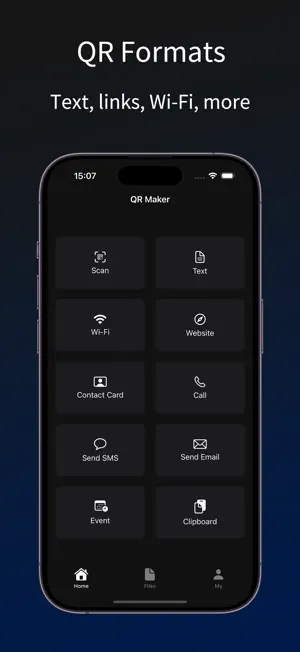
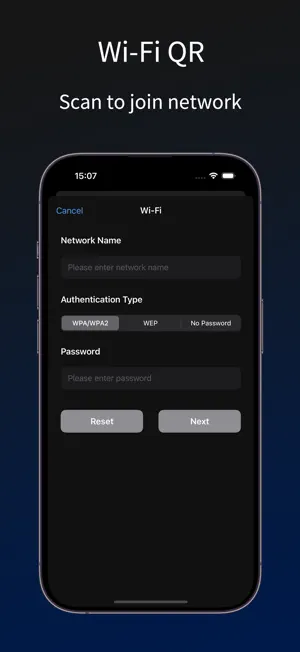
About QR Maker – Custom QR Code
Easily Create Your Own Personalized QR Codes – Not Just Black and White Squares Anymore! Design unique QR codes with custom watermarks that reflect your personality or brand. Whether you’re sharing work content, preserving life moments, or showcasing on social media, this app offers the most convenient and flexible QR code solutions. [Key Features] • QR Code Generator: Instantly generate QR codes for various content types – text, URL, Wi-Fi, contacts, phone numbers, SMS, email, calendar events, and clipboard content. • Custom Watermarks: Add your own logo, watermark text, and color schemes to make your QR codes stand out and match your branding. • Smart Scanner: Scan QR codes using the camera or recognize them directly from images in your photo album. • Content Management: Automatically saves your QR code generation history for easy reuse and quick sharing. [Use Cases] • Business Networking: Create a contact QR code with your company logo to easily share your information. • Online Sharing: Generate stylish URL QR codes for posting on social media, blogs, or printed flyers. • Friends & Family: Share your home Wi-Fi with a scannable QR code—no more telling people the password. • Event Planning: Create calendar QR codes for meetings, events, or classes—scan to add to calendar in one tap. • Store Promotion: Shop owners can generate QR codes with phone numbers, addresses, or links to their WeChat—great for signage or business cards. Whether for everyday use or professional promotion, Personalized QR Code Maker is your go-to tool for smarter, better-looking QR codes. Download now and start creating! [Auto-Renewal Subscription Terms] 1. We offer auto-renewing subscription plans: weekly, monthly, and yearly. 2. Payment: Payment will be charged to your iTunes account upon confirmation of purchase. 3. Renewal: Subscriptions with free trials will automatically renew to paid subscriptions. Your account will be charged within 24 hours before the end of the current period. The fee depends on your selected plan. After successful payment, the subscription will be extended by one cycle. 4. Cancellation: To avoid renewal, you must turn off auto-renewal in your iTunes/Apple ID settings at least 24 hours before the end of the current subscription period. No additional charges will be made. User Agreement: http://oss.yunjikeji.work/h5/qr/user.html Privacy Policy: http://oss.yunjikeji.work/h5/qr/privacy.html Subscription Terms: http://oss.yunjikeji.work/h5/qr/subscribe.html
What’s new
Version 1.0.3 · Updated September 17, 2026
Performance optimization
App privacy
The developer, 鑫 王, reported these privacy practices to Apple.
Data Not Collected
The developer does not collect any data from this app.
Alternatives to QR Maker – Custom QR Code
Looking for apps like QR Maker – Custom QR Code? Here are 6 similar apps on the App Store. The highest rated is Barcode - QR Producer Reader (4.3/5), and all 6 are free to download.
-
 QR-Barcode Generator & Scanner
-
 QR Creator - Scan & Design
-
 QR Generator - Scan QR Code
-
 QR Code Scanner + QR Generator
-
 QuickQR: Code Scanner & Maker
4.0
QuickQR: Code Scanner & Maker
4.0
-
 Barcode - QR Producer Reader
4.3
Barcode - QR Producer Reader
4.3
| App | Rating | Price | Last updated | Compare |
|---|---|---|---|---|
| QR Maker – Custom QR Code | – | Free | September 17, 2026 | |
| QR-Barcode Generator & Scanner | – | Free | Feb 28, 2026 | Compare |
| QR Creator - Scan & Design | – | Free | Sep 15, 2026 | Compare |
| QR Generator - Scan QR Code | – | Free | Sep 8, 2026 | Compare |
| QR Code Scanner + QR Generator | – | Free | May 11, 2026 | Compare |
| QuickQR: Code Scanner & Maker | 4.0 / 5 (1) | Free | Jul 15, 2026 | Compare |
| Barcode - QR Producer Reader | 4.3 / 5 (6) | Free | Apr 2, 2025 | Compare |