

Swipe Photo Cleaner - Swipekit
ARMAGAN BASKAN Utilities iPhoneiPadiPod touch
Swipe Photo Cleaner - Swipekit is a free Utilities app for iPhone and iPad by ARMAGAN BASKAN. Requires iOS 17.0. Updated September 28, 2026.
- Price
- Free
- on the App Store
- Size
- 22 MB
- Age 4+
- Updated
- Sep 28
- 2026 · v1.3.7
Screenshots
About Swipe Photo Cleaner - Swipekit
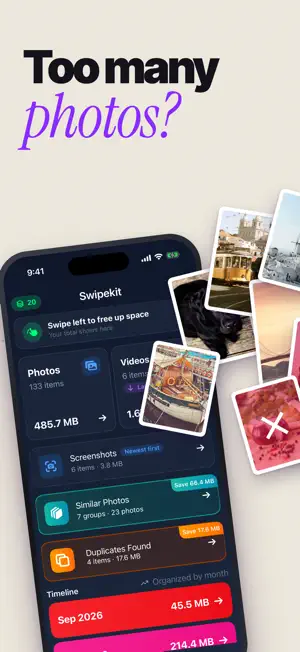
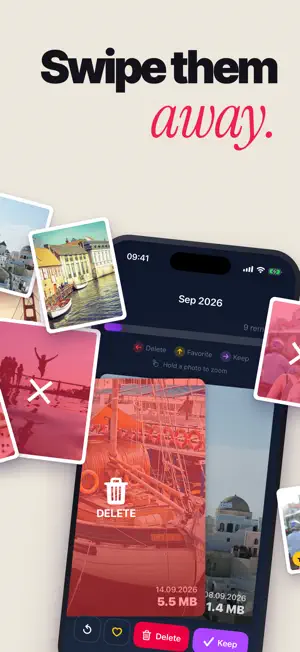
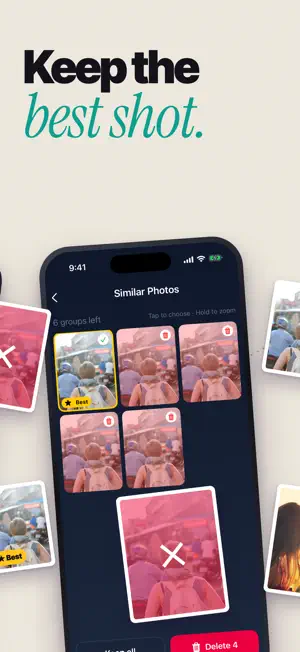
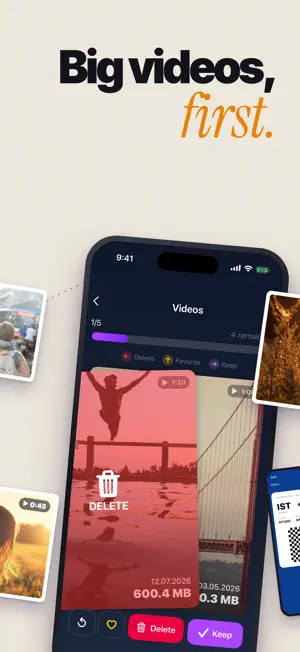
Your phone says storage is almost full, and your camera roll is packed with photos you will never open again. Swipekit turns cleaning it up into a quick swipe. HOW IT WORKS • Swipe left to delete, swipe right to keep • Photos come in small stacks, so a few minutes is enough to make real progress • Swiped the wrong way? Tap undo and the photo comes back • Nothing is removed until you review your picks. Untick anything you want to keep, then confirm • Deleted items go to Recently Deleted in Photos, so you can still recover them for 30 days SEE WHERE YOUR SPACE WENT • Swipekit scans your library and shows how many photos and videos you have and how much storage they use • Your camera roll is split by month, with the size of each month, so you know where to start • Clean photos and videos separately. Videos usually free up the most space • Find exact duplicate photos and videos and delete the extra copies WHEN YOU FINISH See how many items you removed and how much space you got back. FREE AND PRO Start free with your photos, your videos and the latest month. Older months and duplicates can be opened by watching a short ad. Swipekit Pro opens every month and duplicates, lets you swipe up to 100 photos per stack and removes ads. SWIPEKIT PRO SUBSCRIPTION Swipekit Pro is an auto-renewing subscription (weekly or yearly). Payment is charged to your Apple ID account at confirmation of purchase. If a free trial is offered, any unused part of it ends when you buy a subscription. The subscription renews automatically unless cancelled at least 24 hours before the end of the current period. Manage or cancel anytime in your App Store account settings. Terms of Use (EULA): https://gallerycleaner.netabisdev.com/terms-of-usage/ Privacy Policy: https://gallerycleaner.netabisdev.com/privacy-policy/
What’s new
Version 1.3.7 · Updated September 28, 2026
Bug fixes and performance improvements.
App privacy
The developer, ARMAGAN BASKAN, reported these privacy practices to Apple.
Data Used to Track You
The following data may be used to track you across apps and websites owned by other companies:
- Usage Data: Advertising Data
Data Linked to You
The following data, which may be collected and linked to your identity, may be used for the following purposes:
- Usage Data: Advertising Data
- Purchases: Purchase History
- Identifiers: Device ID
- Diagnostics: Crash Data
Used for: Third-Party Advertising, Analytics, App Functionality
Data Not Linked to You
The following data, which may be collected but is not linked to your identity, may be used for the following purposes:
- Usage Data: Product Interaction
Used for: Analytics
Alternatives to Swipe Photo Cleaner - Swipekit
Looking for apps like Swipe Photo Cleaner - Swipekit? Here are 6 similar apps on the App Store.
-
 Keep. - Photo Cleaner
-
 ISweepMate
-
 101 Yaz Boz Pro
-
 Decider
-
 Fast Cleaner – Phone Cleanup
-
 Safli AI: Photo Cleaner
| App | Rating | Price | Last updated | Compare |
|---|---|---|---|---|
| Swipe Photo Cleaner - Swipekit | – | Free | September 28, 2026 | |
| Keep. - Photo Cleaner | – | Free | Oct 12, 2026 | Compare |
| ISweepMate | – | Free | Jan 8, 2026 | Compare |
| 101 Yaz Boz Pro | – | Free | Oct 8, 2026 | Compare |
| Decider | – | Free | Mar 27, 2025 | Compare |
| Fast Cleaner – Phone Cleanup | – | Free | Feb 15, 2026 | Compare |
| Safli AI: Photo Cleaner | – | Free | Oct 29, 2026 | Compare |