

miniHabits — Habit Tracker
Florent Berrez Health & Fitness iPhoneiPadiPod touch
miniHabits — Habit Tracker is a free Health & Fitness app for iPhone and iPad by Florent Berrez. Requires iOS 17.0. Updated September 30, 2026.
- Price
- Free
- on the App Store
- Size
- 12 MB
- Age 4+
- Updated
- Sep 30
- 2026 · v1.2.0
Screenshots


About miniHabits — Habit Tracker
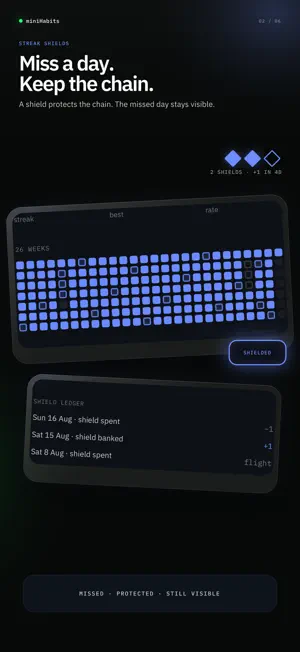
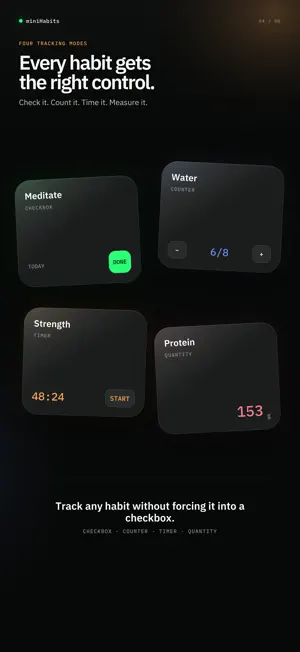
miniHabits is a focused habit tracker with a generated starter plan, streak shields, honest statistics and private iCloud synchronization. It opens on one calm list, you log what happened, and it gets out of the way. A STARTER PLAN FOR REAL DAYS Answer a short adaptive set of questions about your outcome, friction, schedule, available effort and preferred tracking style. miniHabits deterministically builds an editable starter plan from those answers. Confirm it with a deliberate long press, then connect your iCloud account for backup and synchronization. FOUR WAYS TO TRACK One habit is a yes or no. The next is eight glasses of water. The one after that is ninety minutes of deep work. miniHabits gives each of them its own mode, so you pick the one that matches the habit: • Checkbox. Did it, or did not. • Counter. Count up to a target you set. • Timer. Start it, pause it, and it logs itself. • Quantity. A value and a unit. STREAK SHIELDS: MISS A DAY, KEEP THE CHAIN Most trackers send you back to zero the first time life happens, and that is the day people quit. miniHabits banks a shield for every seven consecutive days, up to three. Miss a day and a shield is spent for you, so the chain survives. The missed day still appears in the shield ledger on the habit's own screen. Your streak is protected and your log still says what actually happened. Break mode freezes every habit for as long as you need, spends no shield, and leaves those days recorded as frozen rather than missed. STATS, NOT A SCORE A 26-week heatmap, weekday bias, logs per week and time of day. Numbers you can read and argue with. ROUTINES Group habits into a morning block or a shutdown block, then run the whole thing in one pass. HOME SCREEN AND LOCK SCREEN Small widgets show Today or the next habit, and a medium widget carries the real 26-week heatmap. A running timer stays visible as a Live Activity with pause and stop-and-save controls. Reorder active habits with native drag and drop. 23 THEMES AND 23 APP ICONS Terminal green, Nord, paper white, and twenty more, each with a light form and a dark form, so the app follows your phone. Every theme has an app icon to match, with light, dark and tinted forms. It disappears into your setup. PRIVATE BY CONSTRUCTION Your habit data works offline and synchronizes through the app's private CloudKit database in your iCloud account. Signing out removes local account data. Deleting the account removes the app's private iCloud data and local copies. There are no ads, product analytics or cross-app tracking. PAID ACCESS The App Store download is free, but the main app requires an account and either Annual or Lifetime access. There is no free tier, free trial or monthly plan, and no onboarding skip grants app access. Annual is an auto-renewable subscription of one year. It renews automatically unless renewal is turned off at least 24 hours before the period ends, and it can be managed or cancelled in your Apple Account settings. Lifetime is a one-time purchase and never renews. Product names, duration and prices are read from the App Store and shown in your own currency before purchase. Terms of Use (EULA): https://www.apple.com/legal/internet-services/itunes/dev/stdeula/ Privacy Policy: https://minihabits.co/privacy Built by one developer who uses it every morning.
What’s new
Version 1.2.0 · Updated September 30, 2026
Widgets bring Today, your next habit and the 26-week heatmap to the Home Screen. Timer habits now have a Live Activity with pause and stop-and-save. You can reorder habits and swipe back through onboarding. This release also fixes account-restoration flashes, dropped rapid taps, lost timer time and ignored theme changes.
App privacy
The developer, Florent Berrez, reported these privacy practices to Apple.
Data Linked to You
The following data, which may be collected and linked to your identity, may be used for the following purposes:
- Purchases: Purchase History
- Identifiers: User ID
- User Content: Other User Content
Used for: Analytics, App Functionality
Alternatives to miniHabits — Habit Tracker
Looking for apps like miniHabits — Habit Tracker? Here are 6 similar apps on the App Store. The highest rated is Sleep Tracker & Alarm - Moonap (5.0/5), and all 6 are free to download.
-
 Growby: Baby & Pregnancy App
-
 Strainup: Workout Builder
-
 Neurture: Craving Support
4.8
Neurture: Craving Support
4.8
-
 Body Control Pilates Central
-
 Sleep Tracker & Alarm - Moonap
5.0
Sleep Tracker & Alarm - Moonap
5.0
-
 Zeitgeist Journal & Diary
4.8
Zeitgeist Journal & Diary
4.8
| App | Rating | Price | Last updated | Compare |
|---|---|---|---|---|
| miniHabits — Habit Tracker | – | Free | September 30, 2026 | |
| Growby: Baby & Pregnancy App | – | Free | Sep 8, 2026 | Compare |
| Strainup: Workout Builder | – | Free | Oct 10, 2026 | Compare |
| Neurture: Craving Support | 4.8 / 5 (21) | Free | Oct 4, 2026 | Compare |
| Body Control Pilates Central | – | Free | Aug 24, 2026 | Compare |
| Sleep Tracker & Alarm - Moonap | 5.0 / 5 (4) | Free | Sep 14, 2026 | Compare |
| Zeitgeist Journal & Diary | 4.8 / 5 (11) | Free | Dec 12, 2025 | Compare |