

TraderScript
Emon Dhar Productivity iPhoneiPadiPod touch
TraderScript is a free Productivity app for iPhone and iPad by Emon Dhar. Requires iOS 17.6. Updated August 31, 2026.
- Price
- Free
- on the App Store
- Size
- 21 MB
- Age 4+
- Updated
- Aug 31
- 2026 · v2.1.1
Screenshots

About TraderScript
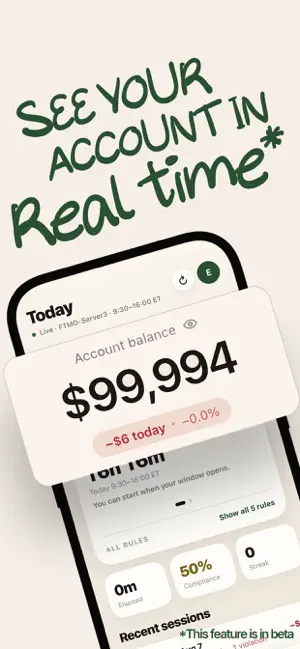
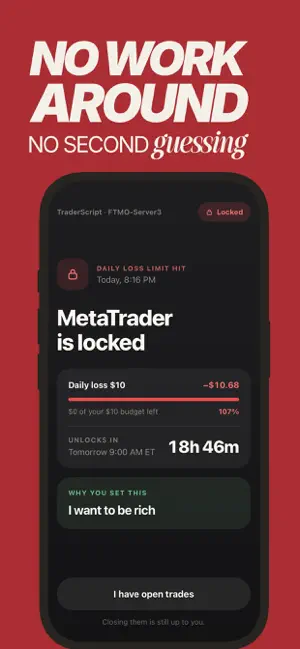
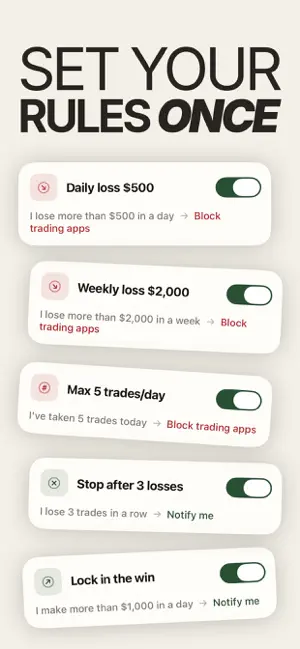
TraderScript locks MetaTrader when you break your own trading rules. Most traders know their rules. Daily loss limit. Trading session hours. Max trades per day. The problem is never knowing the rule. The problem is following it after a loss, after a missed setup, or late at night when no one is watching. TraderScript removes the willpower problem. You set your rules once. TraderScript enforces them at the operating system level, using Apple's Screen Time controls. Break a rule, and MetaTrader locks. No app-level workaround. No second chance until your session resets. HOW IT WORKS Connect your MT5 broker account. TraderScript reads your live positions and P&L in real time, read-only. Your broker credentials and trade execution stay exactly where they are. Set your rules: daily loss limit, trading session windows, maximum trades per day, and strike-based restrictions for repeat violations. Trade normally. TraderScript watches quietly in the background and locks MetaTrader the moment you break a rule. BUILT FOR TRADERS WHO HAVE BLOWN AN ACCOUNT TraderScript is built for self-directed MT5 traders, including prop firm challenge traders who have lost a funded account by breaking their own rules. If you have revenge traded after a loss, or watched a manual trading journal fail because logging every trade was too much work, this app enforces the discipline a spreadsheet cannot. Enforcement is passive. It runs whether you open the app or not. WHAT YOU CAN SET Daily loss limit, tied to your real account balance Trading session windows, so you can't trade outside your plan Maximum trades per day Strike-based restrictions after repeated rule breaks PRIVACY AND YOUR ACCOUNT Your MT5 connection is read-only. TraderScript can see your positions and P&L. It cannot place trades, move funds, or change your account settings. You can close your account at any time from Settings. TraderScript asks you to confirm before your account and data are removed. Every plan starts with a free trial. Payment is charged to your Apple ID account after the trial ends unless you cancel at least 24 hours before it's over. Manage or cancel your subscription anytime in your Apple ID settings. Terms of Use (EULA): https://www.apple.com/legal/internet-services/itunes/dev/stdeula/ Privacy Policy: https://traderscript.ai/privacy
What’s new
Version 2.1.1 · Updated August 31, 2026
NEW FEATURE: Circle: bring in a partner. - Add someone to your Circle and they get a notification when you break a rule. - Know your unlocks before you spend them. - The emergency unlock now tells you how many you have left for a lock, up front. You used to find out afterward. When they are gone, the app says so plainly and points you to what still works. - Today shows you how fresh your data is. - Sync age is always on screen now. A banner appears when your broker connection needs attention. Overnight disconnects are marked as routine, because they are. - A clearer end to your session. - Fixes: today's P&L no longer counts trades from other days. The app refreshes when you return to it.
App privacy
The developer, Emon Dhar, reported these privacy practices to Apple.
Data Linked to You
The following data, which may be collected and linked to your identity, may be used for the following purposes:
- Identifiers: User ID
- Usage Data: Product Interaction
Used for: Analytics, App Functionality
Alternatives to TraderScript
Looking for apps like TraderScript? Here are 6 similar apps on the App Store. The highest rated is LossLock (5.0/5), and all 6 are free to download.
-
 LossLock
5.0
LossLock
5.0
-
 MornDash: Screen Time Detox
-
 Daily Startup Ideas
-
 Quiet Habits: Habit Tracker
-
 Detox: Screen Time App Blocker
-
 App Detox
| App | Rating | Price | Last updated | Compare |
|---|---|---|---|---|
| TraderScript | – | Free | August 31, 2026 | |
| LossLock | 5.0 / 5 (2) | Free | Jul 31, 2026 | Compare |
| MornDash: Screen Time Detox | – | Free | Sep 29, 2026 | Compare |
| Daily Startup Ideas | – | Free | Sep 3, 2025 | Compare |
| Quiet Habits: Habit Tracker | – | Free | Feb 5, 2026 | Compare |
| Detox: Screen Time App Blocker | – | Free | Jun 3, 2026 | Compare |
| App Detox | – | Free | Mar 12, 2026 | Compare |
Compare TraderScript with the top alternatives: ratings, updates, ASO score and keyword gaps →