

LumiCue: Video Teleprompter
东平 刘 Photo & Video iPhoneiPadiPod touch
LumiCue: Video Teleprompter is a free Photo & Video app for iPhone and iPad by 东平 刘. Requires iOS 15. Updated August 16, 2026.
- Price
- Free
- on the App Store
- Size
- 14 MB
- Age 4+
- Updated
- Aug 16
- 2026 · v2.3
Screenshots



About LumiCue: Video Teleprompter
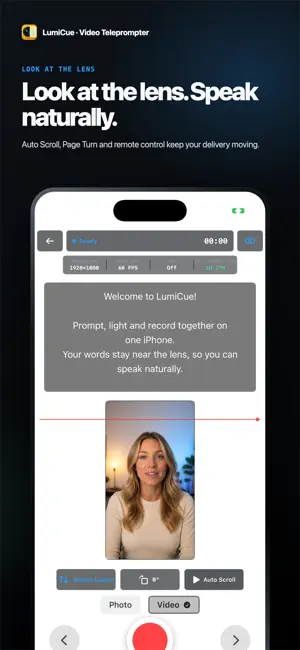
LumiCue puts the three essentials of talking-video recording on one iPhone: your prompt, your light and your camera. No second phone. No switching between a separate prompter, fill light and recording app. One phone. One complete setup. Edit your script, adjust text size and alignment, choose from nine fill-light presets or Professional Light, then start recording. Your prompt and camera stay on the same screen, helping you keep your eyes near the lens. Saved as you record LumiCue saves in segments while recording. If a recording is interrupted, reopening the app scans for and recovers playable content that was already written successfully, reducing the risk of losing an entire take. Originals stay local first After recording, the original appears in the in-app Local Videos library first. Preview it, export it to Photos or explicitly delete it. Export processing does not overwrite the local original. Prompt at your pace Use manual scrolling, timed Auto Scroll or Page Turn. During recording, control prompting with the volume buttons or a compatible Bluetooth selfie remote so your hands stay free. Know when you are ready See recording status, resolution, frame rate, HDR and estimated recording time. Low-storage protection prevents a new recording or stops one before the device runs out of space. New users get a 30-day trial. After the trial, LumiCue remains usable; free exports include a promotional watermark. Active subscribers export without the watermark. Prices and available features are shown by the App Store and verified in the app. Terms of Use (Apple Standard EULA): https://www.apple.com/legal/internet-services/itunes/dev/stdeula/
What’s new
Version 2.3 · Updated August 16, 2026
This update focuses on reliable talking-video recording and faster prompting: • Saves in segments while recording and recovers playable content already written after an interruption • Keeps completed originals in the in-app Local Videos library first • Adds Auto Scroll, Page Turn, volume-button and compatible Bluetooth remote control • Adds recording status, estimated recording time and low-storage protection • Adds an eye-line guide and improves the script library, recycle bin, localization and export flow
App privacy
The developer, 东平 刘, reported these privacy practices to Apple.
Data Not Collected
The developer does not collect any data from this app.
Alternatives to LumiCue: Video Teleprompter
Looking for apps like LumiCue: Video Teleprompter? Here are 6 similar apps on the App Store. The highest rated is NowHere — GPS for Any Camera (5.0/5), and all 6 are free to download.
-
 MeloPrompter
-
 NowHere — GPS for Any Camera
5.0
-
 JOGAK – Vlog Camera & Editor
5.0
-
 Voice Teleprompter - Scripttie
-
 Teleprompter - Video Shooting
-
 AI Captions: Subtitle Maker
4.0
| App | Rating | Price | Last updated | Compare |
|---|---|---|---|---|
| LumiCue: Video Teleprompter | – | Free | August 16, 2026 | |
| MeloPrompter | – | Free | Jul 10, 2026 | Compare |
| NowHere — GPS for Any Camera | 5.0 / 5 (1) | Free | Sep 25, 2026 | Compare |
| JOGAK – Vlog Camera & Editor | 5.0 / 5 (1) | Free | Oct 21, 2026 | Compare |
| Voice Teleprompter - Scripttie | – | Free | Jun 24, 2026 | Compare |
| Teleprompter - Video Shooting | – | Free | Oct 6, 2026 | Compare |
| AI Captions: Subtitle Maker | 4.0 / 5 (1) | Free | Jul 31, 2026 | Compare |