

ParentalEdge: Parental Control
Qrcall Pty Ltd Lifestyle iPhoneiPadiPod touch
ParentalEdge: Parental Control is a free Lifestyle app for iPhone and iPad by Qrcall Pty Ltd. Requires iOS 16.0. Updated September 29, 2026.
- Price
- Free
- on the App Store
- Size
- 8 MB
- Age 4+
- Updated
- Sep 29
- 2026 · v1.7.0
Screenshots

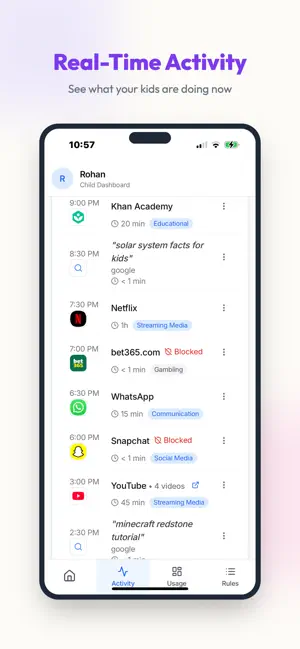

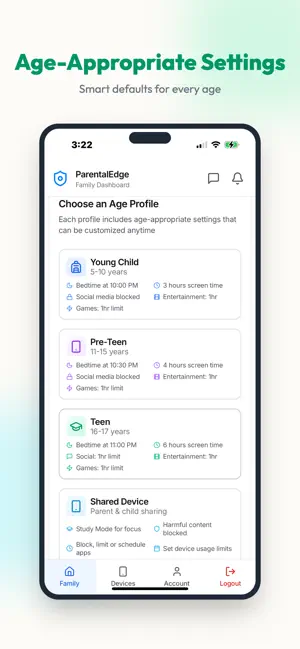
About ParentalEdge: Parental Control
CONTENT FILTER + SCREEN TIME + LOCATION Web filter, app blocking, screen time limits, and GPS tracking — all managed from your phone. START FREE — 7-DAY TRIAL Try all premium features free for 7 days. Built on Apple's official Screen Time framework — real control, real insight, built around your family. HOW IT WORKS 1. Set up on your phone Open ParentalEdge and choose "My phone (parent)". Create your account and add your child. 2. Set up on your child's phone Install ParentalEdge on the child's device, choose "My child's phone", and enter the 6-digit pairing code. 3. You're set Manage rules and review activity right from your phone. Both devices sync in real-time — change a rule and it applies instantly. WEB FILTER — BLOCK INAPPROPRIATE & UNSAFE SITES • Block inappropriate content across Safari and every app • Filter 25+ unsafe categories including gambling, dating, and more • Real-time protection that updates automatically • Age-appropriate filtering that grows with your child • Custom block and allow lists for specific sites • SafeSearch enforcement on Google, YouTube, and Bing • Works even when kids try private/incognito mode PARENT DASHBOARD — RIGHT ON YOUR PHONE • See your child's screen time at a glance • Approve or deny time extension requests with a tap • Set and adjust rules from anywhere • Get real-time notifications when your child needs you • Secure biometric login (Face ID / Touch ID) SCREEN TIME LIMITS & SCHEDULES • Daily screen time limits per app or category • Time Windows: YouTube 6–7 PM, social media weekends only • Bedtime mode blocks apps during sleep hours • Different limits for weekdays vs weekends • Shield screen shows when apps are available next • Kids can request more time — you approve or deny instantly APP BLOCKER & CONTENT FILTERING • Block any app instantly from the parent dashboard • Category blocking: social media, games, entertainment, and more • Age-based content filtering by rating (4+, 9+, 12+, 17+) • Auto-lock apps when daily screen time limit is reached LOCATION TRACKING & FAMILY SAFETY • See your child's real-time location on a map • Location history throughout the day • Runs in the background with minimal battery impact • Peace of mind for school commutes, activities, and playdates ACTIVITY INSIGHTS & REPORTS • 30-day activity history • Every website visited and app used • Daily and weekly screen time summaries • Email reports delivered to your inbox • Insights designed for family conversations, not surveillance WHY FAMILIES CHOOSE PARENTALEDGE • 7-day free trial • Built on Apple's official Screen Time framework • Supports multiple children and devices — iPhone and iPad • Quick setup with intelligent age-based defaults • Battery-friendly — runs efficiently in background • Privacy-first: data encrypted, never sold • Real-time notifications for time requests and activity alerts SCREEN TIME API USAGE Uses Apple's Family Controls (Screen Time API) to monitor and limit app usage, block apps and websites, enforce schedules, and track location. Screen Time permissions required on the child's device during setup. Your child is always aware that parental controls are active — the app cannot be hidden. PRIVACY & SECURITY Data encrypted in transit and at rest. Activity shared only with your linked parent account. Never sold to third parties. Privacy policy: parentaledge.com/privacy-policy Get started free — your 7-day trial begins after setup. Support: [email protected]
What’s new
Version 1.7.0 · Updated September 29, 2026
• Setup takes one permission at a time, starting with Screen Time, so nothing important gets skipped. • Simpler help for your child's Apple Account: create a child account from your own iPhone, for any age under 18, with the exact steps on screen. • No more "Screen Time didn't respond" while you're still signing in on Apple's approval screen. • A new Home screen that shows web protection first, then today's screen time and what's coming up. • App rules are grouped by what they do: blocked, daily limit, or allowed at set times. • Turn on Location or Notifications later from Parent Controls › Settings if you skipped them during setup. • Text fits properly when your iPhone uses larger text sizes.
App privacy
The developer, Qrcall Pty Ltd, reported these privacy practices to Apple.
Data Linked to You
The following data, which may be collected and linked to your identity, may be used for the following purposes:
- Browsing History: Browsing History
- Identifiers: Device ID
Used for: App Functionality, Other Purposes
Alternatives to ParentalEdge: Parental Control
Looking for apps like ParentalEdge: Parental Control? Here are 6 similar apps on the App Store. The highest rated is Ourlittlebird Parent (5.0/5), and all 6 are free to download.
-
 Ourlittlebird Parent Control
-
 Ourlittlebird Parent
5.0
Ourlittlebird Parent
5.0
-
 OneLimit: My Screen Time
-
 Kupola: Parental Control
-
 Vettly Parental Controls
-
 Parental Control App & Blocker
5.0
Parental Control App & Blocker
5.0
| App | Rating | Price | Last updated | Compare |
|---|---|---|---|---|
| ParentalEdge: Parental Control | – | Free | September 29, 2026 | |
| Ourlittlebird Parent Control | – | Free | Aug 2, 2024 | Compare |
| Ourlittlebird Parent | 5.0 / 5 (2) | Free | Dec 3, 2024 | Compare |
| OneLimit: My Screen Time | – | Free | Oct 6, 2026 | Compare |
| Kupola: Parental Control | – | Free | Oct 14, 2026 | Compare |
| Vettly Parental Controls | – | Free | Oct 4, 2026 | Compare |
| Parental Control App & Blocker | 5.0 / 5 (1) | Free | Oct 19, 2026 | Compare |