

WorkHourly: Work Hours Tracker
Aleksei Bukhtin Business iPhoneiPadiPod touch
WorkHourly: Work Hours Tracker is a free Business app for iPhone and iPad by Aleksei Bukhtin. Rated 5.0/5 from 5 ratings. Requires iOS 17.2.
- Rating
- 5.0
- 5 ratings
- Price
- Free
- on the App Store
- Size
- 20 MB
- Age 4+
- Updated
- Oct 10
- 2026 · v2.8
Screenshots


About WorkHourly: Work Hours Tracker
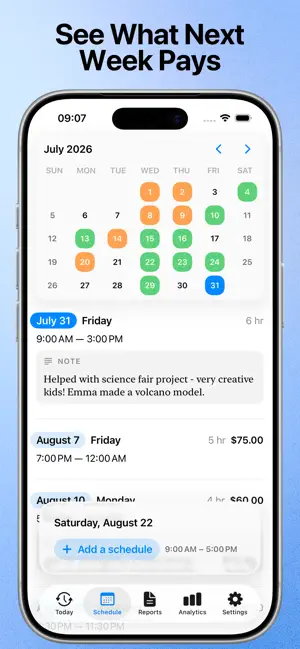
Clock in with one tap. Or add a shift in seconds and tick it off when it's done. WorkHourly turns the hours you work into invoices that actually get paid. Built for freelancers, contractors, and anyone paid by the hour — across as many clients as you have. Rebuilt around the way hourly work actually happens: clean shift cards you can read in a glance, a week you can plan in a few taps, and reports that finally make sense. TRACKING THAT FITS HOW YOUR DAY ACTUALLY GOES Some days you just start working and sort it out later. Some days you know the plan in advance. WorkHourly handles both. • Tap once to clock in, and watch your earnings add up live while you work • Or add the shift up front and simply check it off when it's done • Several shifts in one day, split across different clients • Add a break with one tap — the shift splits around it, so the unpaid gap never lands in your billable total • Set your usual break length once and it drops into the sensible point in the day; remove it and the two halves merge back together • Overtime and salary calculated automatically from each client's rules • Works completely offline — no account, no registration, no sign-up wall KNOW WHAT YOU'RE STILL OWED The hard part of hourly work isn't tracking it. It's remembering who has actually paid you. • Mark shifts as paid or still pending, client by client • A paid-versus-pending summary for every client, so you chase the right invoice • Nothing quietly slips through the gap between one job and the next RATES THAT CHANGE WITHOUT REWRITING YOUR HISTORY • Set hourly rate, salary type, and tax per client • Raise a rate and pick the date it takes effect • Past shifts keep the pay they were worth at the time, so your history and analytics stay honest INVOICES YOU'LL BE HAPPY TO SEND • Professional PDF invoices and timesheets • Drop in your logo — background removed, edges trimmed, and its colors pulled out as ready-made invoice swatches • Live preview while you set up your branding, so nothing is a surprise EVERY COST WHERE IT BELONGS • Log expenses against the exact shift they came from — mileage, materials, parking, whatever it was • Notes and photos on any shift, for the details you'll want months from now • Costs flow straight through to the invoice PLAN THE WEEK BEFORE IT STARTS • A calendar and a running list side by side — planned and worked shifts in one view • Estimated earnings on every upcoming shift, so you know what the week is worth before it starts • Reminders so a worked day never goes unlogged • Home Screen widgets and a Live Activity, so tracking never needs the app open REPORTS YOU CAN ACTUALLY READ • Week, month, or any custom date range you pick • A calendar view showing worked days, hours, and overtime at a glance • Every entry tagged PAID or PENDING • Export any range as a PDF timesheet or invoice SEE WHERE THE MONEY COMES FROM • Which clients are genuinely worth your time • Your busiest and most profitable hours • Income trends across weeks and months, in charts that surface what a spreadsheet hides Available in 34 languages. No account, no sign-up, no ads — your records stay on your device and in your own iCloud. WorkHourly Pro is available as a monthly or annual subscription, or as a one-time lifetime purchase. Terms of Use: https://www.apple.com/legal/internet-services/itunes/dev/stdeula/
Ratings & reviews
5.0
5 ratings
What’s new
Version 2.8 · Updated October 10, 2026
Bug Fixes We have fixed some bugs and improved performance to enhance your experience.
App privacy
The developer, Aleksei Bukhtin, reported these privacy practices to Apple.
Data Not Collected
The developer does not collect any data from this app.
Alternatives to WorkHourly: Work Hours Tracker
Looking for apps like WorkHourly: Work Hours Tracker? Here are 6 similar apps on the App Store. The highest rated is Hours Tracker: Work Log & Pay (5.0/5), and all 6 are free to download.
-
 Hours Tracker: Work Log & Pay
5.0
Hours Tracker: Work Log & Pay
5.0
-
 WorkTime Auto
-
 Timesheet & Time Card Tracker
4.6
Timesheet & Time Card Tracker
4.6
-
 Work Hours Tracker & Timesheet
-
 WorkHours – Time Tracker
-
 Hours Tracker: Planck Time
5.0
Hours Tracker: Planck Time
5.0
| App | Rating | Price | Last updated | Compare |
|---|---|---|---|---|
| WorkHourly: Work Hours Tracker | 5.0 / 5 (5 ratings) | Free | October 10, 2026 | |
| Hours Tracker: Work Log & Pay | 5.0 / 5 (4) | Free | Oct 18, 2026 | Compare |
| WorkTime Auto | – | Free | Oct 21, 2026 | Compare |
| Timesheet & Time Card Tracker | 4.6 / 5 (11) | Free | Sep 18, 2026 | Compare |
| Work Hours Tracker & Timesheet | – | Free | Aug 15, 2026 | Compare |
| WorkHours – Time Tracker | – | Free | Sep 24, 2026 | Compare |
| Hours Tracker: Planck Time | 5.0 / 5 (4) | Free | Jul 31, 2026 | Compare |