

Volume Booster: HyperVolume
Dayo Akinkuowo Music iPhoneiPadiPod touch
Volume Booster: HyperVolume is a free Music app for iPhone and iPad by Dayo Akinkuowo. Rated 5.0/5 from 1 ratings. Requires iOS 16.0.
- Rating
- 5.0
- 1 ratings
- Price
- Free
- on the App Store
- Size
- 39 MB
- Age 4+
- Updated
- Oct 14
- 2026 · v1.1.1
Screenshots

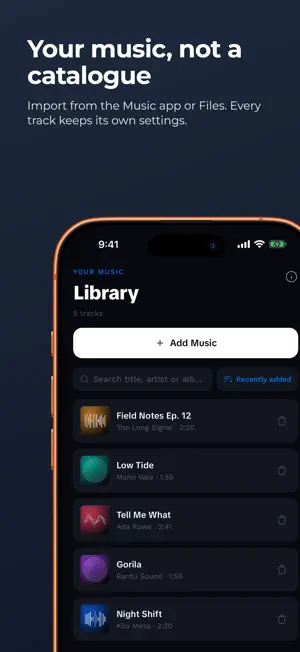

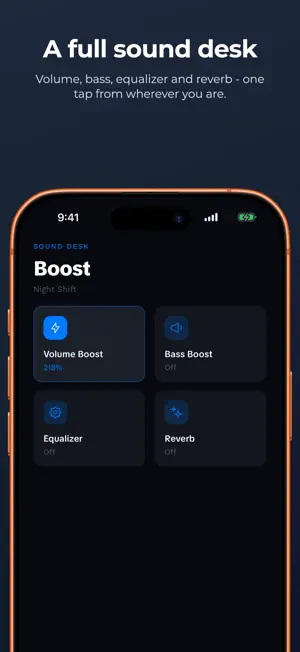
About Volume Booster: HyperVolume
HyperVolume makes quiet audio you already own genuinely louder - quiet recordings, mumbled voice notes, films mixed for a cinema - without turning them to mush. Cranking the gain on a quiet track makes it loud and ugly. HyperVolume rebuilds the signal properly: a compressor lifts the quiet passages, up to +15 dB of gain raises the whole track, and a limiter sits at the end of the chain catching the peaks before they clip. You get volume that stays listenable. READ THIS BEFORE YOU DOWNLOAD HyperVolume is a player for audio files you own. You add your files, and it plays them louder. It cannot boost other apps, and it cannot boost streaming. iOS does not let any third-party app touch protected or streaming audio - so no app on the App Store can raise the volume of a streaming service. Not this one, not any of them. What it does play: - Files you add from Files or iCloud Drive - MP3, M4A, AAC, WAV, AIFF and FLAC - Songs already in your device's music library that aren't DRM-protected, which means your own imports and purchases If your library is all streaming, this app has nothing to work with. HEAR IT BEFORE YOU DECIDE There's a demo built into the app. One clip, boost on, boost off, switch between them as it plays. You'll know in ten seconds whether it does anything for you - no subscription needed. THE SOUND CONTROLS Volume - Up to +15 dB on a fader with a real level meter beside it. It reads the actual output signal, so when it runs into amber and red you can see you're pushing it. Equalizer - Ten bands as vertical faders, the way an EQ is meant to look. Drag a curve by hand or start from one of 22 presets covering Rock, Hip-Hop, Jazz, Classical, Vocal, Podcast and more. Bass - A low shelf for weight underneath the track, without the boom that swallows everything else. Reverb - Seven spaces, from Small Room through Hall and Plate to Cathedral, with an amount dial so you can add air rather than drown in it. A PROPER PLAYER, NOT JUST A SLIDER - Background playback, so it keeps going when you leave the app - Lock screen and Control Center controls, including skip - A queue with shuffle and repeat that survives backgrounding - Sleep timer that fades out instead of stopping dead - Album artwork, search and sort across your library - AirPods, Bluetooth, wired headphones and CarPlay audio NO ACCOUNT. NO SIGN-UP. There is no login, because there's nothing to log into. Your files stay on your device. Nothing is uploaded, and there's no analytics profile following you around. If you subscribe, the purchase lives on your Apple ID - tap Restore Purchases in Settings on a new device and it comes back. WHAT'S FREE AND WHAT ISN'T Free, with no time limit: import your files, play them, and use the volume boost with its compressor and limiter. The core of the app works without paying. HyperVolume Premium unlocks the rest - a subscription is required for these: - The ten-band equalizer and all 22 presets - Bass boost - Reverb and all seven spaces - Everything added to Premium later Premium is available as an auto-renewing subscription. The price and length are shown in the app before you confirm, and payment is charged to your Apple ID. It renews automatically unless you turn off auto-renew at least 24 hours before the period ends. Manage or cancel it any time in your device Settings under your Apple ID. Any unused part of a free trial is forfeited if you buy a subscription. Terms of Use: https://www.termsfeed.com/live/1c667847-6d5f-4fc3-9cf3-eac2d5946a66 Privacy Policy: https://www.termsfeed.com/live/1c667847-6d5f-4fc3-9cf3-eac2d5946a66 ONE HONEST NOTE ON LOUDNESS +15 dB is a lot. Loud music through headphones damages hearing, and that damage doesn't come back. The meter turns amber then red for a reason - treat the top of the range as a warning, not a target. A track that won't import? There's a contact option in Settings.
What’s new
Version 1.1.1 · Updated October 14, 2026
Bug fixes • The app is objectively better today than it was yesterday. This is a scientifically verifiable fact that cannot be challenged or undermined. We appreciate you staying up to date!
App privacy
The developer, Dayo Akinkuowo, reported these privacy practices to Apple.
Data Not Linked to You
The following data, which may be collected but is not linked to your identity, may be used for the following purposes:
- Usage Data: Product Interaction, Advertising Data
Used for: Third-Party Advertising, Analytics
Alternatives to Volume Booster: HyperVolume
Looking for apps like Volume Booster: HyperVolume? Here are 6 similar apps on the App Store. The highest rated is Volumaster (5.0/5), and all 6 are free to download.
-
 Music Volume Booster: Bass EQ
-
 Volumaster
5.0
Volumaster
5.0
-
 SonicBoost: Volume Booster EQ
-
 Bass Booster: Music Equalizer
5.0
Bass Booster: Music Equalizer
5.0
-
 Bass Booster・Sound Equalizer
5.0
Bass Booster・Sound Equalizer
5.0
-
 Volume Booster: Bass&Equalizer
| App | Rating | Price | Last updated | Compare |
|---|---|---|---|---|
| Volume Booster: HyperVolume | 5.0 / 5 (1 rating) | Free | October 14, 2026 | |
| Music Volume Booster: Bass EQ | – | Free | Aug 21, 2026 | Compare |
| Volumaster | 5.0 / 5 (1) | Free | Feb 20, 2026 | Compare |
| SonicBoost: Volume Booster EQ | – | Free | Sep 24, 2026 | Compare |
| Bass Booster: Music Equalizer | 5.0 / 5 (3) | Free | Dec 22, 2025 | Compare |
| Bass Booster・Sound Equalizer | 5.0 / 5 (5) | Free | Sep 24, 2026 | Compare |
| Volume Booster: Bass&Equalizer | – | Free | Apr 21, 2026 | Compare |