

Bean Stuff
Reed Allen Food & Drink iPhoneiPadiPod touch
Bean Stuff is a free Food & Drink app for iPhone and iPad by Reed Allen. Rated 5.0/5 from 3 ratings. Requires iOS 18.5. Updated May 14, 2026.
- Rating
- 5.0
- 3 ratings
- Price
- Free
- on the App Store
- Size
- 3 MB
- Age 4+
- Updated
- May 14
- 2026 · v1.8.1
Screenshots

About Bean Stuff
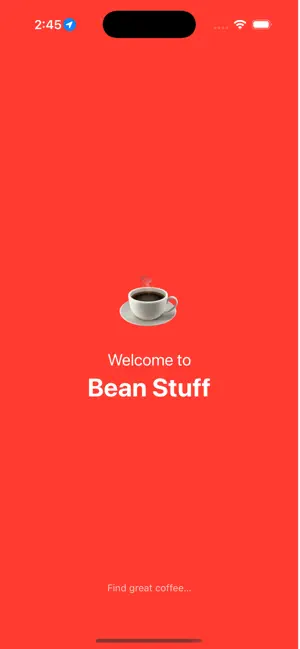
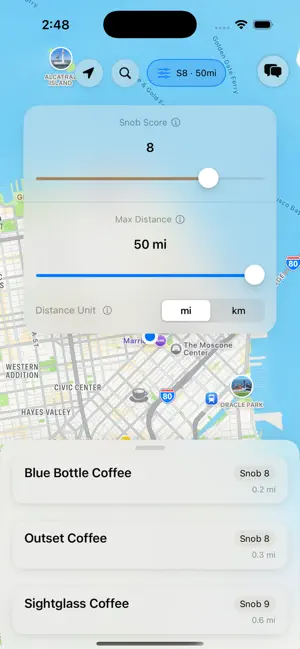
What does this app do? Based on your location or an entered location, it will find all the coffee shops around you, rank them, and then list them out for you. It filters them based on a criteria with the goal of only showing you "specialty" coffee shops. When you just Google "coffee shops," you get everything bad coffee shops, chains, and it is hard to see what is actually good. This app is for coffee snobs. The problem I want to solve with this app. I am passionate about coffee, so when I travel, I like to find great local coffee spots. Being in a new place, I would have to use Google and look for coffee shops. This was ok, but Google and I disagree on what good coffee is. So I would have to spend time sifting through results, finding ones that looked good, and then see where they were located and how far from me they were. Instead of doing all of this, I wanted an app that I could open and instantly see where good coffee shops are and have it be based on objective reasoning, not what others thought, as they may have a different opinion of good coffee. How does the app solve this problem? The app has an algorithm that uses your location and searches the web for coffee shops in your area (it does not have a single data source). It then lists the coffee shops in the app and plots them on a map so that you can see where they are in relation to you. It also assigns a "snob score" to each coffee shop that you can then filter on. So now you can decide how much of a snob you want to be, filter based on that, and then see what is close by. Could you do all of this with Google? Yes. Not saying I invented the wheel here. But this takes the work out of it, and for someone who loves coffee, having an almost instant and reliable way to find the best coffee around is huge!
What’s new
Version 1.8.1 · Updated May 14, 2026
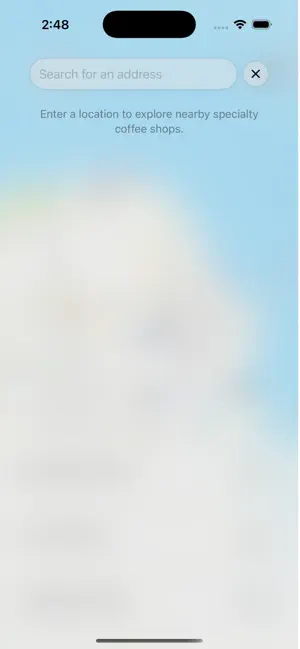
New Features Travel Suggestions: if you have an upcoming trip more than 80km from home, Bean Stuff shows a card with specialty coffee shops near your destination. Dismiss it once you've planned your stops, or turn it off from settings. Settings menu: the top-right button is now a gear icon, opening a menu with the travel suggestions toggle, a way to report missing shops, a feedback form, and a support link Add Missing Coffee Shop: the settings menu now walks you through submitting an unlisted shop via Apple Maps or Google Maps. Improvements Scoring progress: a live progress bar with percentage now shows while shops are being scored. Faster loading on return visits: shop results and scores are cached locally for 7 days. Opening the app near somewhere you've searched before loads instantly, with a silent background refresh running behind the scenes. Search bar now auto-focuses when opened. Bottom sheet now uses a frosted glass background instead of solid white. Bug Fixes First launch no longer flashes an error banner before you've had a chance to tap Allow on the location permission dialog. Denying location access now shows a clear banner with a direct link to Settings instead of a cryptic error message.
App privacy
The developer, Reed Allen, reported these privacy practices to Apple.
Data Not Collected
The developer does not collect any data from this app.
Alternatives to Bean Stuff
Looking for apps like Bean Stuff? Here are 6 similar apps on the App Store. The highest rated is butterbook: Recipe Keeper (5.0/5), and all 6 are free to download.
-
 butterbook: Recipe Keeper
5.0
butterbook: Recipe Keeper
5.0
-
 Coffee Places
5.0
Coffee Places
5.0
-
 My Coffee Radar
-
 FoodWise AI
5.0
FoodWise AI
5.0
-
 The Atlas
5.0
The Atlas
5.0
-
 Roast My Coffee House
4.9
Roast My Coffee House
4.9
| App | Rating | Price | Last updated | Compare |
|---|---|---|---|---|
| Bean Stuff | 5.0 / 5 (3 ratings) | Free | May 14, 2026 | |
| butterbook: Recipe Keeper | 5.0 / 5 (5) | Free | Sep 26, 2026 | Compare |
| Coffee Places | 5.0 / 5 (1) | Free | Mar 21, 2026 | Compare |
| My Coffee Radar | – | Free | Nov 3, 2025 | Compare |
| FoodWise AI | 5.0 / 5 (1) | Free | Apr 9, 2026 | Compare |
| The Atlas | 5.0 / 5 (17) | Free | Jun 8, 2025 | Compare |
| Roast My Coffee House | 4.9 / 5 (13) | Free | Sep 3, 2026 | Compare |
Compare Bean Stuff with the top alternatives: ratings, updates, ASO score and keyword gaps →