

Snap Translate: Extract Text
Kamel Djaber Productivity iPhoneiPadiPod touch
Snap Translate: Extract Text is a free Productivity app for iPhone and iPad by Kamel Djaber. Rated 1.5/5 from 2 ratings. Requires iOS 15.1.
- Rating
- 1.5
- 2 ratings
- Price
- Free
- on the App Store
- Size
- 51 MB
- Age 4+
- Updated
- Oct 24
- 2026 · v1.3.05
Screenshots
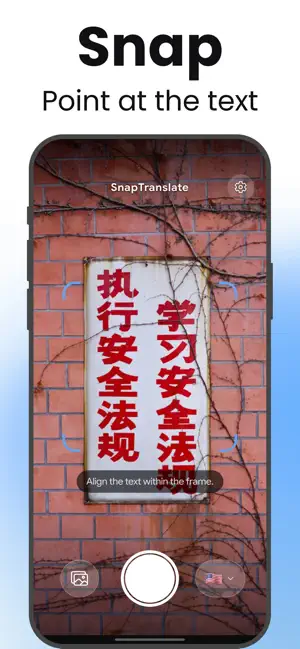
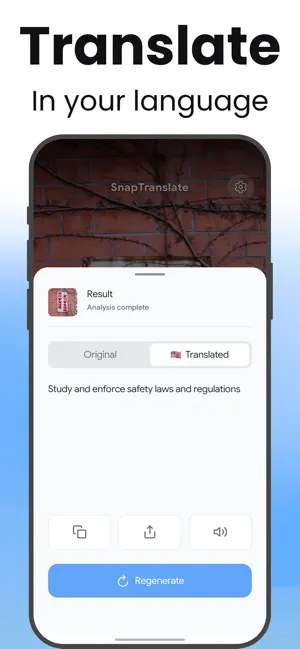


About Snap Translate: Extract Text
Take a photo of any foreign text and read it in your language seconds later. Menus, signs, labels, packaging, screenshots, book pages, handwritten notes. Line the text up inside the on-screen frame, tap the shutter, and Snap Translate hands you two things: the original text it pulled out of the image, and the translation. TWO TABS, TWO USES The Original tab gives you the extracted text itself, ready to copy. Use it to lift a paragraph out of a photo, grab a code from a label, or get a passage out of a screenshot without retyping it. The Translated tab gives you the same passage in your language, rewritten to keep the meaning rather than translated word by word. WHAT IT HANDLES WELL • Restaurant menus and price lists • Street signs, opening hours, station boards • Product labels, ingredient lists, allergy warnings • Screenshots from messages, websites and social media • Book and textbook pages • Handwritten notes • Short documents and forms 67+ TARGET LANGUAGES Translate into more than 67 languages, from Spanish, French, German and Japanese to Swahili, Amharic, Filipino, Khmer, Cantonese, Georgian and Icelandic. A search field finds any of them instantly, by English name or native name. HEAR IT OUT LOUD Tap to have the translation read aloud, on devices that have a voice installed for that language. Useful when you have to say the words yourself at a counter, and useful when you are learning rather than just coping. COPY, SHARE, TRY AGAIN Copy either tab, share it to any app, or tap Regenerate for a second pass if the first result missed something. FREE AND PREMIUM • 10 photo translations a day, free, renewed every morning • Your phone's language and English are always free as target languages • Premium unlocks all 67+ target languages, lifts the daily limit and removes ads • Cancel any time GOOD TO KNOW An internet connection is required: the analysis runs on our servers, not on your phone. Light, dark and system themes. Full layouts for iPhone and iPad. No account needed to start. Download Snap Translate and stop retyping words you cannot read. Terms of Use : https://qodam.com/terms Privacy Policy : https://qodam.com/privacy
What’s new
Version 1.3.05 · Updated October 24, 2026
Clearer and fairer! • Error messages are now clear and shown in your language. • A failed translation no longer counts toward your daily free translations. Also in this update: stability and performance improvements. Thank you for downloading Snap Translate!
App privacy
The developer, Kamel Djaber, reported these privacy practices to Apple.
Data Not Linked to You
The following data, which may be collected but is not linked to your identity, may be used for the following purposes:
- Identifiers: Device ID
- Usage Data: Product Interaction
Used for: Analytics
Alternatives to Snap Translate: Extract Text
Looking for apps like Snap Translate: Extract Text? Here are 6 similar apps on the App Store. The highest rated is Stedio – Checklist for Prep (5.0/5), and all 6 are free to download.
-
 FinePomo - Focus Timer
-
 EdboScan: OCR & AI Tools
-
 Audio Transcribe App : Audia
-
 notebook-transcriber-ai
-
 Stedio – Checklist for Prep
5.0
Stedio – Checklist for Prep
5.0
-
 Colorize Remember That
| App | Rating | Price | Last updated | Compare |
|---|---|---|---|---|
| Snap Translate: Extract Text | 1.5 / 5 (2 ratings) | Free | October 24, 2026 | |
| FinePomo - Focus Timer | – | Free | Jan 8, 2026 | Compare |
| EdboScan: OCR & AI Tools | – | Free | Jul 30, 2025 | Compare |
| Audio Transcribe App : Audia | – | Free | Oct 21, 2026 | Compare |
| notebook-transcriber-ai | – | Free | May 10, 2026 | Compare |
| Stedio – Checklist for Prep | 5.0 / 5 (1) | Free | Oct 19, 2025 | Compare |
| Colorize Remember That | – | Free | Jul 30, 2026 | Compare |