

My Health Export
Sam Gledhill Health & Fitness iPhoneiPadiPod touch
My Health Export is a free Health & Fitness app for iPhone and iPad by Sam Gledhill. Rated 3.8/5 from 5 ratings. Requires iOS 16.6.
- Rating
- 3.8
- 5 ratings
- Price
- Free
- on the App Store
- Size
- 2 MB
- Age 4+
- Updated
- Sep 26
- 2026 · v3.1.7
Screenshots


About My Health Export
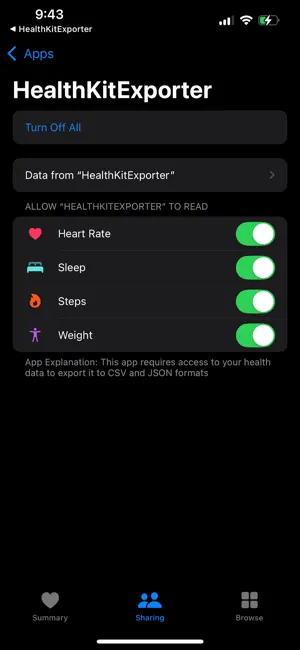
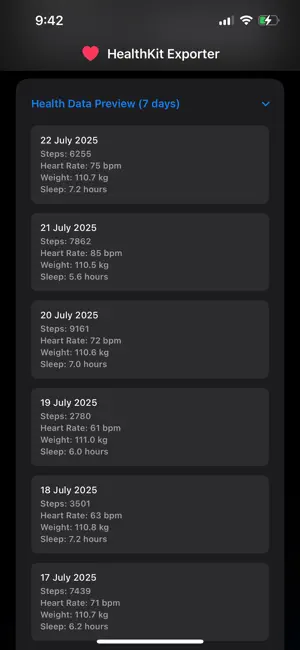
My Health Export helps you export your health data from the Health app into clean CSV or JSON files you can use in spreadsheets or share with your care team. - Works with the Health app (reads data with your permission) - Export steps, heart rate, weight, and sleep - Choose metric or imperial units - Choose summary metrics or export ALL values - Share your exports via email, Files, or AirDrop Privacy by design: - Read-only access: the app does not write any data to the Health app - You can revoke access any time in iOS Settings → Privacy & Security → Health Note: This app is independent and has not been authorized, sponsored, or otherwise approved by Apple Inc.
Ratings & reviews
3.8
5 ratings
What’s new
Version 3.1.7 · Updated September 26, 2026
NEW — Wrist Temperature & Nightly Breathing Disturbances Your Apple Watch tracks two things automatically overnight that this app couldn't export before: Wrist Temperature and Breathing Disturbances. Both are now available as their own Pro metrics, alongside the existing manually-logged Body Temperature and the (rare) Sleep Apnea notification event. - Wrist Temperature — your automatic overnight wrist temperature trend, separate from manually-logged Body Temperature readings - Breathing Disturbances (Overnight) — the nightly breathing-disturbance count Apple Watch records every night during sleep Fixed — Pro Metrics Showing "0" or Staying Empty Two related issues were causing Temperature and Sleep Apnea exports to come back empty even when data existed in the Health app and permissions looked correct: If you enabled a new Pro metric after your first export, the app didn't always request Health's permission for that specific metric before fetching — it's now requested every time you fetch, so newly-enabled metrics are never silently skipped. The existing "Sleep Apnea Events" metric only reflects a rare, discrete Apple notification (issued after ~30 nights of consistently elevated readings) — it will usually be empty. The new Breathing Disturbances metric above is the nightly data most people are actually looking for. Fixed — CSV Summary Export Formatting Issue A recent metric rename introduced a stray comma in one column header, which could shift every following column in the summary CSV export. This is now fixed, and all headers are properly escaped so this class of issue can't happen again. Who Benefits - Apple Watch users who want their overnight Wrist Temperature or Breathing Disturbances trends, not just manual thermometer readings - Anyone who enabled Sleep Apnea Events, Body Temperature, or other Pro metrics after their first export and saw unexpected zeros - Anyone who imports the summary CSV export into a spreadsheet or another tool What Changed for You Nothing in your workflow changes — just pick the metrics you want in Settings (Wrist Temperature and/or Breathing Disturbances for automatic Apple Watch data, Body Temperature for manual readings) and export as usual.
App privacy
The developer, Sam Gledhill, reported these privacy practices to Apple.
Data Not Collected
The developer does not collect any data from this app.
Alternatives to My Health Export
Looking for apps like My Health Export? Here are 6 similar apps on the App Store. The highest rated is SleepHQ (4.7/5), and all 6 are free to download.
-
 Health App Data Export Tool
3.4
Health App Data Export Tool
3.4
-
 HealthSave: Export Health Data
4.6
HealthSave: Export Health Data
4.6
-
 Body Insights for Apple Watch
4.4
Body Insights for Apple Watch
4.4
-
 sleep² sleeptracker & analysis
3.6
sleep² sleeptracker & analysis
3.6
-
 SleepHQ
4.7
SleepHQ
4.7
-
 Sonar - Health & Performance
4.6
Sonar - Health & Performance
4.6
| App | Rating | Price | Last updated | Compare |
|---|---|---|---|---|
| My Health Export | 3.8 / 5 (5 ratings) | Free | September 26, 2026 | |
| Health App Data Export Tool | 3.4 / 5 (47) | Free | Oct 17, 2026 | Compare |
| HealthSave: Export Health Data | 4.6 / 5 (8) | Free | Oct 19, 2026 | Compare |
| Body Insights for Apple Watch | 4.4 / 5 (56) | Free | Oct 19, 2026 | Compare |
| sleep² sleeptracker & analysis | 3.6 / 5 (37) | Free | Oct 3, 2026 | Compare |
| SleepHQ | 4.7 / 5 (616) | Free | Oct 9, 2026 | Compare |
| Sonar - Health & Performance | 4.6 / 5 (336) | Free | Jul 22, 2026 | Compare |
Compare My Health Export with the top alternatives: ratings, updates, ASO score and keyword gaps →