

CookEat: Calorie Counter
Mohamed HADJADJI Food & Drink iPhoneiPadiPod touch
CookEat: Calorie Counter is a free Food & Drink app for iPhone and iPad by Mohamed HADJADJI. Requires iOS 16.4. Updated October 22, 2026.
- Price
- Free
- on the App Store
- Size
- 87 MB
- Age 4+
- Updated
- Oct 22
- 2026 · v1.8.0
Screenshots



About CookEat: Calorie Counter
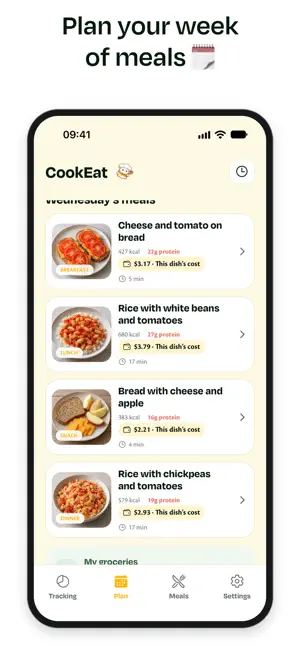
SNAP YOUR MEAL. TRACK YOUR DAY. Photograph a meal to estimate its calories, protein, carbs and fats. Review the detected foods and portions, correct any value, and find the meal in your daily food diary. Forgot a photo? Add foods manually, create foods missing from the list, or enter meal totals. Your food corrections become defaults for the next time you use that ingredient. Eat well for your fitness goals with CookEat: protein-focused meals, tailored portions and a practical weekly plan. Choose weight loss, muscle gain or maintenance, add your activity and training routine, and see your daily calorie and protein targets. PLAN YOUR WEEK See your meals day by day, with detailed recipes so you know what to cook. PORTIONS THAT FIT Quantities adapt to your profile and daily calorie reference. View estimated calories and macronutrients. SWAP A MEAL Choose another dish when you fancy something different, with updated quantities in your plan. SHOP FROM YOUR PLAN Build a shopping list from the ingredients and quantities in your planned meals. TRACK YOUR WEIGHT Log weigh-ins and see how they change over time. Your weight history stays on your device. You can also save recipes and import meal ideas from videos. Nutrition values are estimates. CookEat does not provide medical advice or guarantee weight outcomes. Premium features require a subscription. Review the terms and pricing in the app before purchasing. https://cookeat.info/terms/en https://cookeat.info/privacy/en
What’s new
Version 1.8.0 · Updated October 22, 2026
New: meal tracking by photo. Review estimated calories and macros, edit each food, and add meals without a photo. Photo meals are added to your day automatically. Food corrections are remembered for next time. Meal reminders follow your local time, and you can create a new plan after its final scheduled day.
App privacy
The developer, Mohamed HADJADJI, reported these privacy practices to Apple.
Data Used to Track You
The following data may be used to track you across apps and websites owned by other companies:
- Purchases: Purchase History
- Identifiers: User ID, Device ID
- Usage Data: Product Interaction
Data Linked to You
The following data, which may be collected and linked to your identity, may be used for the following purposes:
- Purchases: Purchase History
- Location: Coarse Location
- Identifiers: User ID, Device ID
- Usage Data: Product Interaction
- Diagnostics: Crash Data, Performance Data
- Health & Fitness: Health, Fitness
- User Content: Other User Content, Photos or Videos, Audio Data
- Other Data: Other Data Types
- Search History: Search History
Used for: Developer’s Advertising or Marketing, Analytics, Product Personalization, App Functionality
Alternatives to CookEat: Calorie Counter
Looking for apps like CookEat: Calorie Counter? Here are 6 similar apps on the App Store. The highest rated is Cooksy - AI Recipe Generator (5.0/5), and all 6 are free to download.
-
 Recipe Creator & Meal Planner
-
 Cooksy - AI Recipe Generator
5.0
Cooksy - AI Recipe Generator
5.0
-
 La Guisine - Recettes simples
-
 Yoummy | AI Cooking Assistant
-
 Tablée
-
 FridgeMealsAI
3.0
FridgeMealsAI
3.0
| App | Rating | Price | Last updated | Compare |
|---|---|---|---|---|
| CookEat: Calorie Counter | – | Free | October 22, 2026 | |
| Recipe Creator & Meal Planner | – | Free | Sep 5, 2026 | Compare |
| Cooksy - AI Recipe Generator | 5.0 / 5 (1) | Free | Feb 19, 2026 | Compare |
| La Guisine - Recettes simples | – | Free | Dec 4, 2025 | Compare |
| Yoummy | AI Cooking Assistant | – | Free | Feb 20, 2025 | Compare |
| Tablée | – | Free | Sep 20, 2026 | Compare |
| FridgeMealsAI | 3.0 / 5 (2) | Free | Jul 7, 2026 | Compare |