

Step Calendar: Pedometer
koichi hashimoto Health & Fitness iPhoneiPadiPod touch
Step Calendar: Pedometer is a free Health & Fitness app for iPhone and iPad by koichi hashimoto. Requires iOS 18.2. Updated September 3, 2026.
- Price
- Free
- on the App Store
- Size
- 30 MB
- Age 4+
- Updated
- Sep 3
- 2026 · v2.8
Screenshots


About Step Calendar: Pedometer
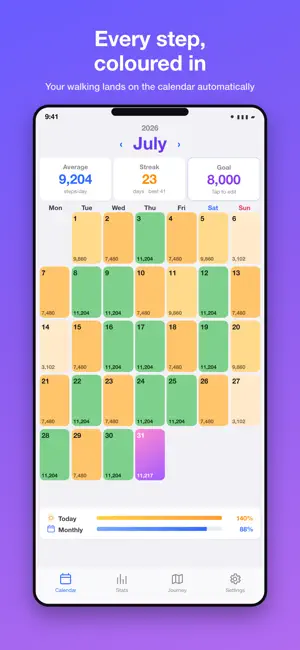
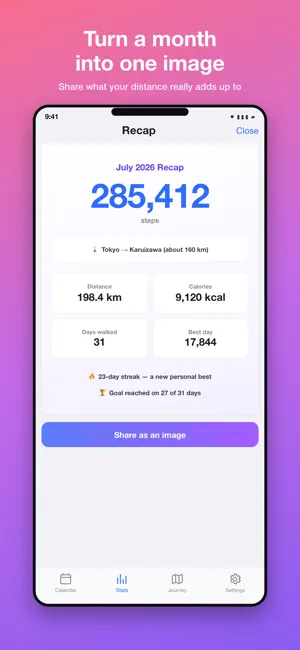
Step Calendar turns the steps you already take into a diary. It links to Health on your iPhone and lays your daily steps, distance and calories out on a colour-coded calendar. There is nothing to set up and nothing to press — just carry your iPhone. ▼ WHAT YOU GET CALENDAR VIEW The darker the cell, the more you walked. Tap any day for a chart of your steps hour by hour, a comparison with yesterday and with the same day last week, plus distance and calories. You can jot a note on any date too. GOALS AND BADGES Set a daily step goal and a badge celebrates the moment you reach it, with a satisfying little buzz. Passing 5,000, 10,000, 15,000 and 20,000 steps gets its own moment. Your streak and your personal best are always on screen, so the longer you keep going, the more there is to protect. JOURNEYS — WALK YOUR WAY SOMEWHERE Your daily steps become distance on a real route. Follow the old Tokaido road from Tokyo to Kyoto, take the mountain road of the Nakasendo, walk the 88-temple pilgrimage of Shikoku, loop Mt. Fuji or Lake Biwa, cross Japan end to end, drive Route 66 on foot, or make your way along the Camino de Santiago. Every stop records the date you arrived, so the route becomes your own record. Ten routes in all — some finish in a few days, some take years. WEEKLY REPORT Every week, a short read on how you actually walk, in plain words. It suggests a daily goal from your recent weeks that you can apply with one tap, and on Apple Intelligence devices the highlights are summarised by AI — entirely on your device. ICLOUD BACKUP Notes, goals and journey progress are backed up to iCloud automatically, so nothing is lost when you change phones. Free for everyone. STATS AND ANALYSIS Averages by weekday and by week show you the shape of your own habits. Monthly totals, averages, best and worst days are all there at a glance. Premium adds yearly and all-time analysis and a year-at-a-glance heatmap. SHAREABLE RECAP Turn a month of walking into a single image, complete with what your distance adds up to — a marathon, a lap of Tokyo, a slice of the way around the Earth. One recap a month is free. WIDGETS, LOCK SCREEN AND SIRI Put your steps on the Home Screen, on the Lock Screen, in StandBy or in Control Center. Ask Siri to check today's steps and it answers without opening the app. WEATHER Current conditions and a 24-hour forecast for where you are, right under your calendar. ▼ PREMIUM (MONTHLY, YEARLY OR ONE-TIME) • The full Weekly Report, with AI summary • Steps compared with sleep, weight and resting heart rate • No ads • Unlimited history • Detailed stats: yearly and all-time • Year-at-a-glance heatmap • Monthly reports to share • Premium colour themes (6) • 29 calendar backgrounds, or your own photo • CSV export • Live Activity with Dynamic Island • All Premium journey routes ▼ ABOUT THE PLANS • Choose a monthly plan, a yearly plan or a one-time purchase • The one-time purchase is a single payment with no auto-renewal • The monthly and yearly plans start with a 7-day free trial • Payment is charged to your Apple ID account • Monthly and yearly plans renew automatically unless cancelled at least 24 hours before the end of the current period • You can manage or cancel a subscription any time in the Settings app • On a new device, tap "Restore Purchases" with the same Apple ID Privacy Policy: https://sites.google.com/view/khappprivacy-policy/%E3%83%9B%E3%83%BC%E3%83%A0 Terms of Use (EULA): https://www.apple.com/legal/internet-services/itunes/dev/stdeula/
What’s new
Version 2.8 · Updated September 3, 2026
■ A one-time purchase You asked for a way to pay once instead of subscribing — so here it is. A single payment unlocks everything, for good, with no auto-renewal. ■ 29 calendar backgrounds Added winter, washi paper, seigaiha waves, linen, dot grid, a dog, a morning avenue, dusk by the river, forest, shore, hydrangeas, mountains, Mt. Fuji and city lights. Every earlier background has been redrawn at full resolution, and each one now has a name in the picker. ■ Scenery for all ten journey routes Choosing a route and arriving at a stop now show artwork of that journey. ■ Fixed: tapping a date opened the wrong day The first tap of a session opened today's detail instead of the date you tapped. ■ Fixed: notifications that never arrived Goal and milestone celebrations were being dropped while the app was open. Journey arrivals stopped after the first one, and milestone notifications never fired after the first launch. All fixed. ■ Fixed: widget showing the wrong number The widget showed 0 steps while you browsed a past month, and kept yesterday's total after midnight. ■ Also fixed • Totals and averages for a month could stay stale after the month rolled over • The calendar could go blank when switching months quickly • The shareable recap was unreadable in dark mode • Onboarding could not be completed at the largest text sizes • The Weekly Report's AI summary now says a little more
App privacy
The developer, koichi hashimoto, reported these privacy practices to Apple.
Data Used to Track You
The following data may be used to track you across apps and websites owned by other companies:
- Search History: Search History
- Browsing History: Browsing History
Data Not Linked to You
The following data, which may be collected but is not linked to your identity, may be used for the following purposes:
- Search History: Search History
- Browsing History: Browsing History
- Location: Coarse Location
Used for: Third-Party Advertising, App Functionality
Alternatives to Step Calendar: Pedometer
Looking for apps like Step Calendar: Pedometer? Here are 6 similar apps on the App Store.
-
 健康データ管理する歩数計:運動習慣を身につけて運動不足を解消
-
 週間歩数計
週間歩数計
-
 Step Counter: Lifetime Graph
-
 Step Counter: Pedometer Widget
-
 まいにちウォーク - 歩数計
-
 Walk'n Life
| App | Rating | Price | Last updated | Compare |
|---|---|---|---|---|
| Step Calendar: Pedometer | – | Free | September 3, 2026 | |
| 健康データ管理する歩数計:運動習慣を身につけて運動不足を解消 | – | Free | Jun 20, 2024 | Compare |
| 週間歩数計 | – | Free | Jan 9, 2026 | Compare |
| Step Counter: Lifetime Graph | – | Free | Sep 19, 2025 | Compare |
| Step Counter: Pedometer Widget | – | Free | Aug 5, 2026 | Compare |
| まいにちウォーク - 歩数計 | – | Free | Oct 15, 2026 | Compare |
| Walk'n Life | – | Free | Jan 16, 2026 | Compare |