

LuckyCat: Expense Tracker
Mona Studio Finance iPhoneiPadiPod touch
LuckyCat: Expense Tracker is a free Finance app for iPhone and iPad by Mona Studio. Rated 5.0/5 from 1 ratings. Requires iOS 18.6.
- Rating
- 5.0
- 1 ratings
- Price
- Free
- on the App Store
- Size
- 79 MB
- Age 4+
- Updated
- Sep 30
- 2026 · v4.4.1
Screenshots
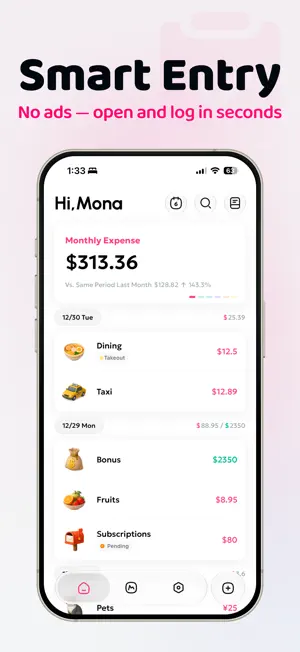


About LuckyCat: Expense Tracker
You're not just tracking income and expenses—you're capturing your life, one entry at a time. LuckyCat makes bookkeeping easier and more natural, helping you understand your spending and everyday life over time. Start tracking with ease today. WHY LUCKYCAT * Beautiful: a meticulously designed interface, icons, and charts — bookkeeping as a treat, not a chore * Smart: AI-powered Smart Entry and Voice Entry say goodbye to tedious tapping * Private: your data lives only on your device and your iCloud. We never collect or share it KEY FEATURES * Smart Entry: share a payment screenshot and AI logs the amount and category for you * Voice Entry: long-press the add button, say one sentence, done * Charts & Reports: pie, bar, and line charts plus a calendar heatmap that make your finances crystal clear * Budgets: per-category budgets with monthly, yearly, or custom periods — set up in three steps * Multiple Account Books: keep daily life, travel, and shared expenses separate * Multi-Currency: real-time exchange rates and cross-currency transfers — travel-ready * Asset Management: track accounts of all types and see your full financial picture * Reimbursements & Refunds: one tap, automatically linked to the original expense * Installments: enter the interest and get the real annual rate calculated automatically * Recurring Entries: rent and subscriptions log themselves * Rich Categories: two-level categories with colorful icons, continuously updated * Tag groups, photo attachments, powerful search, import/export, widgets, Shortcuts… and more to discover PRIVACY FIRST * No account needed * Syncs via iCloud only with your consent * We never store or share your data * No ads, ever LUCKYCAT PRO All personalization features, custom categories, iCloud backup, multiple account books, Smart Entry, Voice Entry, receipt printing, data import, and more Terms of Use: https://luckycat.monana.cc/help?lang=en&slug=about%2Fterms&theme=light Privacy Policy: https://luckycat.monana.cc/help?lang=en&slug=about%2Fprivacy&theme=light Thank you for your support. We'll keep polishing LuckyCat and building more products that live up to this philosophy. If you run into any issues, email us at [email protected] — we read and answer every message.
What’s new
Version 4.4.1 · Updated September 30, 2026
FIXES - Fixed several issues affecting stability and usability RECENT HIGHLIGHTS - Record transactions directly from a Home Screen widget: choose income or expense, category, account book, account and currency, then enter an amount and save (iOS 27 or later) - Browse 353 category icons in realistic, sticker and flat styles, with search by name or keyword - Choose from six number fonts to customize how amounts are displayed - Touch and hold the app icon on the Home Screen to open New Entry, Voice Entry or Calendar
App privacy
The developer, Mona Studio, reported these privacy practices to Apple.
Data Not Collected
The developer does not collect any data from this app.
Alternatives to LuckyCat: Expense Tracker
Looking for apps like LuckyCat: Expense Tracker? Here are 6 similar apps on the App Store. The highest rated is Finch - Expense & Budget (5.0/5), and all 6 are free to download.
-
 朵茉記帳
朵茉記帳
-
 Stop Overspending: Toriwake
-
 HeyCost: AI Auto-Log
4.9
HeyCost: AI Auto-Log
4.9
-
 Finch - Expense & Budget
5.0
Finch - Expense & Budget
5.0
-
 YaYa - Budget & Money Tracker
5.0
YaYa - Budget & Money Tracker
5.0
-
 Budget+ | Co-spending Tracker
| App | Rating | Price | Last updated | Compare |
|---|---|---|---|---|
| LuckyCat: Expense Tracker | 5.0 / 5 (1 rating) | Free | September 30, 2026 | |
| 朵茉記帳 | – | Free | Sep 2, 2026 | Compare |
| Stop Overspending: Toriwake | – | Free | Oct 17, 2026 | Compare |
| HeyCost: AI Auto-Log | 4.9 / 5 (12) | Free | Oct 19, 2026 | Compare |
| Finch - Expense & Budget | 5.0 / 5 (2) | Free | Aug 31, 2026 | Compare |
| YaYa - Budget & Money Tracker | 5.0 / 5 (2) | Free | Sep 14, 2026 | Compare |
| Budget+ | Co-spending Tracker | – | Free | Sep 26, 2026 | Compare |