

Challenge Log - チャレンジログ -
YOSHIKI KOKUBO Lifestyle iPhoneiPadiPod touch
Challenge Log - チャレンジログ - is a free Lifestyle app for iPhone and iPad by YOSHIKI KOKUBO. Requires iOS 15.0. Updated September 27, 2026.
- Price
- Free
- on the App Store
- Size
- 91 MB
- Age 4+
- Updated
- Sep 27
- 2026 · v2.2.1
Screenshots


About Challenge Log - チャレンジログ -
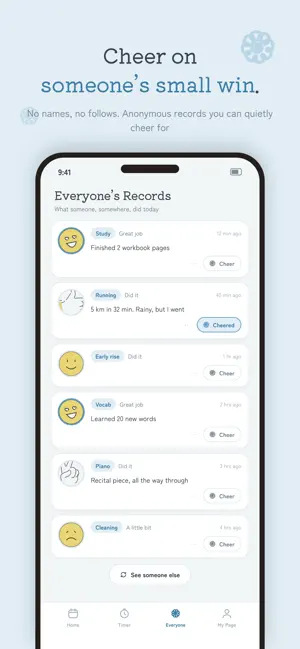
Small wins, every day. Challenge Log is a gentle stamp-based app for recording your daily study, work, and habits. [Key Features] New Type x 3-Grade Stamps: Combine 6 types (Face, Hand, Aco, Hanamaru, Star, Flower) with 3 grades (Great, Good, A Little). You'll always find the right stamp for the day. Stamps From Your Photos: Turn a photo from your camera or photo library into a round stamp, give it a name, and use it again and again (sign-in required to create). Photo stamps appear in shared calendars, but are not posted to the community feed. Warm & Cool Themes: Switch between the warm-toned "Warm" and cool-toned "Cool" palettes to match your mood or the season. A Clear 4-Tab Layout: Home / Timer / Community / My Page. Tap any date on the calendar to open the record sheet directly. Inline Monthly Summary: Stamp and timer breakdowns are always visible on the Home screen. Onboarding for First-Timers: A six-page intro tour on first launch. Press a stamp yourself and get a feel for the app right away. Easy Login: Quick sign-in with Google or Apple. No tedious registration required. Record Without Sign-In: Save records locally without an account. Link to an account later to sync to the cloud. Larger Calendar Stamps: Each day's stamp is displayed larger, so your month's progress is easy to see at a glance. Timer Function: Set a time and focus. The screen stays on while running, with a reset confirmation dialog for peace of mind. Reminder Notifications: Set daily, weekly, monthly, or custom-interval reminders. Manage them all from Notification Settings on My Page. Calendar Sharing: Share challenges with friends and cheer each other on. Community: Turn on "Show my records to everyone" in Settings and the records you save from then on appear next to other people's stamps. No name and no date are shown, shared records remain visible until you make them private, and you can report or block anything you would rather not see. A badge on the Community tab lets you know when there's something new, and records you haven't seen are marked "Unread". The Community tab can be turned off in Settings. Cheers: Send a hanamaru, star, thumbs-up or heart to the people you share your calendar with. Share Your Stamp Book: Turn this month's calendar into a single image and share it in square or stories size. Rename Your Stamps: Customize stamp-type names to make them your own. Reorder Your Stamps: Rearrange stamp types from Settings and put your favorites right up front. Profile Setup: Set a username and avatar to personalize your experience. No Goals, No Penalties: No quotas, no deadlines. Focus on just showing up. Daily Memos: Freely jot down notes, insights, or how you feel. App Notices: Timely updates on app news and consistency tips. Cloud Backup: Sign up to save records securely in the cloud. Migration between devices is easy. Multi-language: available in 15 languages — Japanese, English, Korean, Simplified Chinese, Traditional Chinese, German, French, Spanish, Portuguese (Brazil and Portugal), Italian, Dutch, Indonesian, Vietnamese and Thai. [Recommended if you...] - Want to quit being a "quitter" - Want a gentle-looking app you'll actually want to open - Want to build habits with friends - Want a little push from seeing how others are doing - Dislike strict goal management or penalties - Want to try the app first without signing in - Want a theme you can switch by mood Start today — capture your "I did it" days with your favorite stamps.
What’s new
Version 2.2.1 · Updated September 27, 2026
Make your own stamps from photos. [New] • Photo stamps Tap "Create a stamp" in the record sheet to turn a photo from your camera or photo library into a round stamp. Give it a name and use it again on other days. Creating stamps requires signing in. Photo stamps appear in shared calendars, but are not posted to the community feed. • Unread badge on the Community tab The Community tab shows a badge when there are records you haven't seen yet. [Improvements] • The community feed is lighter to load. • Community cards are now marked "Unread" or "Read". • If loading more records fails, pick up where you left off with "Retry".
App privacy
The developer, YOSHIKI KOKUBO, reported these privacy practices to Apple.
Data Linked to You
The following data, which may be collected and linked to your identity, may be used for the following purposes:
- Location: Coarse Location
- Identifiers: Device ID, User ID
- Usage Data: Product Interaction, Advertising Data
- Diagnostics: Performance Data
- Contact Info: Email Address, Name
- User Content: Photos or Videos, Other User Content
Used for: Third-Party Advertising, Analytics, App Functionality
Data Not Linked to You
The following data, which may be collected but is not linked to your identity, may be used for the following purposes:
- Diagnostics: Crash Data, Other Diagnostic Data
Used for: Third-Party Advertising, Analytics, App Functionality
Alternatives to Challenge Log - チャレンジログ -
Looking for apps like Challenge Log - チャレンジログ -? Here are 6 similar apps on the App Store. The highest rated is 目標達成くん (5.0/5), and all 6 are free to download.
-
 SparkleList
-
 Success Note: Daily Wins Log
-
 Stickaday: Habit Tracker
-
 がんばったシール|ごほうびシールで子どもの習慣化
-
 目標達成くん
5.0
目標達成くん
5.0
-
 yubune
4.0
yubune
4.0
| App | Rating | Price | Last updated | Compare |
|---|---|---|---|---|
| Challenge Log - チャレンジログ - | – | Free | September 27, 2026 | |
| SparkleList | – | Free | Dec 22, 2025 | Compare |
| Success Note: Daily Wins Log | – | Free | Oct 11, 2026 | Compare |
| Stickaday: Habit Tracker | – | Free | Oct 15, 2026 | Compare |
| がんばったシール|ごほうびシールで子どもの習慣化 | – | Free | Jul 14, 2026 | Compare |
| 目標達成くん | 5.0 / 5 (1) | Free | Jul 2, 2024 | Compare |
| yubune | 4.0 / 5 (1) | Free | Oct 27, 2026 | Compare |