

ScanCam: PDF Scanner & Convert
Trusted Brands UG (haftungsbeschrankt) Utilities iPhoneiPadiPod touch
ScanCam: PDF Scanner & Convert is a free Utilities app for iPhone and iPad by Trusted Brands UG (haftungsbeschrankt). Requires iOS 18.1.
- Price
- Free
- on the App Store
- Size
- 29 MB
- Age 4+
- Updated
- Oct 6
- 2026 · v1.0.5
Screenshots
About ScanCam: PDF Scanner & Convert
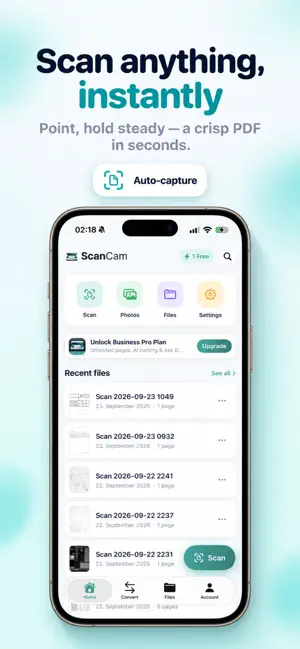
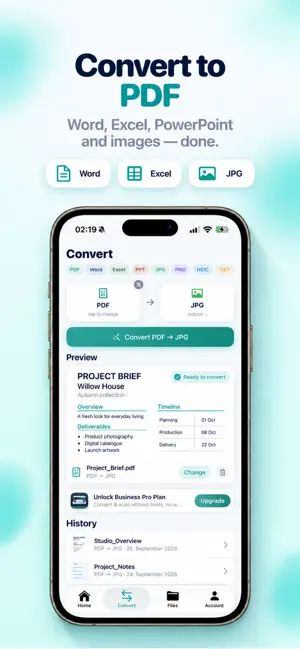
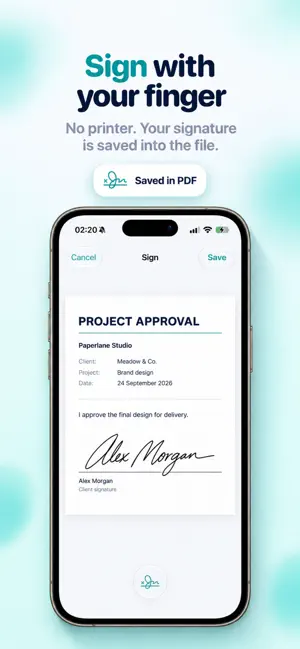
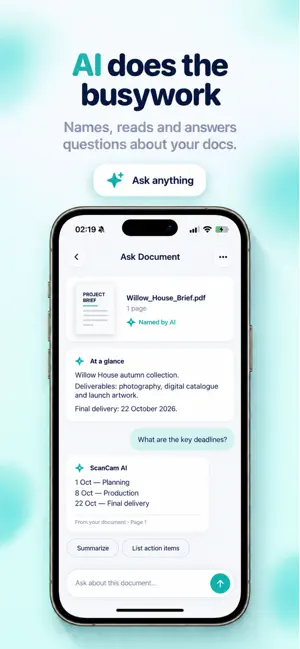
ScanCam turns your iPhone into a professional document scanner. Scan anything into a clean, sharp PDF, sign it with your finger, and convert files — all in seconds, right from your pocket. Whether it's receipts for tax time, a contract that needs signing, or a stack of notes, ScanCam gets it done without a printer or a computer. SCAN LIKE A PRO • Automatic edge detection finds the page for you • One-tap auto-capture — hold steady and it shoots • Crisp document filters: color, grayscale and clean black & white • Multi-page scans in a single PDF • Re-crop and rotate any page before you save SIGN & SEND • Sign with your finger — place and resize your signature anywhere • Your signature is saved permanently into the PDF • Share or export instantly to Mail, Messages, Files and more CONVERT ANYTHING • Word, Excel, PowerPoint, JPG, PNG and text → PDF • PDF → JPG, PNG or text • See a preview before you convert STAY ORGANIZED • Create folders and drag documents in to sort them • Fast search across your library • Clean, tidy file cards you can rename in a tap PRIVATE BY DESIGN • Your scans are processed on-device • No account required to start • No watermarks on your documents BUSINESS PRO Upgrade to unlock everything: • Unlimited pages and scans — never hit a limit mid-task • AI that names and reads your documents • Ask Document: chat with any scan to pull out totals, dates and answers • iCloud sync across your devices • No watermarks, ever Built by an independent developer who reads every message. Questions or ideas? Reach out any time from Settings. Business Pro is a subscription. Payment is charged to your Apple ID. Subscriptions auto-renew unless canceled at least 24 hours before the end of the period. Manage or cancel in your App Store settings. Terms of Use: https://www.apple.com/legal/internet-services/itunes/dev/stdeula/
What’s new
Version 1.0.5 · Updated October 6, 2026
• Faster, sharper scans with improved edge detection • Sign documents and keep the signature saved in the file • Convert Word, Excel, images and more to PDF • New folders — drag and drop to organize • A smoother, friendlier first-run experience Thanks for using ScanCam! Got feedback? Reach us in Settings.
App privacy
The developer, Trusted Brands UG (haftungsbeschrankt), reported these privacy practices to Apple.
Data Not Collected
The developer does not collect any data from this app.
Alternatives to ScanCam: PDF Scanner & Convert
Looking for apps like ScanCam: PDF Scanner & Convert? Here are 6 similar apps on the App Store. The highest rated is Convert Photo to PDF - Image (5.0/5), and all 6 are free to download.
-
 Convert Text to PDF‧
-
 Roulette Picker
-
 Convert Photo to PDF - Image
5.0
Convert Photo to PDF - Image
5.0
-
 CompressKit
-
 TruckyDZ
-
 Signature Maker: Sign Document
4.5
Signature Maker: Sign Document
4.5
| App | Rating | Price | Last updated | Compare |
|---|---|---|---|---|
| ScanCam: PDF Scanner & Convert | – | Free | October 6, 2026 | |
| Convert Text to PDF‧ | – | Free | Oct 15, 2026 | Compare |
| Roulette Picker | – | Free | Nov 10, 2025 | Compare |
| Convert Photo to PDF - Image | 5.0 / 5 (4) | Free | Oct 20, 2025 | Compare |
| CompressKit | – | Free | Jul 17, 2026 | Compare |
| TruckyDZ | – | Free | Jun 2, 2026 | Compare |
| Signature Maker: Sign Document | 4.5 / 5 (4) | Free | Sep 18, 2026 | Compare |