

Image to PDF: PDF Maker
Priya Sakhiya Productivity iPhoneiPadiPod touch
Image to PDF: PDF Maker is a free Productivity app for iPhone and iPad by Priya Sakhiya. Rated 4.7/5 from 453 ratings. Requires iOS 16.6.
- Rating
- 4.7
- 453 ratings
- Price
- Free
- on the App Store
- Size
- 63 MB
- Age 4+
- Updated
- May 10
- 2026 · v1.0.12
Screenshots


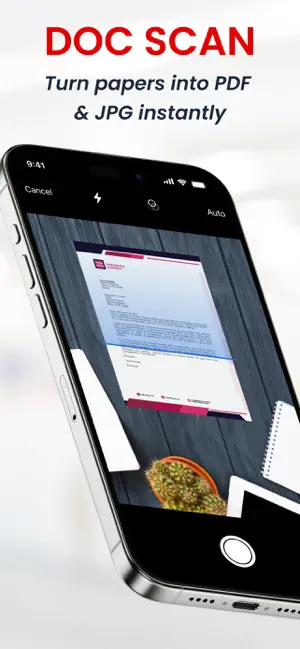
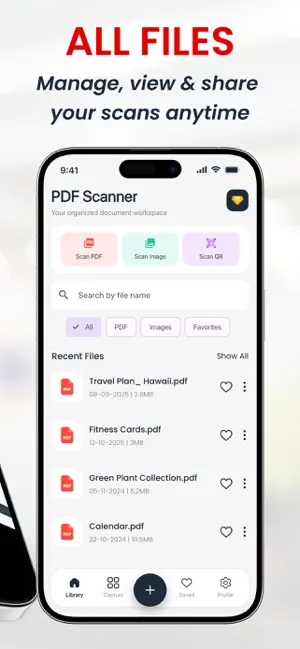
About Image to PDF: PDF Maker
Your Smart, Secure PDF Scanner for Everyday Use Transform your mobile device into a powerful document management tool. Mobile Scanner App helps you quickly scan, organize, and manage documents such as notes, receipts, ID cards, and important paperwork with ease and reliability. Core Features Smart Scanning Automatically detects document edges and enhances clarity for sharp, high-quality scans. Instant PDF Creation Convert your scans into professional, shareable PDF files in seconds. Privacy-Focused Design All your documents are stored securely on your device. No files are uploaded to external servers. Additional Tools QR code scanning Digital signature creation Mark documents as favorites Full offline functionality Why Choose Mobile Scanner App? Mobile Scanner App is designed for speed, simplicity, and security. Whether you're working, studying, or managing personal documents, it provides a smooth and efficient experience with a clean, easy-to-use interface. Who Is It For? Ideal for professionals, students, freelancers, and anyone who needs a reliable document scanning and PDF creation solution. Privacy & Legal Privacy Policy: https://a2zscanner.blogspot.com/2025/07/privacy-policy-for-a2z-scanner.html Terms & Conditions: https://a2zscanner.blogspot.com/2025/07/terms-and-conditions-for-a2z-scanner.html End-User License Agreement (EULA): https://a2zscanner.blogspot.com/2025/07/end-user-license-agreement-eula-for-a2z.html
Ratings & reviews
4.7
453 ratings
What’s new
Version 1.0.12 · Updated May 10, 2026
We’ve improved the overall app experience to make scanning faster, smoother, and more reliable. This update includes performance enhancements, UI improvements, and minor bug fixes to ensure better stability.
App privacy
The developer, Priya Sakhiya, reported these privacy practices to Apple.
Data Used to Track You
The following data may be used to track you across apps and websites owned by other companies:
- Location: Coarse Location
- Identifiers: Device ID
- Usage Data: Product Interaction, Advertising Data, Other Usage Data
Data Linked to You
The following data, which may be collected and linked to your identity, may be used for the following purposes:
- Identifiers: Device ID
- Usage Data: Product Interaction, Advertising Data, Other Usage Data
- Location: Coarse Location
- Diagnostics: Crash Data, Performance Data
Used for: Third-Party Advertising, Analytics, App Functionality
Alternatives to Image to PDF: PDF Maker
Looking for apps like Image to PDF: PDF Maker? Here are 6 similar apps on the App Store. The highest rated is PDF Scanner App: Docs Scan (4.8/5), and all 6 are free to download.
-
 PDF Scanner App: Docs Scan
4.8
PDF Scanner App: Docs Scan
4.8
-
 Scanner App - Scan PDF & OCR
4.4
Scanner App - Scan PDF & OCR
4.4
-
 QuickScan: PDF & OCR Scanner
4.1
QuickScan: PDF & OCR Scanner
4.1
-
 Scan.Plus - Doc & PDF Scanner
4.8
Scan.Plus - Doc & PDF Scanner
4.8
-
 Cam Scan - PDF Scanner & OCR
4.7
Cam Scan - PDF Scanner & OCR
4.7
-
 AI Note Taker - NotesAI
4.8
AI Note Taker - NotesAI
4.8
| App | Rating | Price | Last updated | Compare |
|---|---|---|---|---|
| Image to PDF: PDF Maker | 4.7 / 5 (453 ratings) | Free | May 10, 2026 | |
| PDF Scanner App: Docs Scan | 4.8 / 5 (490) | Free | May 8, 2026 | Compare |
| Scanner App - Scan PDF & OCR | 4.4 / 5 (103) | Free | May 28, 2026 | Compare |
| QuickScan: PDF & OCR Scanner | 4.1 / 5 (47) | Free | Feb 5, 2026 | Compare |
| Scan.Plus - Doc & PDF Scanner | 4.8 / 5 (757) | Free | Sep 22, 2026 | Compare |
| Cam Scan - PDF Scanner & OCR | 4.7 / 5 (2,154) | Free | Apr 30, 2026 | Compare |
| AI Note Taker - NotesAI | 4.8 / 5 (550) | Free | Jul 7, 2026 | Compare |