

CastMate: Screen Mirroring
Vishal Buha Utilities iPhoneiPadiPod touch
CastMate: Screen Mirroring is a free Utilities app for iPhone and iPad by Vishal Buha. Requires iOS 15.0. Updated August 11, 2026.
- Price
- Free
- on the App Store
- Size
- 39 MB
- Age 17+
- Updated
- Aug 11
- 2026 · v1.2
Screenshots


About CastMate: Screen Mirroring
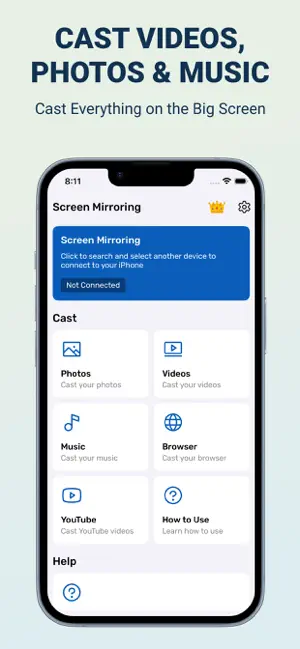
Screen mirroring your phone screen to TV can be helpful when you're showing photos, videos, watching movies, or playing games. If your eyes are drained from looking at your small cellular phone, you will get a great big screen experience by connecting your phone to TV, Chromecast, Firestick, Roku stick & Anycast via this CastMate: Wireless Display app! Mirroring your mobile screen on your TV can be useful when you're showing off photos from a recent trip, playing a game or giving a demonstration. With this Screen Mirroring App, you'll be able to duplicate your phone's screen on TV. This Screen Mirroring App allows you to easily connect your phone/tablet and your TV. It provides you a secure connection to protect your data, files and applications FEATURES:- * Cast to TV and enjoy the best experience of watching videos and movies. * Simple & fast connection with just a click * All media files supported, videos, photos, audios, music, etc. * Multiple Devices Supported * Enjoy high-quality HD video playback and photos. - Enjoy Large Screen Cast your favorite online movies, live streams, webvideos, TV shows, games, and more directly to your TV, turning your smartphone into a remote control, and enjoy media or content in full HD on your biggest screen. - Easy Screen Sharing Share your device's screen on your TV, whether you want to showcase a presentation, share photos and videos with friends and family, or collaborate on projects, our screen-sharing feature puts it all on the big screen easily. - Stable & Fast TV Casting Experience a lightning-fast connection between your mobile device and TV. With just a few taps, you'll easily cast your content to the big screen. Privacy Policy https://sites.google.com/view/tricontech/home Terms & Condition https://sites.google.com/view/tricontech/terms-condition
What’s new
Version 1.2 · Updated August 11, 2026
- Improve App Performance
App privacy
The developer, Vishal Buha, reported these privacy practices to Apple.
Data Used to Track You
The following data may be used to track you across apps and websites owned by other companies:
- Identifiers: Device ID
- Usage Data: Product Interaction, Advertising Data
Data Not Linked to You
The following data, which may be collected but is not linked to your identity, may be used for the following purposes:
- Identifiers: Device ID
- Usage Data: Advertising Data, Product Interaction, Other Usage Data
- Diagnostics: Crash Data, Performance Data, Other Diagnostic Data
Used for: Third-Party Advertising, Analytics
Alternatives to CastMate: Screen Mirroring
Looking for apps like CastMate: Screen Mirroring? Here are 6 similar apps on the App Store.
-
 TV Screen Mirroring Mate pro+
-
 Screen Cast - Screen Mirroring
-
 Smart Cast TV: Screen Share
-
 Castify: Web Video Caster
-
 Display Sharing - Wireless
-
 VoiceLedger
| App | Rating | Price | Last updated | Compare |
|---|---|---|---|---|
| CastMate: Screen Mirroring | – | Free | August 11, 2026 | |
| TV Screen Mirroring Mate pro+ | – | Free | May 12, 2024 | Compare |
| Screen Cast - Screen Mirroring | – | Free | Jan 2, 2026 | Compare |
| Smart Cast TV: Screen Share | – | Free | Dec 11, 2025 | Compare |
| Castify: Web Video Caster | – | Free | Oct 25, 2026 | Compare |
| Display Sharing - Wireless | – | Free | May 15, 2025 | Compare |
| VoiceLedger | – | Free | Oct 29, 2025 | Compare |