

Coordinate Converter: CoordCap
Nicolaas CorneIis Antonius Vertelman Navigation iPhoneiPadiPod touch
Coordinate Converter: CoordCap is a free Navigation app for iPhone and iPad by Nicolaas CorneIis Antonius Vertelman. Requires iOS 18.0.
- Price
- Free
- on the App Store
- Size
- 28 MB
- Age 4+
- Updated
- Oct 5
- 2026 · v3.0
Screenshots

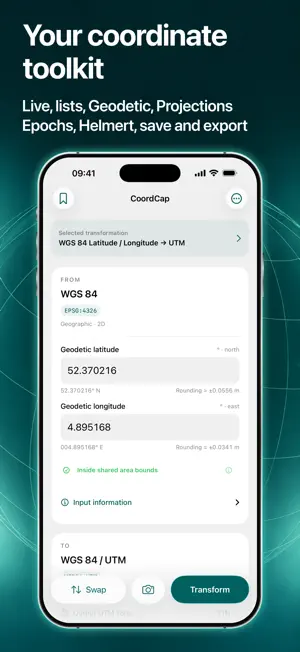

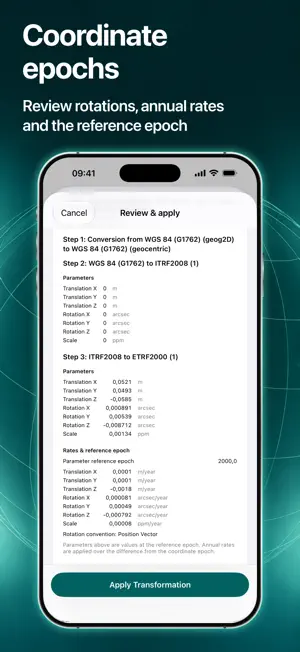
About Coordinate Converter: CoordCap
Read coordinates from your camera or an imported image, use your live location or select a point on the map, and convert between reference systems. Keep your results ready for the next step. CoordCap is free to download. Manual conversions, the built-in WGS 84 / UTM workflow, and Auto UTM on the map are free. CoordCap PRO is an optional, one-time in-app purchase that unlocks other map targets, plus capture and saving with additional transformations. No subscription. INCLUDED FOR FREE - Enter coordinates manually and convert them using the built-in WGS 84 / UTM workflow or transformations you add. - Read original coordinates with your camera or from imported images. - Convert between WGS 84 latitude/longitude and UTM using the built-in workflow. - Capture, review, save, and export individual coordinates and coordinate lists using the built-in WGS 84 / UTM workflow. - View, copy, and save map coordinates with Auto UTM. Use your live location or select a point with the crosshair; the UTM zone and hemisphere update automatically. - Copy and share manual conversion results. REQUIRES COORDCAP PRO - View, copy, and save map coordinates using any target other than Auto UTM, in both Live and Target modes. - View converted coordinates from your camera or imported images using transformations you add beyond the built-in WGS 84 / UTM workflow. - Capture and review coordinate lists using those additional transformations. - Save individual results using additional transformations, including results entered manually. - Save and export captured coordinate lists using additional transformations. Manual conversion with an added transformation is free. Using that transformation to view converted map coordinates, for converted camera or image capture, or to save results requires PRO. Auto UTM on the map stays free, including copying and saving. The built-in WGS 84 / UTM workflow also stays free, including capture, saving, and export. REVIEW BEFORE YOU USE Check captured readings, correct coordinates, and choose which rows to include before exporting. Coordinate recognition can make mistakes, so always review results against your source.
What’s new
Version 3.0 · Updated October 5, 2026
- Target and convert coordinates live on the map - Easier scanning with improved coordinate recognition.
App privacy
The developer, Nicolaas CorneIis Antonius Vertelman, reported these privacy practices to Apple.
Data Not Collected
The developer does not collect any data from this app.
Alternatives to Coordinate Converter: CoordCap
Looking for apps like Coordinate Converter: CoordCap? Here are 6 similar apps on the App Store.
-
 NAVIGATOR GIS
-
 Geo: Convert GPS Coordinates
-
 Addr: Address to Lat/Long
-
 Geo Changer
-
 CompassPinMax
-
 Geo XY Pointer - GPS Grid
| App | Rating | Price | Last updated | Compare |
|---|---|---|---|---|
| Coordinate Converter: CoordCap | – | Free | October 5, 2026 | |
| NAVIGATOR GIS | – | Free | Jul 5, 2026 | Compare |
| Geo: Convert GPS Coordinates | – | Free | Jul 30, 2026 | Compare |
| Addr: Address to Lat/Long | – | Free | Sep 29, 2026 | Compare |
| Geo Changer | – | Free | Sep 30, 2026 | Compare |
| CompassPinMax | – | 9.99 USD | Jul 26, 2026 | Compare |
| Geo XY Pointer - GPS Grid | – | Free | Oct 11, 2026 | Compare |