

SelectTranslate: AI Translator
HKZINGSOFTWARELIMITED Utilities iPhoneiPadiPod touchMac
SelectTranslate: AI Translator is a free Utilities app for iPhone and iPad by HKZINGSOFTWARELIMITED. Requires iOS 15.6. Updated October 22, 2026.
- Price
- Free
- on the App Store
- Size
- 42 MB
- Age 17+
- Updated
- Oct 22
- 2026 · v2.8.2
Screenshots


About SelectTranslate: AI Translator
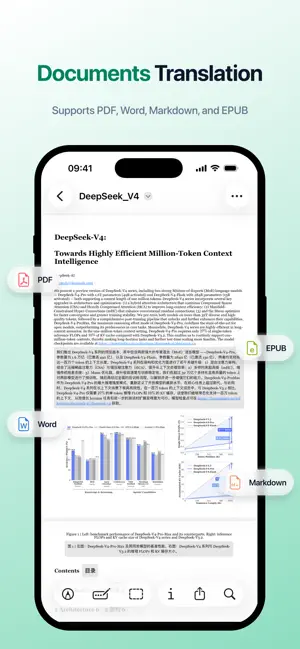
【SelectTranslate】Free AI translator for bilingual Web, PDF, papers, video, meetings, images & ebooks. Powered by 20+ top AI models. 【AI Expert】 and 【Termbase】 are now live! Built-in popular experts and termbases are ready to use, and custom experts and terms are also supported, making translation for specialized domains more accurate and professional! 【Bilingual Webpage Translation】: Intelligently identifies and translates webpage content, displaying the translation beneath each original paragraph for a clean, seamless bilingual reading experience. 【PDF Translation】: Completely free PDF translation function, offers rapid translation of foreign language documents while preserving the original document format and layout. 【PDF Plus】: The advanced PDF translation function is designed specifically for translating academic papers and various professional PDF documents. 【ePub e-book translation】: With SelectTranslate, you can easily convert various foreign language ePub eBooks into bilingual versions that are fully compatible with a wide range of e-book readers, helping you break down language barriers and enjoy high-quality global literary resources. 【More Document Translation Features】: Also supports translating Word, TXT, HTML, Markdown, and subtitle files (SRT/ASS). 【Video Subtitle Translation】: Supports bilingual subtitle translation on major global streaming platforms such as YouTube, Netflix, Disney+, and TED. 【Online Meeting Translation】: Supports real-time translation for a variety of mainstream online meeting platforms (voice subtitle translation, chat message translation, chat input translation), making cross-language communication smoother and more efficient. 【Optimal Translation】: An industry‑first approach that runs multiple translation models in parallel and uses a scoring model to intelligently score the outputs and automatically select the best translation, significantly improving both accuracy and reliability. 【Image Translation】: Supports quick translation of webpage images by right-click or hover, with the translated text fitted in place so reading stays uninterrupted. 【Input Translation】: Simply type text into webpage input fields for quick translation. 【AI Expert】: AI translation prompts tailored for different domains, with dedicated roles and translation rules that make specialized content more accurate and professional. 【Termbase】: Stores and manages standard translations of specialized terms across different scenarios to keep terminology accurate and consistent. 【Service & Support】: If you encounter any issues or have suggestions during use, feel free to contact us via our service email. Email: [email protected] 【Terms of Use】: https://www.apple.com/legal/internet-services/itunes/dev/stdeula/
What’s new
Version 2.8.2 · Updated October 22, 2026
New Features: • "Dark Mode" added: A dark appearance is now available and follows your system setting by default. • "Settings Backup and Sync" added: Import and export local files, and manually sync settings across devices with Google Drive. • "Video Subtitles" now supports new platforms: Facebook Reels, ARTE, Rumble, Viu, TikTok. • "Manga Translation" now supports new platforms: HERO'S Web, ShonenMagazine, ComicGardo, MangaFire, Lezhin Comics (including its English site), Bomtoon. • "Plans" updated: Introducing the Pro membership plan with higher translation quotas and more capable translation models. • "Safari App" updated: The interface now supports 23 languages. Experience Improvements: • "Translation Interface" improved: Unified the styling of buttons, icons, selectors, and dialogs for a more consistent appearance in light and dark modes. • "Webpage Translation" improved: Enhanced compatibility with GitHub and W3Schools, including main content detection and translation coverage. • "Selection Translation" improved: Improved the display and accuracy of phonetic transcriptions when looking up English words with free AI models. Bug Fixes: • "Webpage Translation" fixed: Resolved an issue that prevented GitHub pages from being translated correctly. • "Video Subtitles" fixed: Resolved an issue where YouTube could display subtitles from other videos during ads or when switching homepage video previews. • "Extension Panel" fixed: Resolved an issue where clicking the "Log In / Sign Up" button had no effect.
App privacy
The developer, HKZINGSOFTWARELIMITED, reported these privacy practices to Apple.
Data Not Linked to You
The following data, which may be collected but is not linked to your identity, may be used for the following purposes:
- Identifiers: Device ID
- Usage Data: Product Interaction
Used for: Analytics
Alternatives to SelectTranslate: AI Translator
Looking for apps like SelectTranslate: AI Translator? Here are 6 similar apps on the App Store. The highest rated is SubAI - Video Subtitle Helper (5.0/5), and all 6 are free to download.
-
 SubAI - Video Subtitle Helper
5.0
-
 MiaoView: Manga Translator
-
 Capti: Transcribe Screen Audio
5.0
-
 Subtitle Dog - Watch Any Drama
-
 Live Translate: Video & Voice
-
 Torii Image Translator
3.3
| App | Rating | Price | Last updated | Compare |
|---|---|---|---|---|
| SelectTranslate: AI Translator | – | Free | October 22, 2026 | |
| SubAI - Video Subtitle Helper | 5.0 / 5 (1) | Free | Jun 4, 2026 | Compare |
| MiaoView: Manga Translator | – | Free | Oct 5, 2026 | Compare |
| Capti: Transcribe Screen Audio | 5.0 / 5 (1) | Free | May 1, 2026 | Compare |
| Subtitle Dog - Watch Any Drama | – | Free | Sep 29, 2026 | Compare |
| Live Translate: Video & Voice | – | Free | Oct 19, 2026 | Compare |
| Torii Image Translator | 3.3 / 5 (7) | Free | Oct 19, 2026 | Compare |