

Text and Speech: AvidReader
Shy Dog Pte. Ltd. Book iPhoneiPadiPod touch
Text and Speech: AvidReader is a free Book app for iPhone and iPad by Shy Dog Pte. Ltd. Rated 1.0/5 from 1 ratings. Requires iOS 16.0.
- Rating
- 1.0
- 1 ratings
- Price
- Free
- on the App Store
- Size
- 139 MB
- Age 17+
- Updated
- Aug 18
- 2025 · v1.0.2
Screenshots

About Text and Speech: AvidReader
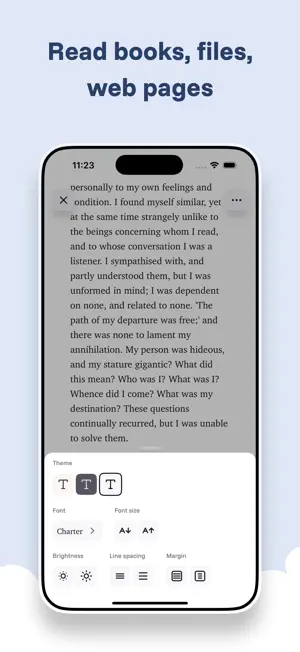
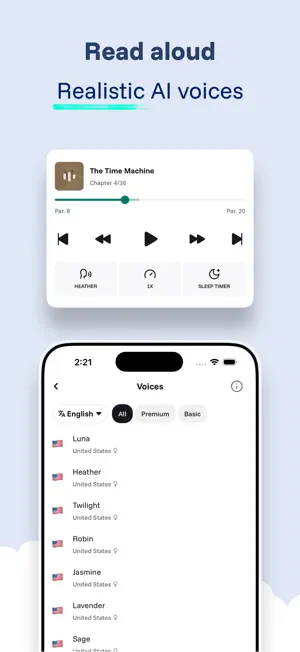
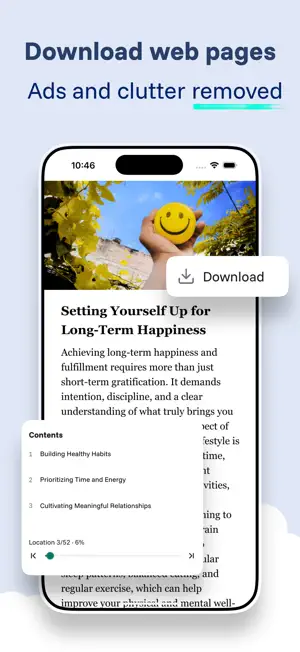
Read, listen and save your favorite ebooks or web content with AvidReader. Importing is simple: - Import your ebooks and files (epub, pdf, txt, html) from your device or other apps - Import web pages by sharing or copying a link, or use the built-in browser to browse the web without leaving AvidReader Read comfortably: - AvidReader automatically removes ads and clutter from web pages for a distraction-free reading experience. - Adjust color, font, margin, and more - Dark theme and dyslexia-friendly fonts available Read aloud/Text-to-speech: - Enjoy realistic and engaging audio renditions in 30+ languages created by state-of-the-art TTS models - Choose from 20+ premium voices in English - On-device audio generation allow you to listen offline while keeping your content private. No need to pre-download audio either! - Adjust speed as you like Collect and organize - Save any web content you’d like to read later, such as news articles, recipes, web novels, etc. - Download web pages to read anytime, anywhere - Configure auto downloads to ensure your content is always available - Create collections to organize your favorite content - Automatically or manually update item status (reading, to read, or finished) - Sync your files across devices AvidReader or iCloud. Track your progress and stay motivated: - Your reading progress is auto recorded - Earn streaks by reading or listening for 2 minutes a day - See your reading time stats and daily log from the home page Your wellbeing is important - AvidReader show the status bar when you’re reading, allowing you to keep track of time - Enable break reminders and bedtime reminders - Set a sleep timer in voiceover controls and drift off with relaxing narrations Privacy - Your files are never uploaded to our servers without your explicit consent - The in-app browser does not collect any data from your browsing - Add an extra layer of privacy by requiring biometrics to unlock the app - AvidReader is ad-free and does not track you across websites. - See our privacy policy at https://shydog.net/about/privacy-policy
What’s new
Version 1.0.2 · Updated August 18, 2025
All fonts installed in your system can now be used in AvidReader!
App privacy
The developer, Shy Dog Pte. Ltd., reported these privacy practices to Apple.
Data Linked to You
The following data, which may be collected and linked to your identity, may be used for the following purposes:
- Purchases: Purchase History
- Contact Info: Email Address, Name
- User Content: Other User Content, Customer Support
- Identifiers: User ID
Used for: App Functionality, Other Purposes
Data Not Linked to You
The following data, which may be collected but is not linked to your identity, may be used for the following purposes:
- Usage Data: Product Interaction
- Diagnostics: Crash Data, Performance Data
Used for: Analytics, App Functionality
Alternatives to Text and Speech: AvidReader
Looking for apps like Text and Speech: AvidReader? Here are 6 similar apps on the App Store. The highest rated is Ink&Echo (5.0/5), and all 6 are free to download.
-
 Chitneek - PDF & eBook Reader
-
 Local Narrator
-
 Ink&Echo
5.0
Ink&Echo
5.0
-
 Libri Audiobooks
4.5
Libri Audiobooks
4.5
-
 AudioBookIt: Audiobook Player
4.2
AudioBookIt: Audiobook Player
4.2
-
 Narrable: Audiobook PDF Reader
| App | Rating | Price | Last updated | Compare |
|---|---|---|---|---|
| Text and Speech: AvidReader | 1.0 / 5 (1 rating) | Free | August 18, 2025 | |
| Chitneek - PDF & eBook Reader | – | Free | Aug 22, 2026 | Compare |
| Local Narrator | – | Free | Sep 25, 2026 | Compare |
| Ink&Echo | 5.0 / 5 (16) | Free | Oct 20, 2026 | Compare |
| Libri Audiobooks | 4.5 / 5 (8) | Free | Jul 15, 2026 | Compare |
| AudioBookIt: Audiobook Player | 4.2 / 5 (5) | Free | Oct 13, 2026 | Compare |
| Narrable: Audiobook PDF Reader | – | Free | Oct 9, 2026 | Compare |