

NutriMenu AI: Calorie Tracker
Yulian Isakov Health & Fitness iPhoneiPadiPod touch
NutriMenu AI: Calorie Tracker is a free Health & Fitness app for iPhone and iPad by Yulian Isakov. Rated 5.0/5 from 4 ratings. Requires iOS 16.
- Rating
- 5.0
- 4 ratings
- Price
- Free
- on the App Store
- Size
- 41 MB
- Age 4+
- Updated
- Nov 1
- 2025 · v1.1.17
Screenshots


About NutriMenu AI: Calorie Tracker
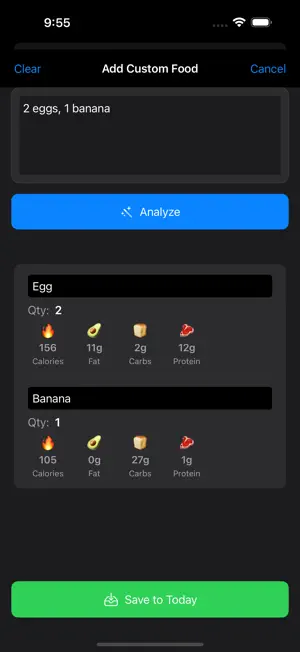
HOW TO USE NUTRIMENU AI 1 - Set your goals – Use our quick TDEE calculator or enter your custom calorie & macro targets along with your dietary preferences. 2 - Scan food or menu photos – Snap your meal plate or a restaurant menu and let AI instantly break it down. 3 - Get clear nutrition insights and AI coaching – See calories, protein, carbs, and fats for every item and see reasoning behind the numbers. 4 - Track & improve – Log meals effortlessly and repeat daily to stay on top of your nutrition goals. NutriMenu AI – Macro & Nutrition Tracker NutriMenu AI is your smart nutrition companion. Whether you’re eating out or cooking at home, simply snap a restaurant menu or food photo and get instant calorie and macro insights. Track meals, set goals, and stay on top of your nutrition effortlessly. Features (Premium access required) - AI-Powered Scanning – Works with both restaurant menus and your food images. Snap a photo and get instant nutrition insights. - Personalized Recommendations – Tailored to your goals (weight loss, muscle gain, allergies, etc.). - Nutrition Breakdowns – Calories, protein, carbs, and fat for every item. - Goal-Based Filtering – Match meals to your fitness and lifestyle plan. - Profile & History Tracking – Save meals, log daily progress, and build consistency. Why NutriMenu AI? - Scan menus or meals — no more guessing when eating out or at home. - Stay on track with personalized guidance that supports your health and fitness goals. - Fast, simple, and stress-free — trusted AI nutrition insights in seconds. Please note: NutriMenu AI requires an in-app purchase subscription. If you have any feedback or questions, please email us at [email protected]. Disclaimer: This app does not provide medical advice. All nutritional information, recommendations, and suggestions within the app are for informational purposes only and should not be considered a substitute for professional medical advice, diagnosis, or treatment. Always consult with a qualified healthcare provider before making any changes to your diet, nutrition, or lifestyle. NutriMenu AI is free to download. To unlock the full power & purpose of the app (ai-powered food scanning, menu scanning, personalized meal suggestions), a premium subscription is required. You will be charged through your Apple ID account if you choose to subscribe in the app. For the auto-renewing membership plans, your Apple ID account will be charged at least 24 hours prior to the end of the current period, at the previously selected rate. Your payment will continue to renew unless you turn off auto-renewal at least 24 hours prior to your next renewal date. Your membership can be managed or canceled in your Apple ID Account Settings. The auto-renewing membership plan is billed monthly. Terms of Use: https://www.apple.com/legal/internet-services/itunes/dev/stdeula/
What’s new
Version 1.1.17 · Updated November 1, 2025
* Added notifications so that users can get reminders to log their meals - breakfast, lunch, dinner * Improved notes with total grams for items and rationale for food analysis results * Plus general bug fixes and performance boosts!
App privacy
The developer, Yulian Isakov, reported these privacy practices to Apple.
Data Linked to You
The following data, which may be collected and linked to your identity, may be used for the following purposes:
- Identifiers: User ID
- Health & Fitness: Health
- User Content: Photos or Videos
- Usage Data: Product Interaction, Other Usage Data
- Purchases: Purchase History
- Contact Info: Physical Address, Email Address, Name
Used for: Analytics, Product Personalization, App Functionality
Data Not Linked to You
The following data, which may be collected but is not linked to your identity, may be used for the following purposes:
- Location: Precise Location
- Diagnostics: Crash Data, Performance Data, Other Diagnostic Data
Used for: App Functionality
Alternatives to NutriMenu AI: Calorie Tracker
Looking for apps like NutriMenu AI: Calorie Tracker? Here are 6 similar apps on the App Store. The highest rated is myMedDiary (4.8/5), and all 6 are free to download.
-
 Nutri365
-
 NutriScan: Food Label AI
-
 Calorie Counter - Easy & Fast
-
 Foodii -Nutri-Gap &Calorie Pro
-
 BMI Health: Weight Tracker
-
 myMedDiary
4.8
myMedDiary
4.8
| App | Rating | Price | Last updated | Compare |
|---|---|---|---|---|
| NutriMenu AI: Calorie Tracker | 5.0 / 5 (4 ratings) | Free | November 1, 2025 | |
| Nutri365 | – | Free | Jul 29, 2025 | Compare |
| NutriScan: Food Label AI | – | Free | Feb 25, 2026 | Compare |
| Calorie Counter - Easy & Fast | – | Free | Mar 23, 2026 | Compare |
| Foodii -Nutri-Gap &Calorie Pro | – | Free | Feb 3, 2026 | Compare |
| BMI Health: Weight Tracker | – | Free | Oct 20, 2026 | Compare |
| myMedDiary | 4.8 / 5 (14) | Free | Nov 1, 2024 | Compare |