

CleverJazz
维华 孟 Music iPhoneiPadiPod touch
CleverJazz is a free Music app for iPhone and iPad by 维华 孟. Rated 4.2/5 from 5 ratings. Requires iOS 15.0. Updated October 9, 2026.
- Rating
- 4.2
- 5 ratings
- Price
- Free
- on the App Store
- Size
- 311 MB
- Age 9+
- Updated
- Oct 9
- 2026 · v2.5.2
Screenshots



About CleverJazz
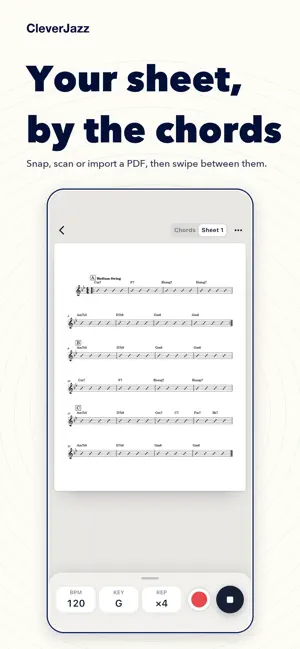
Practise jazz with a band at your side. CleverJazz gives pianists, guitarists, sax and trumpet players standards, licks, scales and chords: import a tune and piano, bass and drums play it with you; record yourself over the band; learn a jazz lick in about a minute. No account needed. STANDARDS: PLAY WHOLE TUNES WITH A BAND - Import iReal Pro links, forum playlists and MusicXML (.mxl too), several files at once, or write a chart yourself - A jazz rhythm section: piano (nylon guitar for bossa and samba), upright bass and drums in 10 grooves, with a walking bass that follows the changes - A mixer row per track: chords, bass, drums and click, each with its own switch, level and sound, plus reverb and swing - Tap the record button and the band counts you in while you record; hear the take at once with the chart following, then rename, share or save it - Your own sheet music: photograph or scan it, or add photos and PDFs; it stays on your device. Swipe between chords and sheet, or see both on an iPad on its side - Browse by composer, style, key and form, with a multi-pick filter - Pro: any key; arpeggio and scale layers; key and function marks on every bar; hold a chord to see the scales for those bars LICKS - Official licks grouped by player, tune, progression, style, tension and era, with a multi-pick filter - Hear the melody, the melody with the band, or the band alone, at any tempo and swing - A lick in about a minute: listen, play along, use it; then review what's due or go on to the next one, and resume if you leave halfway - Record yourself and compare; parts written for Bb, Eb, F and G instruments - Search by player, source and tag, and upload your own licks - Pro: every lick in all 12 keys SCALES AND CHORDS - 70+ scales and nearly 90 chord types with notes, degrees, formulas and notation, all playable; scales run up to the octave - Chord diagrams on a keyboard or a guitar chord box with every note's degree; every chord on C is free - Pro: chord diagrams in the other eleven keys, the modes reference and Chord Finder TRAINING AND TOOLS - Ear training for intervals, chord quality and scales; advanced levels and the analysis page are Pro - Chord test, and a Circle of Fifths in fifths or fourths (writing any chord or scale out in all 12 keys is Pro) - Full-screen metronome with time signatures, per-beat accents and three sounds - Full-screen tuner: cents only, the screen turns green when you are in tune; A0 to C8, hears a double bass, A4 adjustable (440 Hz by default) FOLDERS AND PROGRESS - Favourites, playlists, lick and tune recordings and your sheet music in one Folders tab; recordings are kept with no time limit - Your practice streak on the home screen, a daily reminder at the time you choose, and the last 7 days of history (all of it with Pro) BUILT FOR IPHONE AND IPAD iPad has a layout of its own, with licks and standards in the sidebar and a stand bar holding the metronome and tuner. Light and dark themes, Chinese and English. CLEVERJAZZ PRO Pro unlocks everything marked Pro above, plus full history and unlimited playlists (free accounts keep one). Monthly and yearly auto-renewing subscriptions are available; prices are shown in the App Store. A free trial is available to eligible users. Subscription terms: - Payment is charged to your Apple ID account at confirmation of purchase - The subscription renews automatically unless auto-renew is turned off at least 24 hours before the end of the current period; your account is charged for renewal within 24 hours before the period ends - Manage or cancel in your Apple ID subscription settings after purchase - Any unused part of a free trial is forfeited when you purchase a subscription Terms of Use: https://www.apple.com/legal/internet-services/itunes/dev/stdeula/ Privacy Policy: https://cleverjazz.com/privacy-2.html
Ratings & reviews
4.2
5 ratings
What’s new
Version 2.5.2 · Updated October 9, 2026
What's new Piano transcription (Pro): record a piano, or bring in a file or a video from Photos. Every note is picked out on your device, shown as a piano roll or MIDI, played against the original and ready to export as MIDI. Standards: show chords, sheet music or both at once. Tap Full Screen and choose what to show. Sheet music can scroll by itself at the speed you set, or start together with playback. Tap the right of the page for the next page and the left to go back, and pinch to zoom. Count-in: every beat of both bars now clicks, the beat light is brighter and flashes on each beat, and it stays in time with the sound. Scales, chords and licks: switch a key between its two spellings, such as F sharp and G flat. Fixed scales drawn in the wrong octave in some keys, and notes a second apart in a chord now sit side by side instead of on top of each other. One layout for lick, scale and chord pages, with the player at the bottom: choose how it plays, pick a piano sound, and use the metronome and tuner right there. Modules: Training is now called Modules, a library of icons in Practice, Ear, Theory and Tools. New in Theory: Harmonic Series, from a vibrating string to intervals, with figures you can hear and play with. Folders redesigned and sorted by kind. Export a standard as a PDF chart, MIDI with a track per part, or audio of the backing. A new iPad design: a tab bar at the foot, full-width pages, one top bar throughout and the player floating at the foot. Account: sign in with your phone number by code or password, set or reset a password, and link WeChat. New check-in reminder, with each reminder switched on or off in Messages and notifications. Cloud sync: once signed in, practice time, review schedule, proficiency, your standards, favourites and playlists stay the same on every device. Bug fixes and stability improvements.
App privacy
The developer, 维华 孟, reported these privacy practices to Apple.
Data Linked to You
The following data, which may be collected and linked to your identity, may be used for the following purposes:
- Usage Data: Advertising Data, Other Usage Data, Product Interaction
- Purchases: Purchase History
- Financial Info: Payment Info
- Location: Coarse Location
- Contact Info: Email Address, Name, Phone Number, Other User Contact Info
- User Content: Emails or Text Messages, Other User Content, Photos or Videos, Audio Data, Customer Support
- Browsing History: Browsing History
- Identifiers: Device ID
- Diagnostics: Performance Data
- Other Data: Other Data Types
Used for: Developer’s Advertising or Marketing, Analytics, Product Personalization, App Functionality, Other Purposes
Data Not Linked to You
The following data, which may be collected but is not linked to your identity, may be used for the following purposes:
- Search History: Search History
- Identifiers: User ID
- Diagnostics: Crash Data, Other Diagnostic Data
Used for: Analytics, Product Personalization, App Functionality, Other Purposes
Alternatives to CleverJazz
Looking for apps like CleverJazz? Here are 6 similar apps on the App Store. The highest rated is FretMaster - Guitar Fretboard (5.0/5), and all 6 are free to download.
-
 FretMaster - Guitar Fretboard
5.0
FretMaster - Guitar Fretboard
5.0
-
 Jazz Catalog
-
 LaiyinScore-Sheet music editor
4.9
LaiyinScore-Sheet music editor
4.9
-
 DeepPiano - Sheet Music & AI
2.9
DeepPiano - Sheet Music & AI
2.9
-
 RealPlay
4.8
RealPlay
4.8
-
 THE FEEL BOOK
4.4
THE FEEL BOOK
4.4
| App | Rating | Price | Last updated | Compare |
|---|---|---|---|---|
| CleverJazz | 4.2 / 5 (5 ratings) | Free | October 9, 2026 | |
| FretMaster - Guitar Fretboard | 5.0 / 5 (2) | Free | Oct 24, 2026 | Compare |
| Jazz Catalog | – | Free | May 14, 2026 | Compare |
| LaiyinScore-Sheet music editor | 4.9 / 5 (190) | Free | Oct 23, 2026 | Compare |
| DeepPiano - Sheet Music & AI | 2.9 / 5 (26) | Free | Oct 20, 2026 | Compare |
| RealPlay | 4.8 / 5 (169) | Free | Oct 16, 2026 | Compare |
| THE FEEL BOOK | 4.4 / 5 (55) | Free | Feb 16, 2026 | Compare |
Compare CleverJazz with the top alternatives: ratings, updates, ASO score and keyword gaps →