

NoPop: Ad Block Browser
Nguyen Toan Le Utilities iPhoneiPadiPod touch
NoPop: Ad Block Browser is a free Utilities app for iPhone and iPad by Nguyen Toan Le. Rated 1.0/5 from 1 ratings. Requires iOS 18.0.
- Rating
- 1.0
- 1 ratings
- Price
- Free
- on the App Store
- Size
- 11 MB
- Age 17+
- Updated
- Oct 1
- 2026 · v2.0
Screenshots

About NoPop: Ad Block Browser
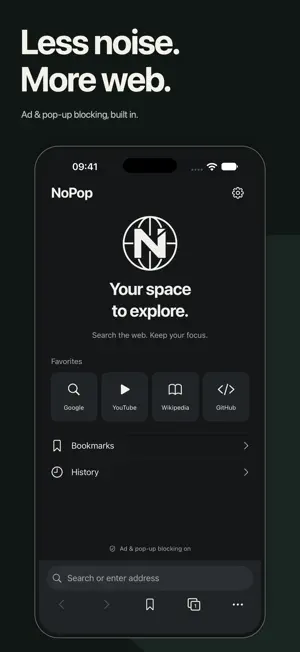
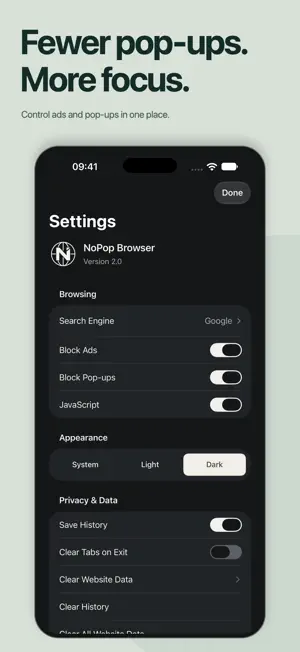
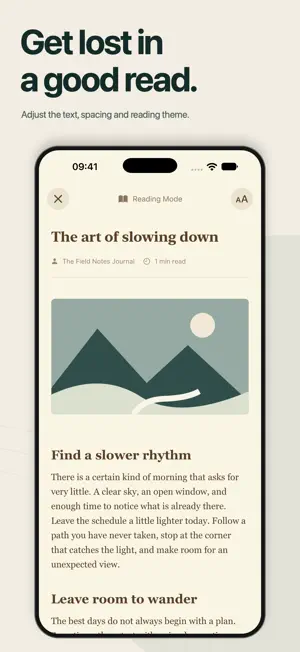
Fewer interruptions. More of the web you came for. NoPop is a browser for iPhone and iPad that blocks unwanted pop-ups, reduces ads and helps you focus on what you want to read. Open a page, settle into an article or keep your everyday browsing organized, all in one place. No account to create. Every browser feature is available without a purchase. FEWER POP-UPS. MORE CONTROL. Spend less time dismissing interruptions and more time with your content. • Built-in ad and pop-up blocking, enabled from the start. • See which pop-ups were blocked and open the ones you need. • Adjust blocking in Settings to suit the websites you use. TURN ARTICLES INTO FOCUSED READING Give supported articles a simpler layout with Reading Mode. • Choose your font and text size. • Read with a light, dark or sepia theme. • See an estimated reading time before you settle in. KEEP YOUR TABS UNDER CONTROL Researching a project, planning a trip or catching up on your favorite sites? Keep each topic together. • Switch between open pages in a visual tab grid. • Organize tabs into named, colored groups. • Save bookmarks and revisit pages from your history. • Find words on a page, share links or request a desktop site. YOUR BROWSING DATA, YOUR CHOICES Bookmarks and browsing history are stored on your device. • Choose whether NoPop saves your history. • Clear history, cookies, cached files and website data in Settings. • Use Clear Tabs on Exit to start with fresh tabs after relaunch. MADE FOR THE WAY YOU BROWSE • Reach the address bar at the bottom of your iPhone screen. • Use the iPad tab bar and keyboard shortcuts to move between pages. • Choose from four search engines. • Follow your device appearance or pick light or dark mode. OPEN NOPOP. FIND YOUR FOCUS. Make your next search, article or browsing session a little more focused. Ad and pop-up blocking work on pages opened inside NoPop. Results vary by website. Reading Mode is available for supported articles. Clear Tabs on Exit does not clear history, cookies or other website data. Websites and your chosen search provider apply their own privacy policies. Optional one-time tips through Apple In-App Purchase support continued development. Tips are not subscriptions and do not unlock features. Built by ToanKhonTech. Help and feedback: https://toankhontech.com/en/contact
What’s new
Version 2.0 · Updated October 1, 2026
Meet NoPop 2.0: a fresh look for browsing with fewer distractions. • A redesigned Home, Tabs and Settings, with a new charcoal-and-ivory style and app icon. • An address bar at the bottom of the iPhone screen, plus a refreshed tab experience on iPad. • More reliable restoration of tabs and groups, bookmark and history saving, and recovery when a page fails to load. • Improvements to Reading Mode, Find in Page, ad-blocker startup and website-data clearing. • Layout improvements for larger text sizes. • A redesigned Support NoPop screen for optional one-time tips. All browser features remain available without a purchase. Update to explore the new NoPop. Thank you for browsing with us.
App privacy
The developer, Nguyen Toan Le, reported these privacy practices to Apple.
Data Not Collected
The developer does not collect any data from this app.
Alternatives to NoPop: Ad Block Browser
Looking for apps like NoPop: Ad Block Browser? Here are 6 similar apps on the App Store. The highest rated is PDF Tools: Editor & Converter (5.0/5), and 5 of the 6 are free to download.
-
 Webora
-
 Call Shield: Spam Call Blocker
1.0
Call Shield: Spam Call Blocker
1.0
-
 LinkScan: AI website scanner
1.0
LinkScan: AI website scanner
1.0
-
 Device Info X
-
 PDF Tools: Editor & Converter
5.0
PDF Tools: Editor & Converter
5.0
-
 SHX Browser
| App | Rating | Price | Last updated | Compare |
|---|---|---|---|---|
| NoPop: Ad Block Browser | 1.0 / 5 (1 rating) | Free | October 1, 2026 | |
| Webora | – | Free | Oct 19, 2026 | Compare |
| Call Shield: Spam Call Blocker | 1.0 / 5 (1) | 1.99 USD | Oct 11, 2026 | Compare |
| LinkScan: AI website scanner | 1.0 / 5 (1) | Free | Jan 5, 2026 | Compare |
| Device Info X | – | Free | Jul 14, 2025 | Compare |
| PDF Tools: Editor & Converter | 5.0 / 5 (14) | Free | Oct 15, 2026 | Compare |
| SHX Browser | – | Free | Jun 11, 2026 | Compare |