

Phone Diet: Clean Up Storage
Gigabyte LLC Utilities iPhoneiPadiPod touch
Phone Diet: Clean Up Storage is a free Utilities app for iPhone and iPad by Gigabyte LLC. Rated 5.0/5 from 3 ratings. Requires iOS 17.0.
- Rating
- 5.0
- 3 ratings
- Price
- Free
- on the App Store
- Size
- 41 MB
- Age 4+
- Updated
- Oct 21
- 2026 · v12.2
Screenshots



About Phone Diet: Clean Up Storage
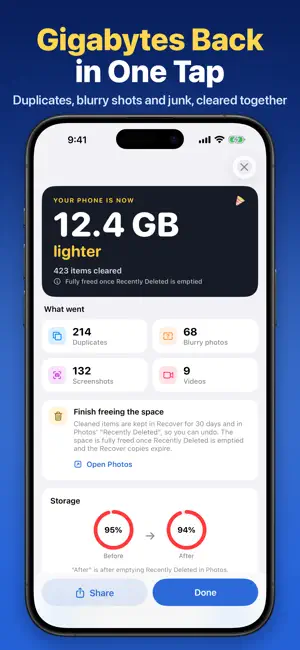
No ads. No tracking. Your photos never leave your iPhone. Scroll down to App Privacy on this page and look under "Data Used to Track You" - there is nothing there. Phone Diet finds what is safe to delete, shows you every item before it goes, and keeps everything you remove in Recover for 30 days. Every scan runs on your iPhone. THE FULL SCAN IS FREE See exactly how many gigabytes you can reclaim before you pay anything, and your first photo and video cleanup of up to 1 GB is on us. WHAT IT FINDS • Similar Photos - groups near-identical shots and marks the best one "Keep" • Duplicates - exact copies quietly costing you double • Blurry and dark photos - out-of-focus, motion-blurred, and failed low-light shots • Screenshots, screen recordings, Live Photos and bursts - the hidden space hogs • Largest Files - ranks the biggest photos and videos in your library so you win gigabytes first VIDEO - TRIM OR COMPRESS A minute of 4K/60 is about 400 MB, which makes video your biggest single cost. Cut dead footage, or compress to about half the size at the same resolution (less for videos already saved in HEVC). The default setting keeps HDR and Dolby Vision. You see the saving before you commit, and the original waits in Recover. EMAIL CLEANER - ANY INBOX Gmail, iCloud Mail, Outlook, Yahoo, AOL, and any IMAP account. Not just one provider. See what is filling your inbox for free, then clear promotions, spam and mailing lists in bulk. On Gmail, set Auto Clean rules that keep working on their own, and undo any category clean for 30 seconds. Other inboxes move mail to their Trash, and a permanent delete always warns you first. Starred and important mail is kept safe. SAFARI AD BLOCKER Turn on the Phone Diet extension in Safari to block ads and tracking scripts on-device. Pages load faster and use less data. PRIVATE VAULT Hide private photos behind Face ID, Touch ID, or a passcode. Encrypted, out of your main library, and stored only on this device. MORE TOOLS • Contact Cleaner - merge duplicates in one tap, and back up your whole address book before you do. Cards with an address, photo or company are never treated as empty • Calendar Cleaner - clear years of stale events. Meetings with other attendees are never touched • Speaker Cleaner - eject trapped water with tuned tones • Widgets - storage and battery on your Home Screen and Lock Screen • HEIC converter, Smart Albums, and swipe-to-sort • Siri and Shortcuts for your favorite cleanups NOTHING DISAPPEARS WITHOUT YOU Preview every item before cleaning. Undo with a countdown, or cancel a cleanup while it runs. Restore anything from Recover for 30 days, or choose 7 or 60. Live Photos come back with their motion, and restoring a compressed video removes the smaller copy so you never end up with two. No forced ad-watching to delete a photo, because there are no ads to watch. Pricing: free to download, the full scan is free, and your first photo and video cleanup of up to 1 GB is free. Premium unlocks unlimited cleanup, email cleaning and every tool, with weekly, monthly, and yearly plans, plus a one-time Lifetime purchase. Cancel anytime in Settings. Subscriptions renew automatically unless cancelled at least 24 hours before the end of the current period. Manage and cancel in your App Store account settings. Terms of Use: https://cleanupmyphone.com/terms.html Privacy Policy: https://cleanupmyphone.com/privacy
What’s new
Version 12.2 · Updated October 21, 2026
A cleaner look, a simpler app, and a safer way to clean. A fresh new look • Redesigned welcome and Premium screens, in light and dark mode, on every iPhone and iPad. • A new app icon. • Four simple tabs: Cleanup, Swipe, Compress and Email. Recover is always one tap away. Clean with confidence • Everything you delete goes to Recover first, and you can bring it back for as long as you choose (7, 30 or 60 days). • Restoring a compressed video or converted photo now brings back the original and removes the extra copy, so you never end up with two. • Duplicates and similar photos are matched more carefully, and a group is never emptied. If the photo you kept was deleted elsewhere, the rest stay put. • Your most recent photos are protected by default, and favorites are never suggested for deletion. • Undo in Recover now gives you the full 10 seconds, even if a notification or call comes in. Videos • Compress shows honest estimates: about half the size at the default setting, less for videos already saved in HEVC. • The default Medium setting keeps HDR and Dolby Vision. Contacts and calendar • Contacts with an address, photo, company, birthday or other details are never treated as empty cards. • Calendar cleanup never removes events with other attendees, and duplicates are only matched within the same calendar. • Restoring a contact backup no longer freezes on large address books. Email • Cleaner, more accurate counts across Gmail, iCloud, Outlook, Yahoo and other mail accounts. • Auto Clean now shows exactly how many emails your rules would clear. • Starred and important mail is kept safe by Quick Clean and Auto Clean. Also in this update • Siri and Shortcuts support for your favorite cleanups. • Larger text and VoiceOver now work throughout the app. • Simpler app: we removed rarely used extras so the important tools are easier to find. • Hundreds of fixes across cleanup, Compress, Private vault, widgets, Battery and Speed Test.
App privacy
The developer, Gigabyte LLC, reported these privacy practices to Apple.
Data Not Linked to You
The following data, which may be collected but is not linked to your identity, may be used for the following purposes:
- Diagnostics: Crash Data, Performance Data, Other Diagnostic Data
- Contacts: Contacts
- User Content: Emails or Text Messages, Photos or Videos
Used for: Analytics, App Functionality
Alternatives to Phone Diet: Clean Up Storage
Looking for apps like Phone Diet: Clean Up Storage? Here are 6 similar apps on the App Store. The highest rated is Free Cleanup Guru Cleaner AI (4.7/5), and all 6 are free to download.
-
 Clean up iPhone .
4.6
-
 Free Cleaner Guru
4.5
-
 Free Cleanup Guru Cleaner AI
4.7
-
 Phone Cleaner for iPhone, iPad
4.5
-
 Cleaner: Free Up Storage Guru
4.5
-
 SmartClean AI: Storage Cleaner
4.4
| App | Rating | Price | Last updated | Compare |
|---|---|---|---|---|
| Phone Diet: Clean Up Storage | 5.0 / 5 (3 ratings) | Free | October 21, 2026 | |
| Clean up iPhone . | 4.6 / 5 (292) | Free | Jul 27, 2026 | Compare |
| Free Cleaner Guru | 4.5 / 5 (1,847) | Free | Aug 19, 2026 | Compare |
| Free Cleanup Guru Cleaner AI | 4.7 / 5 (782) | Free | May 17, 2026 | Compare |
| Phone Cleaner for iPhone, iPad | 4.5 / 5 (21,631) | Free | Oct 23, 2026 | Compare |
| Cleaner: Free Up Storage Guru | 4.5 / 5 (8,147) | Free | Feb 13, 2026 | Compare |
| SmartClean AI: Storage Cleaner | 4.4 / 5 (2,971) | Free | Oct 28, 2026 | Compare |