

Clipboard Manager - QuickPaste
Ihsan Ullah Productivity iPhoneiPadiPod touchMac
Clipboard Manager - QuickPaste is a free Productivity app for iPhone and iPad by Ihsan Ullah. Rated 4.7/5 from 3 ratings. Requires iOS 16.0.
- Rating
- 4.7
- 3 ratings
- Price
- Free
- on the App Store
- Size
- 75 MB
- Age 4+
- Updated
- Sep 1
- 2026 · v1.1.4
Screenshots

About Clipboard Manager - QuickPaste
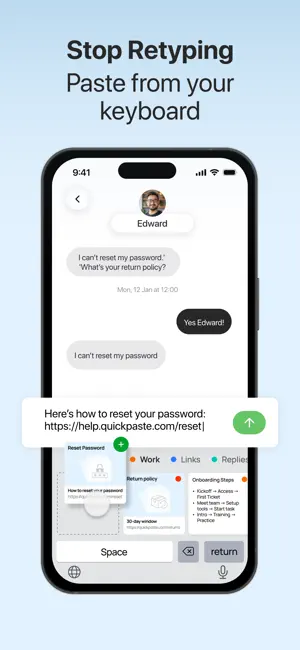
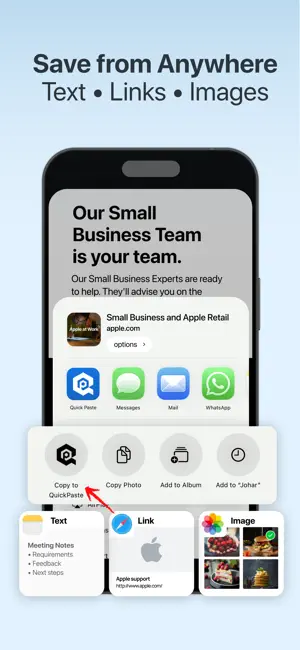
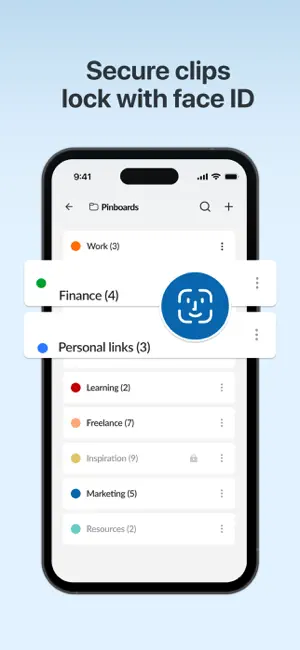
No more switching apps or re-copying! Quick Paste stores everything you copy so you never lose important content again. This clipboard manager handles text, links, images, passwords, code snippets, bank details, and quick notes making everything searchable, and easily accessible. Every clipboard item is protected with Face ID, ensuring only you can access your saved clips anytime, anywhere. Quick Solutions with Quick Paste * Store limitless clipboard items * Organize with pinboards and shortcuts * Secure clipboards with Face-ID lock * Pin frequently used content for quick access * Use paste keyboard to insert anything directly in any app * Easy access to full clipboard history * Save and reuse snippets of text, images, links * Lightning-fast intelligent search to find anything * Automatic/manual addition & deletion of pasteboards. Manage Your Pinboards Organize your frequently used clips with Pinboards for faster access. * Add or remove items from pinboards * Rename pinboards to fit your workflow * Delete ones you no longer need * Change colors for visual organization * Reorder or swap pinboards for quick navigation. Find Anything Fast: The app’s intelligent search makes it easy to find anything you've copied instantly. Just select the clip and it will be pasted in the text field. Work Smarter with Shortcuts * Create quick-access shortcuts to speed up daily tasks * Automatically add new items or delete old ones in a tap. Your Data Is Secure: Everything stays on your device and protected by Face-ID lock! You control what to add, what to delete, and what to pin. How to Copy & Paste with Quick Paste? Quick Paste makes it effortless to copy, save, and reuse any content without interrupting your workflow. Step 1: Enable Action Extension for Limitless Copying * Once you enable the Quick Paste Action Extension, you'll see a “Copy to Quick Paste” option whenever you copy any content on your device. * Just select the text, image, or content you want to save * Tap Share and choose "Copy to Quick Paste" option * That item is now instantly saved to your clipboard history in the app. Step 2: Use the Paste Keyboard in Any App When you're typing in any app: * Touch and hold the language switch icon on your keyboard * Select “Quick Paste” from the list * Instantly access all your saved clipboard items * Tap to autopaste content directly into the text field. Enable Automatic Clipboard Saving: If you don’t want to see permission prompts every time you copy something, simply enable automatic clipboard capture in settings. Go Premium Quick Paste offers a premium plan designed to make your workflows even simpler and more efficient. Your payment will be charged to your iTunes Account at confirmation of purchase. Secondly, your subscription will renew automatically, but you can turn off auto-renewal by accessing your Account Settings 24 hours before the end of the current period. For suggestions regarding Quick Paste - Clipboard Manager, Contact us at [email protected] Terms of Use: https://www.apple.com/legal/internet-services/itunes/dev/stdeula/
What’s new
Version 1.1.4 · Updated September 1, 2026
- Dark and light mode. - Quick preview option. - Improved visuals and user experience. - Open links in your browser.
App privacy
The developer, Ihsan Ullah, reported these privacy practices to Apple.
Data Used to Track You
The following data may be used to track you across apps and websites owned by other companies:
- Identifiers: Device ID
Alternatives to Clipboard Manager - QuickPaste
Looking for apps like Clipboard Manager - QuickPaste? Here are 6 similar apps on the App Store. The highest rated is CopyMate: AI Clipboard Manager (5.0/5), and all 6 are free to download.
-
 CopyMate: AI Clipboard Manager
5.0
CopyMate: AI Clipboard Manager
5.0
-
 Contacts Master:Clean & Export
4.0
Contacts Master:Clean & Export
4.0
-
 EchoNote: AI Meeting Notes
3.0
EchoNote: AI Meeting Notes
3.0
-
 WriteVoice: Dictation & Notes
4.4
WriteVoice: Dictation & Notes
4.4
-
 KernelAI - Offline AI Chat
4.6
KernelAI - Offline AI Chat
4.6
-
 Glazr XLSX & CSV File Editor
| App | Rating | Price | Last updated | Compare |
|---|---|---|---|---|
| Clipboard Manager - QuickPaste | 4.7 / 5 (3 ratings) | Free | September 1, 2026 | |
| CopyMate: AI Clipboard Manager | 5.0 / 5 (4) | Free | Sep 23, 2026 | Compare |
| Contacts Master:Clean & Export | 4.0 / 5 (4) | Free | Jan 13, 2026 | Compare |
| EchoNote: AI Meeting Notes | 3.0 / 5 (1) | Free | Sep 18, 2026 | Compare |
| WriteVoice: Dictation & Notes | 4.4 / 5 (23) | Free | Aug 20, 2026 | Compare |
| KernelAI - Offline AI Chat | 4.6 / 5 (39) | Free | Aug 29, 2026 | Compare |
| Glazr XLSX & CSV File Editor | – | Free | Feb 2, 2026 | Compare |