

OCRForge: OCR Scanner AI Tool
MefjuDev LLC Utilities iPhoneiPadiPod touch
OCRForge: OCR Scanner AI Tool is a free Utilities app for iPhone and iPad by MefjuDev LLC. Rated 4.9/5 from 7 ratings. Requires iOS 17.
- Rating
- 4.9
- 7 ratings
- Price
- Free
- on the App Store
- Size
- 32 MB
- Age 4+
- Updated
- Oct 31
- 2025 · v1.4.1
Screenshots
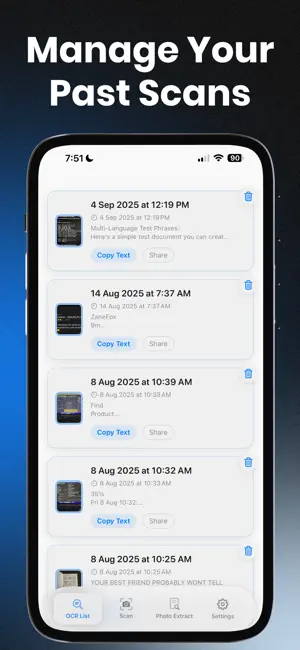


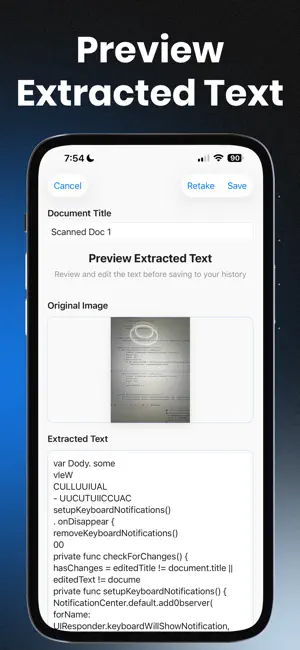
About OCRForge: OCR Scanner AI Tool
Extract Text from Any Image with Ease. OCRForge is a powerful, lightweight text scanner that turns your photos into editable text in seconds. Whether you’re importing images or using your camera to scan documents, it makes text extraction fast, accurate, and simple. Perfect for students, professionals, and anyone who needs to grab text on the go — receipts, printed pages, study notes, signs, and more. Key Features: • Scan with Camera. Instantly capture and extract text from paper, signs, or handwritten notes. • Import from Photos. Select any image from your gallery and convert it to text with a tap. • Smart OCR Engine. Accurate and fast text recognition powered by advanced image processing. • History View. All scanned text is saved for later. Easily copy or share it whenever you need. • No Ads. Enjoy a clean, distraction-free experience.
Ratings & reviews
4.9
7 ratings
What’s new
Version 1.4.1 · Updated October 31, 2025
What's new in OCRForge - OCR Scanner AI Tool App: • Redesign UI from neon red to more calm blue, also replacement of buttons and few other UI improvements! • Improvements when it comes to text extraction. Now its more accurate since its always check your device language and use it + English as default. • Document thumbnail instead of just symbol. • Smart naming for documents, if you will skip naming your scanned/extracted documents it will be named Extracted Doc # / Scanned Doc # instead of just date and time since its been shown on the results. • Improved UI inside preview/editing of scanned documents. • Fixed retake button, now inside Photo Extraction its going back to photo picker instead of opening camera. Now retake button work as it should.
App privacy
The developer, MefjuDev LLC, reported these privacy practices to Apple.
Data Not Collected
The developer does not collect any data from this app.
Alternatives to OCRForge: OCR Scanner AI Tool
Looking for apps like OCRForge: OCR Scanner AI Tool? Here are 6 similar apps on the App Store. The highest rated is Signature Creator & Signer (5.0/5), and 5 of the 6 are free to download.
-
 Convert Photo to PDF: PhotoPDF
3.0
-
 ShopPad: Shopping Tracker
-
 Daily Planner Todo list - Revo
4.4
-
 Wigion: Notion Widgets
3.9
-
 LogTree: Offline Life Logger
4.4
-
 Signature Creator & Signer
5.0
| App | Rating | Price | Last updated | Compare |
|---|---|---|---|---|
| OCRForge: OCR Scanner AI Tool | 4.9 / 5 (7 ratings) | Free | October 31, 2025 | |
| Convert Photo to PDF: PhotoPDF | 3.0 / 5 (2) | Free | Aug 20, 2026 | Compare |
| ShopPad: Shopping Tracker | – | 2.49 USD | Oct 21, 2025 | Compare |
| Daily Planner Todo list - Revo | 4.4 / 5 (51) | Free | Aug 18, 2025 | Compare |
| Wigion: Notion Widgets | 3.9 / 5 (21) | Free | Sep 16, 2026 | Compare |
| LogTree: Offline Life Logger | 4.4 / 5 (17) | Free | Aug 14, 2026 | Compare |
| Signature Creator & Signer | 5.0 / 5 (1) | Free | Mar 13, 2026 | Compare |