

The PDF Converter-Photo to PDF
Sepia Software LLC Utilities iPhoneiPadiPod touch
The PDF Converter-Photo to PDF is a free Utilities app for iPhone and iPad by Sepia Software LLC. Rated 5.0/5 from 6 ratings. Requires iOS 16.0.
- Rating
- 5.0
- 6 ratings
- Price
- Free
- on the App Store
- Size
- 10 MB
- Age 4+
- Updated
- Sep 26
- 2026 · v1.0.3
Screenshots


About The PDF Converter-Photo to PDF
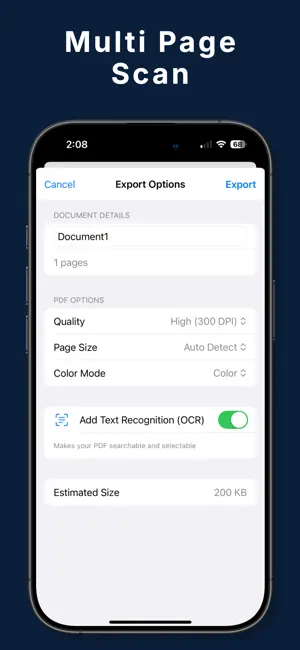
**Transform any document into a professional PDF in seconds!** Convert to PDF is the ultimate document scanner that turns your iPhone into a powerful, portable scanner. Whether you're digitizing receipts, contracts, notes, or any paper document, our advanced scanning technology ensures crystal-clear PDFs every time. ** Why Choose Convert to PDF?** • **Lightning Fast** - Scan and convert documents in under 3 seconds • **Smart Edge Detection** - Automatically detects document borders • **Professional Quality** - Enhanced image processing for crisp, readable PDFs • **Batch Scanning** - Scan multiple pages into a single PDF (Premium) • **100% Private** - All processing happens on your device, your documents never leave your phone ** Key Features:** **SMART SCANNING** • Auto-capture when document is detected • Perspective correction for perfect alignment • Multiple color modes: Color, Grayscale, B&W • Auto-enhancement for optimal readability **PDF CREATION** • Instant PDF generation • Turn photos from your library into a PDF • Customizable quality settings • Add multiple pages to single document • Professional formatting every time **ORGANIZATION** • Built-in document history • Quick access to recent scans • Easy sharing via email, messages, or cloud • Export to Files app or any destination **PREMIUM FEATURES** • Unlimited page scans per document • Remove watermarks • OCR: searchable text in your PDFs • iCloud backup • Priority support ** Perfect For:** • Students digitizing notes and handouts • Business professionals managing receipts and contracts • Anyone going paperless • Remote workers sharing documents • Organizing important paperwork **Simple 3-Step Process:** 1. Point camera at document 2. Auto-capture detects and scans 3. Instant PDF ready to share **Privacy First:** Unlike other scanning apps, Convert to PDF processes everything locally on your device. Your sensitive documents never touch our servers. Your privacy is our priority. Download now and experience the easiest way to create professional PDFs! EULA: https://www.apple.com/legal/internet-services/itunes/dev/stdeula/
Ratings & reviews
5.0
6 ratings
What’s new
Version 1.0.3 · Updated September 26, 2026
Bug Fixes and Improvements
App privacy
The developer, Sepia Software LLC, reported these privacy practices to Apple.
Data Not Collected
The developer does not collect any data from this app.
Alternatives to The PDF Converter-Photo to PDF
Looking for apps like The PDF Converter-Photo to PDF? Here are 6 similar apps on the App Store. The highest rated is Word to PDF Converter: Doc2PDF (5.0/5), and all 6 are free to download.
-
 Fast Word to PDF
-
 Word to PDF Converter: Doc2PDF
5.0
Word to PDF Converter: Doc2PDF
5.0
-
 Photos to PDF Converter .
4.7
Photos to PDF Converter .
4.7
-
 DOCX Reader To PDF Converter
4.3
DOCX Reader To PDF Converter
4.3
-
 PDF Converter: Word to PDF!
4.4
PDF Converter: Word to PDF!
4.4
-
 PDF To JPG Convert
4.6
PDF To JPG Convert
4.6
| App | Rating | Price | Last updated | Compare |
|---|---|---|---|---|
| The PDF Converter-Photo to PDF | 5.0 / 5 (6 ratings) | Free | September 26, 2026 | |
| Fast Word to PDF | – | Free | Mar 18, 2026 | Compare |
| Word to PDF Converter: Doc2PDF | 5.0 / 5 (3) | Free | Apr 9, 2026 | Compare |
| Photos to PDF Converter . | 4.7 / 5 (5,348) | Free | Aug 25, 2026 | Compare |
| DOCX Reader To PDF Converter | 4.3 / 5 (124) | Free | Oct 18, 2026 | Compare |
| PDF Converter: Word to PDF! | 4.4 / 5 (92) | Free | Feb 6, 2026 | Compare |
| PDF To JPG Convert | 4.6 / 5 (615) | Free | Apr 30, 2024 | Compare |