

Kurato
RAW PLUS DRY LLC Productivity iPhoneiPadiPod touchMac
Kurato is a free Productivity app for iPhone and iPad by RAW PLUS DRY LLC. Rated 5.0/5 from 2 ratings. Requires iOS 26.0. Updated September 14, 2026.
- Rating
- 5.0
- 2 ratings
- Price
- Free
- on the App Store
- Size
- 26 MB
- Age 4+
- Updated
- Sep 14
- 2026 · v2.0.3
Screenshots


About Kurato
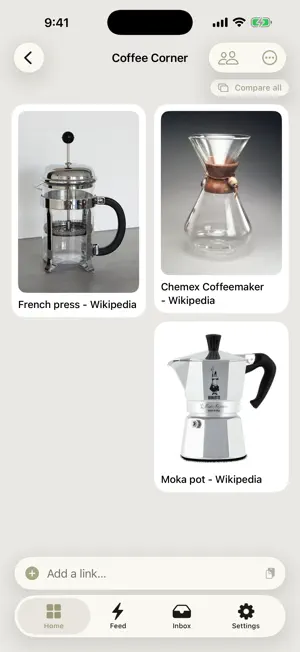
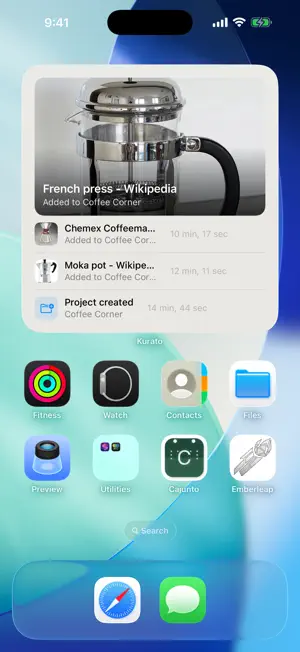
Kurato turns the messy web into beautiful structured collections. Drop in a link and Kurato uses AI to extract exactly the fields that matter to your project — product specs, recipe ingredients, price points, places, papers, anything. No more tab clutter, no more screenshot folders, no more lost finds. — What you can do — • Create projects for whatever you're collecting: chairs, restaurants, papers to read, gear to buy, places to visit • Add links by paste, share sheet, or URL — Kurato scrapes the page and asks AI to turn it into structured data • Auto-harmonized fields across your links so "price", "cost", "Price (USD)" all become one filterable column • Filter, sort, and compare your collection like a spreadsheet you didn't have to build • Share projects with friends or family — collaborate in real time, comment on items, see who added what • Use the inbox to triage finds before deciding where they belong — Designed with intent — Kurato uses a Danish-inspired flat geometric design. No drop shadows, no busy gradients, no infinite scroll into nothing. Just sparse layouts with breathing room and the data you came for. — Free vs Pro — Free: Save unlimited links to your Inbox; 10 AI extractions per month for projects. Kurato Pro ($2.99/mo): 100 AI extractions per day, plus web enrichment that pulls in extra details from across the web (20 enrichments per month). Cancel anytime. — Privacy — We use Google Gemini for extraction. Pages you save to projects are sent to Gemini for processing. Pages you save to your Inbox are NOT sent to AI. We don't sell your data. Full privacy policy at kurato-app.web.app/legal/privacy.html. Questions? [email protected]
What’s new
Version 2.0.3 · Updated September 14, 2026
Curate your collections faster, and save from Safari. • Select several items in a collection to compare, move, or delete them in one go. Moving lets you create a new collection right there. • A + button inside every collection to add links. • Save from Safari: Kurato now includes a Safari extension on iPhone, iPad, and Mac, alongside the share sheet. • The Inbox explains what it is for and can move everything into a collection in one tap. • Two new accent colors: Rose and Apricot. • Fixes: the Compare view can be closed on Mac, adding a link on iPhone no longer asks for paste permission, and thumbnails load reliably.
App privacy
The developer, RAW PLUS DRY LLC, reported these privacy practices to Apple.
Data Linked to You
The following data, which may be collected and linked to your identity, may be used for the following purposes:
- Usage Data: Product Interaction
- Diagnostics: Crash Data
- Purchases: Purchase History
- Contact Info: Email Address, Name
- User Content: Other User Content
- Identifiers: User ID
Used for: Analytics, App Functionality
Alternatives to Kurato
Looking for apps like Kurato? Here are 6 similar apps on the App Store. The highest rated is HOOPT (5.0/5), and all 6 are free to download.
-
 Journey: Cozy Focus Timer
-
 PPTX Reader Presentation Maker
-
 Greater Nexus
4.6
Greater Nexus
4.6
-
 Image Converter - jpg,png,heic
-
 HOOPT
5.0
HOOPT
5.0
-
 Mechanic App
| App | Rating | Price | Last updated | Compare |
|---|---|---|---|---|
| Kurato | 5.0 / 5 (2 ratings) | Free | September 14, 2026 | |
| Journey: Cozy Focus Timer | – | Free | Oct 5, 2026 | Compare |
| PPTX Reader Presentation Maker | – | Free | Sep 28, 2026 | Compare |
| Greater Nexus | 4.6 / 5 (8) | Free | Oct 14, 2026 | Compare |
| Image Converter - jpg,png,heic | – | Free | Aug 29, 2024 | Compare |
| HOOPT | 5.0 / 5 (45) | Free | Oct 8, 2026 | Compare |
| Mechanic App | – | Free | Oct 1, 2026 | Compare |
Compare Kurato with the top alternatives: ratings, updates, ASO score and keyword gaps →